Audit logs
UpdatedAudit logs help you track changes made to your account, workspaces, messages, and other assets so you can keep your account secure and troubleshoot issues.
To track changes to your workspace data, like updates to people or custom objects, go to your Activity Logs.
Overview
As an Account Admin, you have access to two audit logs:
- Go to Account settings > Audit logs to see Account-level audit logs. These provide security-related information like team member session data, changes in permissions, and deletion of API keys.
- Go to Workspace settings > Audit logs to see Workspace-level audit logs. These provide information about changes that team members and Customer.io made to your workspace, including imports and exports.
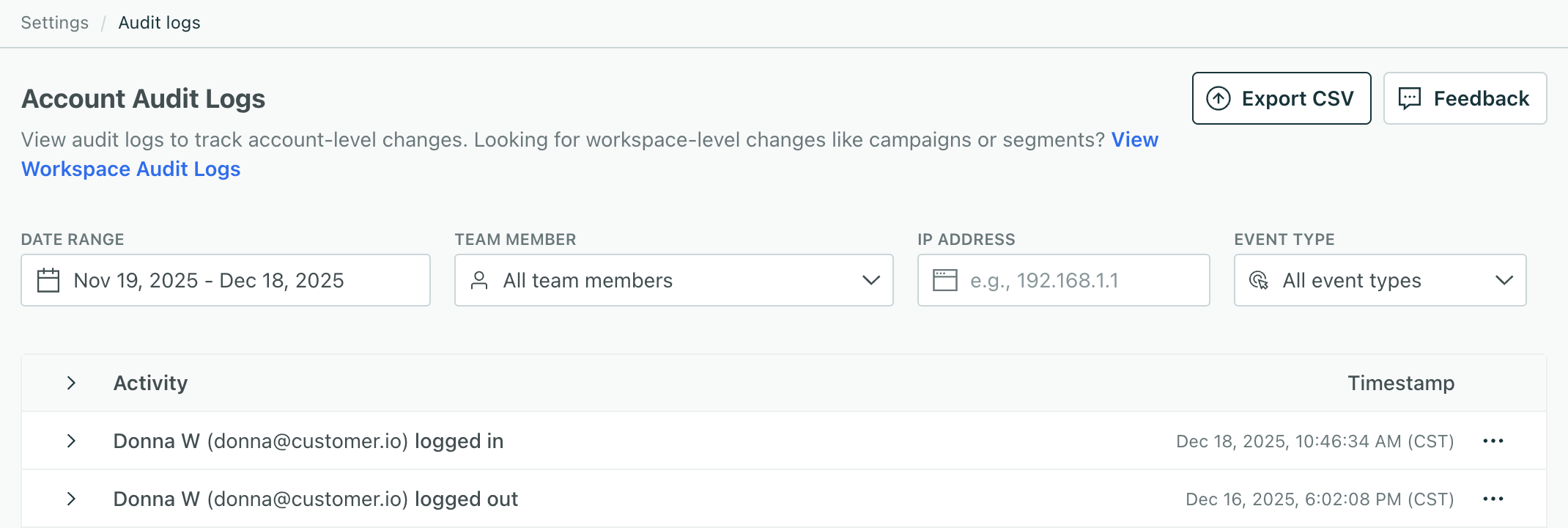
Each entry in the audit log shows an Activity and a Timestamp. Click to see more details about an activity. You’ll see different activities depending on whether you’re viewing account or workspace logs.
Filter your audit logs
You can filter your logs by Date Range, but your plan determines the maximum available time period.
- On an Essentials plan, you can view, filter, and export data from the past 30 days.
- On a Premium or Enterprise plan, you can view and filter for data over any time period, but you can only export up the past year of activities.
You can filter your logs by Date Range, Team member, the IP address of users who perform activities, and Event type. The Event type is a category of activities.
The System team member
Under Team member, the System entry represents Customer.io. We do some things automatically, like adding pre-built segments when you create a new workspace. These activities are attributed to System.
Share your audit logs
You can share your audit logs outside of Customer.io in a few ways:
- Export to CSV
- Copy raw data
- Copy metadata
To share an individual activity with another Account Admin, click and then Copy link.
Export to CSV
Click Export to CSV, and then choose the date range to export and which workspace to save the download to.
Keep in mind, if you’re on the Essentials plan, you can export up to the past 30 days of logs. On the Premium or Enterprise plans, you can export up to the last year.
Copy log data
To copy log data, click :
- Select View raw data to copy the event payload.
- Select View metadata to copy the metadata like IP address and API used in the request.
Show diff
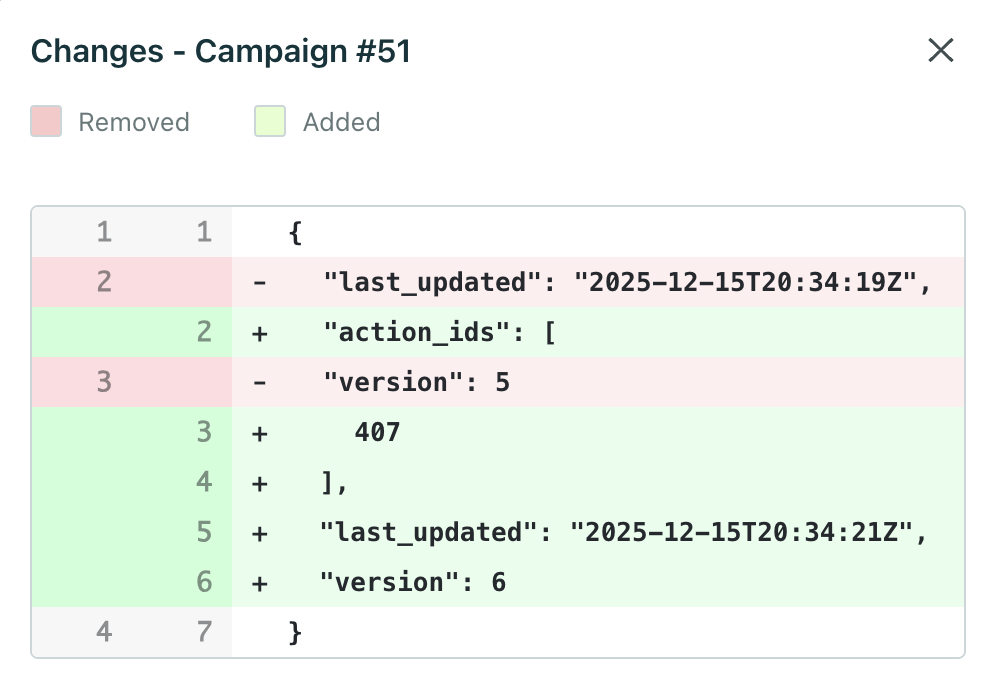
To see how the event changed your account or workspace data, click and then Show diff.
Here’s an example of a diff for a campaign in a workspace log. You can see what was removed in red and added in green:
Account audit log activities
Activities are grouped into Event Type values that represent a category of activities. For example, Administration activities are related to account-level settings and permissions.
| Activity | Description |
|---|---|
| Administration | |
| Account | The main Customer.io account settings and configuration |
| Workspace | Separate environments within the account (e.g., production, staging) |
| API & Integrations | |
| API Credentials | API keys used to authenticate with Customer.io Track APIs. We currently don't surface data for Pipelines integrations. |
| App API Key | API keys used to authenticate with Customer.io App APIs |
| Dedicated IP Address | Custom IP Addresses associated with the account |
| Permissions | |
| Role | Custom roles defining permission sets for team members |
| Team Member | Users with access to the Customer.io account |
| Team Member Workspace Permissions | Workspace-specific permissions assigned to team members |
| Team Member Account Permissions | Account-wide permissions assigned to team members |
| Security | |
| Log in/out | User authentication events |
| SCIM Configuration | SSO user provisioning with System for Cross-domain Identity Management (SCIM) |
| SCIM Token | Authentication tokens for SCIM provisioning |
| SSO Configuration | Single Sign-On identity provider settings, like SAML |
| Whitelisted IP | IP addresses allowed for restricted access |
Workspace audit log activities
Activities are grouped into Event Type values that represent a category of activities. For example, Content activities are related to images, files, and media uploaded to the workspace.
What data’s not available?
For now, you’ll have to reach out to support to audit events for most items under Integrations. The Integrations category mostly accounts for activities related to workspace-level settings, like message integrations (SMS/Twilio, Email/SMTP, Webhooks, and so on).
Click Need help? and choose Get help with an issue to submit a request.
Send us feedback
Click Feedback to let us know what you need to better audit your account and workspaces.

