

Customer.io data out
Getting started
- Go to Data & Integrations > Integrations and select the Customer.io entry in the Directory tab.
- (Optional) Select the data sources that you want to connect to your outbound integration. You can always connect data sources later. We'll only show you data sources that work with your integration.
-
Configure your integration.
- Site ID: Customer.io site ID. This can be found on your [API Credentials page](https://fly.customer.io/settings/api_credentials).
- API Key: Customer.io API key. This can be found on your [API Credentials page](https://fly.customer.io/settings/api_credentials).
- Account Region: Learn about [Account Regions](https://docs.customer.io/data-centers/).
- Click Enable Destination.
Actions
When you're done setting things up, you can go to the Actions tab to see how we map incoming data to your integration.
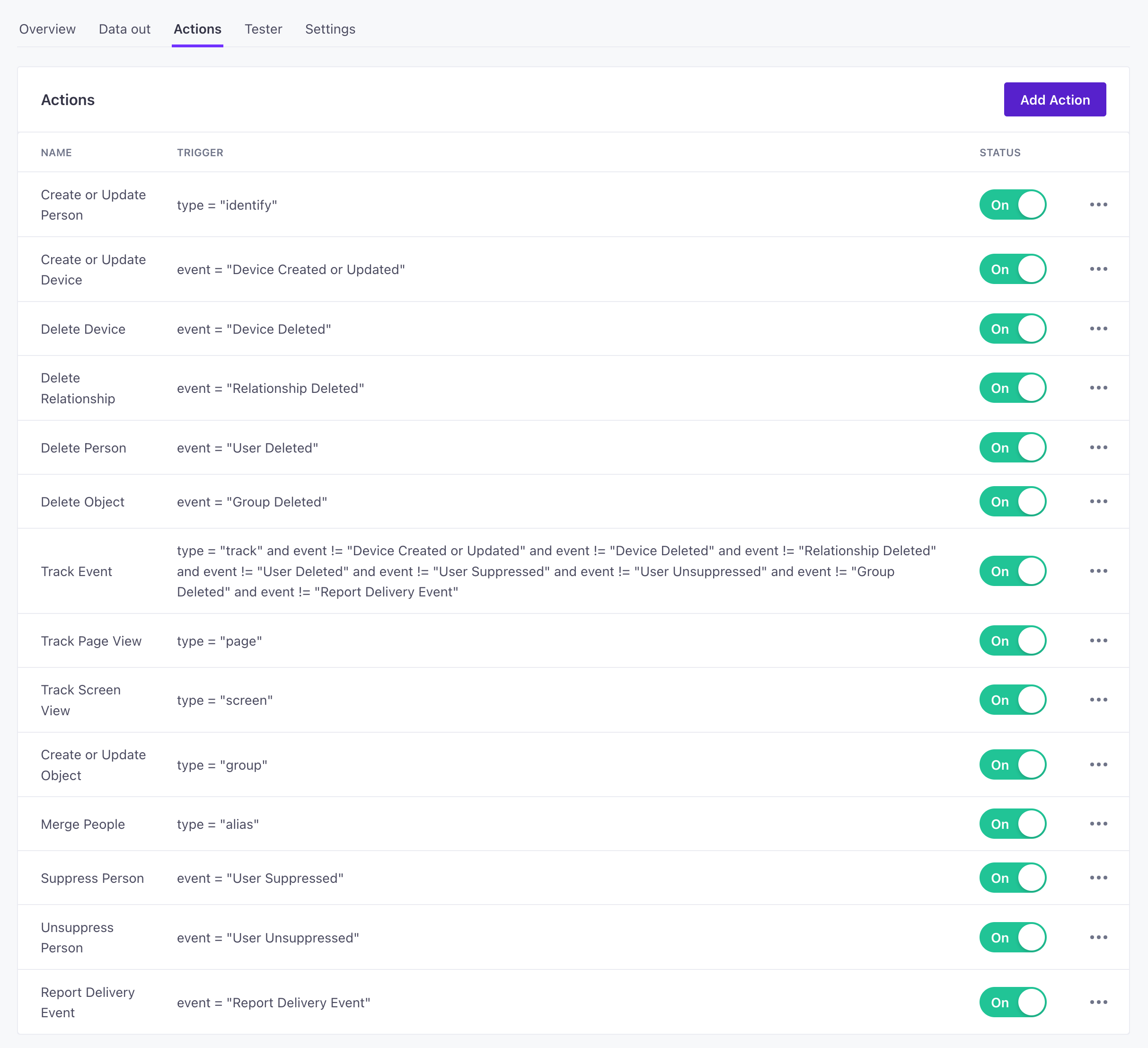
| Action | Default Trigger | Description |
|---|---|---|
| Create or Update Device | event = "Application Installed"orevent = "Device CreatedorUpdated"orevent = "Application Opened" | Create or update a person's device. |
| Delete Device | event = "Application Uninstalled"orevent = "Device Deleted" | Delete a person's device. |
| Delete Relationship | event = "Relationship Deleted" | Delete a relationship between a person and an object in Customer.io |
| Delete Person | event = "User Deleted" | Delete a person in Customer.io. |
| Delete Object | event = "Object Deleted" | Delete an object in Customer.io. |
| Create or Update Person | type = "identify" | Create a person in Customer.io or update them if they exist. |
| Track Event |
type = "track"
andevent != "Device CreatedorUpdated"
andevent != "Device Deleted"
andevent != "Relationship Deleted"
andevent != "User Deleted"
andevent != "User Suppressed"
andevent != "User Unsuppressed"
andevent != "Group Deleted"
andevent != "Report Delivery Event"
andevent != "Application Installed"
andevent != "Application Opened"
andevent != "Application Uninstalled"
andevent != "Object Deleted"
andevent != "Report Content Event"
andevent != "Geofence Transition"
andevent != "Live Notification Event"
andevent != "Live Notification Token" | Track an event for a known or anonymous person. |
| Track Page View | type = "page" | Track a page view for a known or anonymous person. |
| Track Screen View | type = "screen" | Track a screen view for a known or anonymous person. |
| Track Live Notification Event | event = "Live Notification Event" | A Live Notification Started, Updated, or Ended. |
| Register Live Notification Token | event = "Live Notification Token" | Register a push-to-start or instance token for a Live Notification. |
| Track Geofence Transition | event = "Geofence Transition" | Track a geofence enter or exit transition for a person. |
| Create or Update Object | type = "group" | Create an object in Customer.io or update them if they exist. |
| Merge People | type = "alias" | Merge two customer profiles together. |
| Suppress Person | event = "User Suppressed" | Track a "User Suppressed" event to suppress a person. |
| Unsuppress Person | event = "User Unsuppressed" | Track a "User Unsuppressed" event to suppress a person. |
| Report Delivery Event | event = "Report Delivery Event" | Report delivery metrics for a message sent from the Customer.io Journeys product. |
| Report Content Event | event = "Report Content Event" | Report a Viewed or Clicked Content event. |
Create or update a person (identify)
Incoming Information that you know about a person, captured from A key-value pair that you associate with a person or an object—like a person's name, the date they were created in your workspace, or a company's billing date etc. Use attributes to target people and personalize messages.identify calls add and update profiles in your workspace. We map traitsidentify events in Data Pipelines. Traits are analogous to attributes in Customer.io Journeys.
By default, we send this event when you identify a profile—like when they submit their email address on your website requesting more information, or when they create an account with you.
You’ll typically set relationships between a profile and an object and information about the relationship with the group call. But you can also send this information in an identify call if you want. When you relate a profile to an object through an identify call, you’ll place the group information in the context object.
{
  "type": "identify",
  "traits": {
    "first_name": "cool",
    "last_name": "person",
    "email": "cool.person@example.com",
    "plan": "premium",
    // include if you want to set relationships/attributes
    "objectId": "math101-2024",
    "objectTypeId": "2",
    "relationshipAttributes": {
        "dues_paid": true,
        "class_complete": true,
        "grade": "A-"
    }
  },
  "userId": "97980cfea0067",
  "created_at": "1679407797",
}
Add and update profiles by ID or email
In Customer.io, you can identify profiles by an id or an email address, which provides a way to work with contacts who provide an email address but haven’t generated a backend ID (like when someone signs up as a lead but hasn’t yet become a paying customer). When you send identify events to this destination, they’ll add or update profiles in Customer.io depending whether or not the corresponding email or ID exists.
If an identify request contains either a userId or an email trait, and that profile doesn’t already exist, we’ll create a profile in Customer.io
If an identify request contains either a userId or an email trait, and that profile already exists, we’ll update the profile in Customer.io
If an The attributes you use to add, modify, and target people. Each unique identifier value represents an individual person in your workspace.identify request contains both a userId and an email trait, but one of those values wasn’t associated with the profile, we’ll add the new identifier
Customer.io Journeys doesn’t support anonymous identify calls yet
We’re working on support for anonymous profiles, but, for now, Journeys ignores anonymous identify calls.
This doesn’t mean you shouldn’t send anonymous identify calls—even if Journeys is your only destination. Anonymous still has value if:
- You send data to other, non-Customer.io destinations, many of which support anonymous profiles.
- You use our JavaScript source.
If you use our JavaScript source, anonymous identify calls store traits in local storage and attach them to subsequent identify calls. This means that when you formally identify a profile later, you won’t need to capture all of a customer’s traits at the same time; the JavaScript source will automatically associate their anonymously gathered traits with their userId.
Delete person
You’ll delete profiles in Customer.io Journeys by sending a track call called User Deleted. You can always change the name of the event in the Actions tab of your destination settings.
Deleting a person doesn’t necessarily require a userId. You can delete a person by their email address, for example. If you don’t include a userId, we can delete a profile by properties.email. If you include both, we’ll use the userId.
{
  "type": "track",
  "event": "User Deleted",
  "userId": "97980cfea0067",
  "timestamp": "1679407797",
  "properties": {
    "reason": "user requested deletion"
  }
}
Create or update an object (group)
In Customer.io Journeys, we refer to groups as objects An object is a non-person entity that you can associate with one or more people—like a company, account, or online course.
The group call does two things:
- It creates or updates an object, like an
identifycall does for profiles. - If you include a
userId, it also relates a profile to the object—including any relationship attributesA key-value pair that you associate with a person or an object—like a person's name, the date they were created in your workspace, or a company's billing date etc. Use attributes to target people and personalize messages.
you pass in the call.
Note the objectTypeId field: objects in Customer.io Journeys have a type—an incrementing number beginning at 1. This lets you have different kinds of objects; if you run an edtech company, for example, you might have objects for online classes, departments of faculty members, clubs or study groups, and so on. If you don’t pass traits.object_type_id (or objectTypeId), we assume that the value is 1.
Like profiles, objects and their relationships with profiles can also have traits—things you know about the object, like its name, industry, and so on. A relationship might have things you know about the relationship between the group and a profile, like a profile’s position in a company, whether they’re a primary contact for a company, and so on.
Items in the traits object apply to the object itself—except for the relationshipAttributes key. Anything you put in the traits.relationshipAttributes object applies to the relationship between a profile and the object.
{
  "messageId": "4vl6zh",
  "timestamp": "2022-11-24T22:56:14.144Z",
  "type": "group",
  "traits": {
    "class_code": "cio101",
    "class_name": "Customer.io Basics",
    "start_date": 1679410730,
    "object_type_id": 1,
    "relationshipAttributes": {
      "type": "student",
      "dues_paid": true,
      "class_completed": false
    }
  },
  "groupId": "cio101-spring2024",
  "userId": "97980cfea0067"
}
Object and relationship attributes
Both objects and profiles have their own attributes A key-value pair that you associate with a person or an object—like a person's name, the date they were created in your workspace, or a company's billing date etc. Use attributes to target people and personalize messages.
In the example above, our object is an online class and we set relationship traits (attributes) for a student. We could just as easily define relationship traits for a teacher, a teaching assistant, and so on—anyone who might be related to the class. These attributes help you send automations that are relevant to the relationship between a profile and an object.
Delete relationship
In Journeys, profiles are related to groups (called objects An object is a non-person entity that you can associate with one or more people—like a company, account, or online course.track call called Relationship Deleted.
Your call must include:
properties.objectId: the ID of the object a profile is related to.properties.objectTypeId: the type of object the person is related to (defaults to1).- either
userIdorproperties.email: the ID or email of the person you’re removing the relationship from. If you include both values, we’ll use theuserId.
{
  "messageId": "4vl6zh",
  "timestamp": "2022-11-24T22:56:14.144Z",
  "type": "track",
  "event": "Relationship Deleted",
  "properties": {
    "objectId": "example-company",
    "objectTypeId": 2
  },
  "userId": "97980cfea0067"
}
Delete object
In Journeys, you can delete a group (called an object An object is a non-person entity that you can associate with one or more people—like a company, account, or online course.track call called Object Deleted. Deleting an object also removes all relationships between people and the object.
{
  "messageId": "4vl6zh",
  "timestamp": "2022-11-24T22:56:14.144Z",
  "type": "track",
  "event": "Object Deleted",
  "properties": {
    "objectId": "example-company",
    "objectTypeId": 2
  },
  "userId": "97980cfea0067"
}
Create or update a device
When a profile uses your mobile app or mobile website, you can capture and send device information to Customer.io. We capture this information with two specific events: Application Installed and Application Opened. These represent the times when you’ll typically register for a token and associate a device with a profile.
{
  "messageId": "i6yatl",
  "timestamp": "2022-11-24T22:48:17.593Z",
  "type": "track",
  "email": "cool.person@example.com",
  "properties": {
    "device_id": "cEFolG5uRDGPizsaUh4X4m:APA91bFsKwjW9zUaiuJMCGqa3fLRiJ8fv1riQ6U-1iI72aSFZx5wxiqGnqbL-S2g3kZ5RrRUUo3AAVh_LhpFbjDlSqEoC4rqHmH8Z1BGgqaD9jStahy63cGXueW-vOr6mTOekmXgWSww"
  },
  "userId": "97980cfea0067",
  "event": "Application Installed"
}
Delete device
We automatically remove a device when we register an event called Application Uninstalled. Our SDK automatically sends this event when profiles uninstall your app.
However, device tokens are transient tokens can expire based on your push provider, and you’ll likely register for a new device token whenever someone closes and re-opens your app. We automatically prune devices from our messaging platform when tokens are invalidated, but we don’t do this as a part of event subscriptions. You may want to send additional calls to delete previous devices as we prune them from your Journeys tab.
{
  "messageId": "i6yatl",
  "timestamp": "2022-11-24T22:48:17.593Z",
  "type": "track",
  "email": "cool.person@example.com",
  "properties": {
    "device_id": "long-device-token"
  },
  "userId": "97980cfea0067",
  "event": "Application Uninstalled"
}
Track event
The track call represents an activity someone performs—typically in your app or on your website. If you send this event and the profile you reference in the event doesn’t exist, we’ll create them.
You’ll notice that the track event excludes several event names. The Customer.io Journeys API contains methods and endpoints that don’t map naturally to other source calls—like deleting profiles, suppressing profiles, and so on. We’ve mapped these calls to track events with specific names. You can always change the name of the event in the Actions tab of your destination settings. Events that don’t match the defined names act as standard track events in Customer.io.
{
  "messageId": "i6yatl",
  "timestamp": "2022-11-24T22:48:17.593Z",
  "type": "track",
  "email": "cool.person@example.com",
  "properties": {
    "class_name": "Customer.io Basics",
    "class_code": "cio101",
    "start_date": 1679410730
  },
  "userId": "97980cfea0067",
  "event": "enrolled"
}
Page views and screens
There are two special kinds of track events: page and screen calls. These represent the pages profiles visit on your website and the screens profiles visit in your mobile app respectively. You can use these events to monitor the places profiles do and don’t visit in your website or app. You might also use page and screen calls to follow up with profiles, to see if they were still interested in a particular product, online class, and so on.
page event
{
  "messageId": "efxqsi",
  "timestamp": "2022-11-24T22:55:59.498Z",
  "type": "page",
  "email": "cool.person@example.com",
  "properties": {
    "session_started": 1679410730,
    "url": "https://www.example.com"
  },
  "userId": "97980cfea0067",
  "name": "home"
}
screen event
{
  "messageId": "9zk6c",
  "timestamp": "2023-03-20T22:56:06.259Z",
  "type": "screen",
  "email": "cool.person@example.com",
  "properties": {
    "session_started": 1679410730
  },
  "userId": "97980cfea0067",
  "name": "home"
}
Merge profiles
Customer.io lets you merge profiles. If you use your JavaScript SDK, we’ll automatically merge anonymous profiles with their identified counterparts when you identify them. But for any other case—if you’re not using our JavaScript SDK or you want to merge two non-anonymous profiles—you’ll want to set up a Merge People action.
This action uses on the alias call from your sources. You’ll set the userId and previousId values in the alias call, where:
userIdis the ID of the profile that you want to remain in customer.io. If this profile doesn’t exist, the request won’t do anything.previousIdis the ID of the profile that you want to merge into theuserIdprofile and remove.
The A key-value pair that you associate with a person or an object—like a person's name, the date they were created in your workspace, or a company's billing date etc. Use attributes to target people and personalize messages.userId inherits attributespreviousId that are not already set on the userId; if the userId and the previousId both have an attribute, the userId takes precedence.
The userId also inherits events performed by the anonymousId. Note that events merged from the previousId profile cannot trigger automations.
{
  "previousId": "97980cfea0067",
  "id": "cool_person"
}
Suppress and unsuppress profiles
In Journeys, suppressing a profile deletes their profile and prevents you from reusing their ID or email—whichever identifier you pass in the event.
You can suppress or unsuppress users by sending events called User Suppressed and User Unsuppressed respectively.
In most cases, you’ll want to delete people without suppressing them. Suppressing people is typically a last resort—along the lines of GDPR “right to be forgotten” requests.
{
  "messageId": "4vl6zh",
  "timestamp": "2022-11-24T22:56:14.144Z",
  "type": "track",
  "event": "User Suppressed",
  "userId": "97980cfea0067"
}
Report content event
Premium This feature is available for Premium plans.The “Report content event” action tracks views and clicks for anonymous messages.
Only premium and enterprise customers have access to anonymous in-app messages. Go to your account settings to learn about upgrading!
Conversion timestamps
If you want to convert ISO-8601 strings to timestamps, set Convert Timestamps when setting up actions. This converts attributes containing ISO-8601 strings (like 2023-05-18T22:58:45+00:00) to Unix timestamps (like 1684475925).
We’ll only convert valid ISO-8601 date-times down to millisecond precision. If you store your timestamps in another format, or store timestamps using nanosecond precision, we won’t convert them.
2025-08-13T15:45:17.451Z✅ (milliseconds - will convert)2025-08-13T02:08:40.1418726Z❌ (nanoseconds - won’t convert)