

Build a compliant SMS opt-in form
U.S. carriers require specific elements on your SMS opt-in form before they approve your sender registration. This page covers each requirement so you can build a compliant consent surface and avoid registration delays.
Before you register as an SMS sender, carriers and SMS providers like Twilio review your opt-in form to make sure it meets their compliance standards. A missing element can delay or block your registration.
This page covers the 11 elements that a compliant U.S. SMS opt-in form must include. For information about the opt-in and opt-out process, including keywords, welcome messages, and what to show SMS providers like Twilio, see Opt-in and out flow.
Required elements
Your opt-in form must include all of the following elements. Carriers evaluate each one during registration.
- Brand name in heading. Your company or brand name appears in the form heading so users know who they’re consenting to receive messages from.
- Separate mobile number field. The user manually enters their phone number. Pre-filled or inferred numbers don’t satisfy consent requirements. Carriers need evidence that the user actively provided their number.
- Unchecked consent checkbox. The checkbox is unchecked by default. Pre-checked boxes don’t meet the “prior express written consent” standard under TCPA rules. The user must actively check the box to opt in.
- Single-purpose consent. SMS consent isn’t bundled with other actions like email signup, account creation, or terms-and-conditions acceptance. The checkbox is dedicated to SMS consent only.
- Specific program description. The disclosure describes the messages you send, like “promotional offers and order updates” rather than just “text messages.”
- “Consent is not a condition of any purchase.” When your form appears alongside a transaction like a checkout page, state that SMS consent isn’t required to complete a purchase. This is a TCPA requirement.
- Frequency disclosure. State how often you’ll message users. Use a specific number when possible, like “Up to 4 messages per month,” or “Message frequency varies” if it varies.
- “Message and data rates may apply.” Include this standard disclosure on the form. Carriers also require it in your welcome message after a user opts in.
- HELP and STOP keywords called out. Call out both keywords before the user consents—for example, “Reply HELP for help and STOP to cancel.”
- Privacy policy and terms of service links. Link both so they’re reachable from the form. Your privacy policy must also state that mobile numbers aren’t sold or shared with third parties. See Update your privacy policy for SMS.
- Clear submit action. The submit button label matches the user’s intent, like “Sign Up” or “Subscribe.” The form can be submitted without checking the SMS consent checkbox. Checking it opts the user into SMS only, and leaving it unchecked simply means they won’t receive text messages.
Example opt-in form
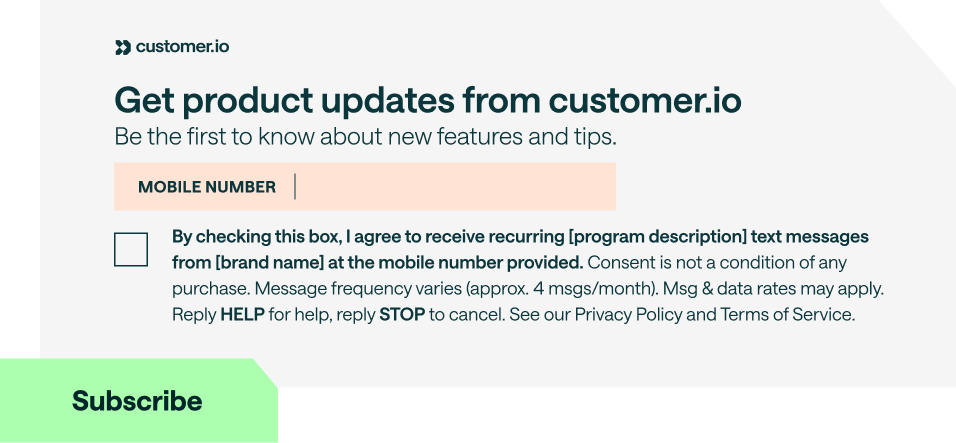
This example shows how the 11 elements come together on a single form. The bracketed text—like [brand name] and [program description]—marks where you fill in your own details.
Keep a record of each opt-in
Customer.io can keep a history of each person’s SMS opt-in and opt-out decisions that you can use for compliance purposes.
When a person consents to receive SMS messages through your website or app, send Customer.io an identify The Customer.io operation that adds or updates a person. When you identify a person, Customer.io either adds a person if they don't exist in your workspace, or updates them if they do. Before you identify someone (by their email address or an ID), you can track them anonymously.true in cio_subscription_preferences. Customer.io keeps a consent record with the date of the opt-in and where it came from.
Send only the SMS preference so that you don’t overwrite the person’s other topic and channel preferences, which would also change their consent history. The right request depends on the API you use. See Set preferences outside of the subscription center for examples.
Keep a copy of your form’s consent text
Consent records don’t store the wording on your form. Keep your own dated copy of each version of your form’s consent text, so you can match a person’s opt-in to the language they saw when they opted in.