# Personalize actions with JavaScript
In our *Create Event* and *Create or Update Person* actions, you can use JavaScript or Liquid to access and manipulate variables. This page shows JavaScript methods corresponding to common Liquid use cases, helping you take advantage of JavaScript in your workflow actions.
## How it works[](#how-it-works)
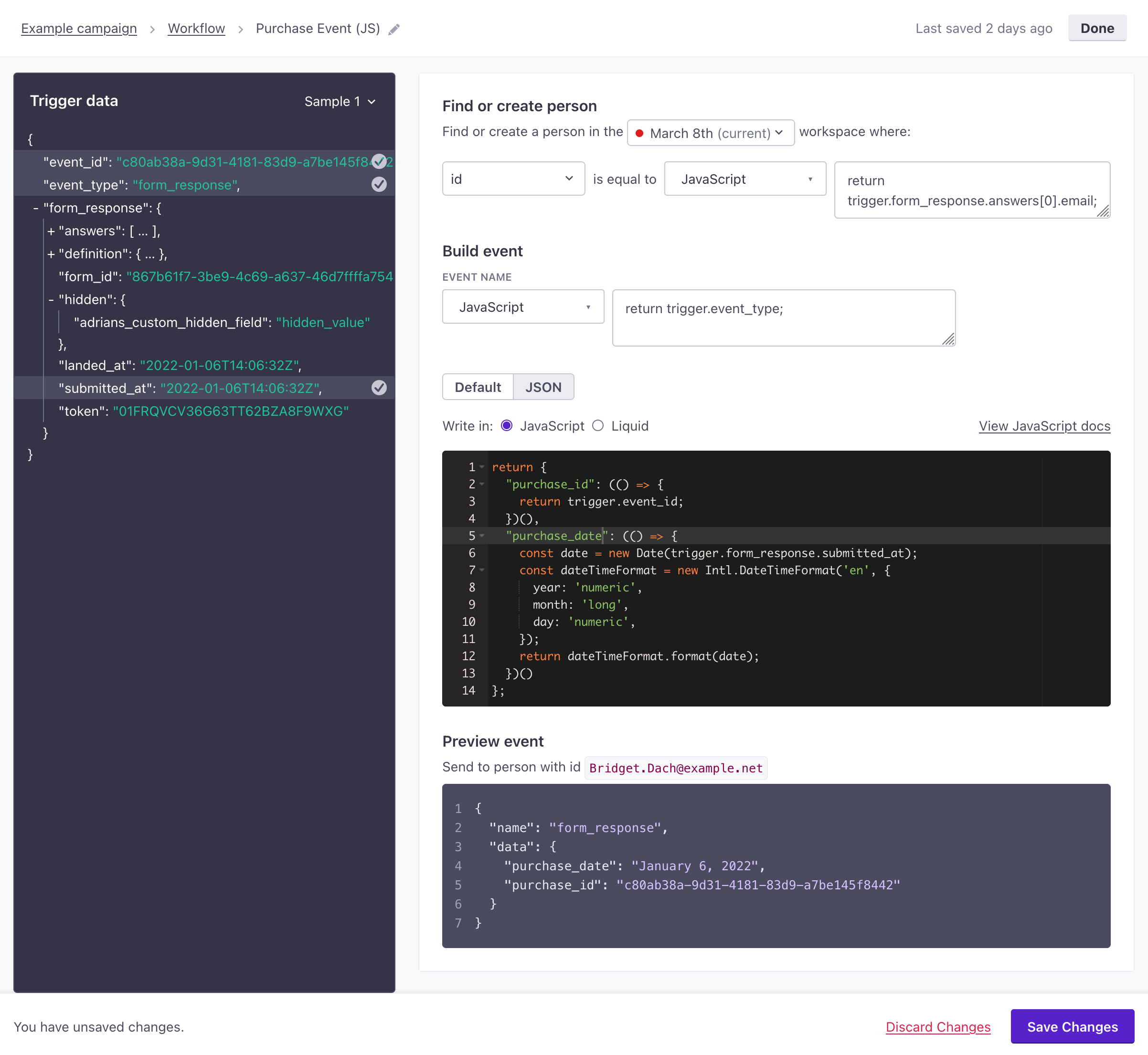
In our [*Create Event*](/journeys/event-action/) and [*Create or Update Person*](/create-update-person/) actions, you can select the *JavaScript* option to `return` a specific value from your Trigger data. JavaScript might be easier to use than Liquid when you want to modify incoming JSON.
If you use the JSON editor in the *JavaScript* mode, you can return an object representing the `data` object for your event. These are properties you can reference in messages or other campaigns using [liquidA syntax that supports variables, letting you personalize messages for your audience. For example, if you want to reference a person’s first name, you might use the variable `{{customer.first_name}}`.](/using-liquid)—e.g. `{{event.purchase.total}}`.
We use the V8 JavaScript Engine, supporting EMCAScript standards to help you modify your data. However, you can’t perform network/HTTP calls.
You can’t use Liquid inside JavaScript
When you use the JavaScript option, you must manipulate values with JavaScript. If you try to return a snippet value that contains Liquid, you’ll receive an error.
[](#2c9b7b39b68dc89daba6669fb7a1e659-lightbox)
## Accessing variables[](#accessing-variables)
As with Liquid, you access variables from your incoming data with JSON dot notation.
JavaScript
#### JavaScript[](#JavaScript)
```javascript
return customer.first_name;
```
Liquid
#### Liquid[](#Liquid)
```fallback
{{ customer.first_name }}
```
## Capitalize the first letter of a string[](#touppercase)
You might store your audience’s name as a lower case `first_name` and `last_name` strings but want to capitalize names when addressing a person.
JavaScript
#### JavaScript[](#JavaScript)
```javascript
return `${customer.first_name[0].toUpperCase()}${customer.first_name.slice(1)}`;
```
Liquid
#### Liquid[](#Liquid)
```fallback
{{ customer.first_name | capitalize }}
```
## Split a string[](#split-a-string)
If you store your customer’s name as a single string called `full_name` (e.g. `Cool Person`), you might want to split string to return a person’s first or last names. The example below assumes that the `full_name` attribute contains a space between the first and last names.
JavaScript
#### JavaScript[](#JavaScript)
```javascript
return customer.full_name.split(' ')[0];
```
Liquid
#### Liquid[](#Liquid)
```fallback
{{ customer.full_name | split: " " | first }}
```
## Fallbacks and If statements[](#fallbacks-and-if-statements)
In many cases, you should use an if statement, so you have a fallback value if a variable doesn’t exist. You can do this in JavaScript with an `if` statement. It’s very similar to what you can do in Liquid. For simple or inline cases, you can use the [?? operator](https://developer.mozilla.org/en-US/Web/JavaScript/Reference/Operators/Nullish_coalescing_operator).
JavaScript
#### JavaScript[](#JavaScript)
```javascript
if (customer.plan_name != null) {
return `You are currently on our ${customer.plan_name} plan.`;
} else {
return `Please choose a plan.`;
}
```
JavaScript with ??
#### JavaScript with ??[](#JavaScript with ??)
```javascript
return customer.plan_name ?? 'free_trial';
```
Liquid
#### Liquid[](#Liquid)
```fallback
{% if customer.plan_name != blank %}
You are currently on our {{ customer.plan_name }} plan.
{% else %}
Welcome to your free trial!
{% endif %}
```
### Compare attributes[](#compare-attributes)
You can compare attributes in an if statement, creating conditions that determine the value(s) you set.
JavaScript
#### JavaScript[](#JavaScript)
```javascript
if (customer.attribute_1 === customer.attribute_2) {
return 'Hello awesome person!';
}
```
Liquid
#### Liquid[](#Liquid)
```fallback
{% if customer.attribute_1 == customer.attribute_2 %}
Hello awesome person!
{% endif %}
```
### Compare values with inequality[](#compare-values-with-inequality)
You can check if values are less than or greater than an attribute etc.
JavaScript
#### JavaScript[](#JavaScript)
```javascript
if (customer.lifetime_value > 100) {
return 'Thanks for being a loyal customer!';
}
```
Liquid
#### Liquid[](#Liquid)
```fallback
{% if customer.lifetime_value > 100 %}
Thanks for being a loyal customer!
{% endif %}
```
## Convert dates[](#convert-dates)
You can convert dates using `toLocaleString`. Add an object of options after the locale string to re-format your date. We typically store date-time values as Unix timestamps in seconds; when you timestamps in JavaScript, you’ll convert them to milliseconds with `* 1000`.
JavaScript
#### JavaScript[](#JavaScript)
```javascript
return new Date(customer.created_at * 1000).toLocaleDateString("en-US");
// if `created_at` is 1646936855, this returns "3/10/2022"
```
JavaScript with options
#### JavaScript with options[](#JavaScript with options)
```javascript
return new Date(customer.created_at * 1000).toLocaleDateString("en-US", { year: 'numeric', month: 'long', day: 'numeric' });
// if `created_at` is 1646936855, this returns "March 10, 2022"
```
Liquid
#### Liquid[](#Liquid)
```text
{{ created_at | 'date: %B %d, %Y'}}
// if `created_at` is 1646936855, this returns "March 10, 2022"
```
## Convert values to a percentage[](#convert-percentage)
Math operations are fairly simple in JavaScript. In the example below, we’re generating a percentage by dividing two values and multiplying the result by 100.
JavaScript
#### JavaScript[](#JavaScript)
```javascript
return (Math.floor((customer.purchase_total_to_date / customer.next_rewards_tier) * 100))
```
Liquid
#### Liquid[](#Liquid)
```fallback
{{ assign percent = customer.purchase_total_to_date | divided_by: customer_next_rewards_tier }}
{{ percent | times: 100 }}
```
## Loops[](#loops)
You can loop through values in an array. However, the way you format your JavaScript depends on what you want to do with the resulting data.
For example, imagine an attribute called `friends`, containing an array of strings. You could list the names like this:
JavaScript
#### JavaScript[](#JavaScript)
```javascript
return customer.friends.join('
');
```
Liquid
#### Liquid[](#Liquid)
```fallback
{% for person in customer.friends %}
{{ person }}
{% endfor %}
```
But, if you wanted to act on an array of objects, like showing the name and price of each item in an array of `items`, you could do something like this:
JavaScript
#### JavaScript[](#JavaScript)
```javascript
return event.items.map((item) => {
return `${item.name}: ${item.price}
`;
});
```
Liquid
#### Liquid[](#Liquid)
```fallback
{% for item in event.items %}
{{ item.name }}: {{ item.price }}
{% endfor %}
```