Randomized delay
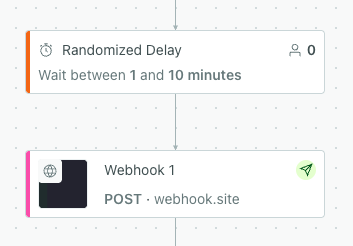
UpdatedYou can hold people in randomized time delays in campaigns. When journeys reach a Random Delay block, we hold them for a random amount of time between the minimum and maximum time you set using a flat distribution model. This can help you avoid overloading rate-limited API endpoints with webhook requests.
Add a condition
Like with other workflow blocks, you can add one or more conditions so only certain people wait in a random delay. If they don’t meet the condition, they move forward immediately. You can set a profile attribute, event, message, or segment condition to make sure people move through your campaign at the right pace.
Consider whether the condition might be better suited to a forthcoming webhook or message action instead. For instance, if you’re concerned about overloading an API endpoint, you could reduce webhook requests if you only send them when people are a member of a certain segment. You can also add conditions to multiple blocks if that better suits your needs!
Edit a random delay in a live campaign
You can adjust the minimum or maximum delay while the campaign is live. After the change, journeys that reach the delay will randomly wait based on the new timeframe. Any journeys that were currently waiting and now fall outside the maximum time to wait will move forward.

