

Set preferences outside of the subscription center
Let your audience manage their subscription preferences outside of your Customer.io messages—in your app, during sign-up, or anywhere else you want to provide a link.
How it works
Customer.io’s Subscription Center feature lets your audience set their subscription preferences when they click Unsubscribe or Manage your preferences in your messages. But you might want to let your audience proactively manage their preferences outside of messages—like as a part of your in-product settings or as a part of your sign-up flow.
There are two ways to do this:
- Link to the hosted subscription center — Generate a signed URL that takes a person directly to your Customer.io-hosted subscription center page. This is the simplest approach and requires no custom UI.
- Build a custom subscription preferences page — Use our APIs to fetch and update preferences within a page that you host. This gives you full control over the design and experience.
Generate a subscription center link
You can use our API to generate a signed URL that links directly to your Customer.io-hosted subscription center. Your users can manage all of their topic preferences from this page—no custom form required.
This is useful when you want to provide a subscription center link in places like:
- Your app’s account settings or profile page
- A welcome or onboarding email sent through a custom system
- An SMS or push notification
-
Call the Generate a subscription center token endpoint with the person’s identifier:
BASHcurl --request GET \ --url https://api.customer.io/v1/subscription_center/person@example.com/token \ --header 'Authorization: Bearer YOUR_APP_API_KEY' -
The response includes a
tokenand a ready-to-useurl:JSON{ "token": "abc123...", "url": "https://track.customer.io/u/i/abc123.../" } -
Serve the
urlvalue as a link for your customer. The token is valid for 24 hours.
Create a custom subscription preferences page
If you need full control over the branding and experience of your subscription preferences page, you can use our App and Track APIs to fetch and update preferences within a page that you host. Use our App API to fetch subscription preferences for your customers and our Track API to update subscription preferences. You can also set preferences using our Web SDK.
You can set your audience’s subscription preferences using the reserved A key-value pair that you associate with a person or an object—like a person's name, the date they were created in your workspace, or a company's billing date etc. Use attributes to target people and personalize messages.cio_subscription_preferences attributetopics and channels preferences where every individual preference is a boolean (true/false).
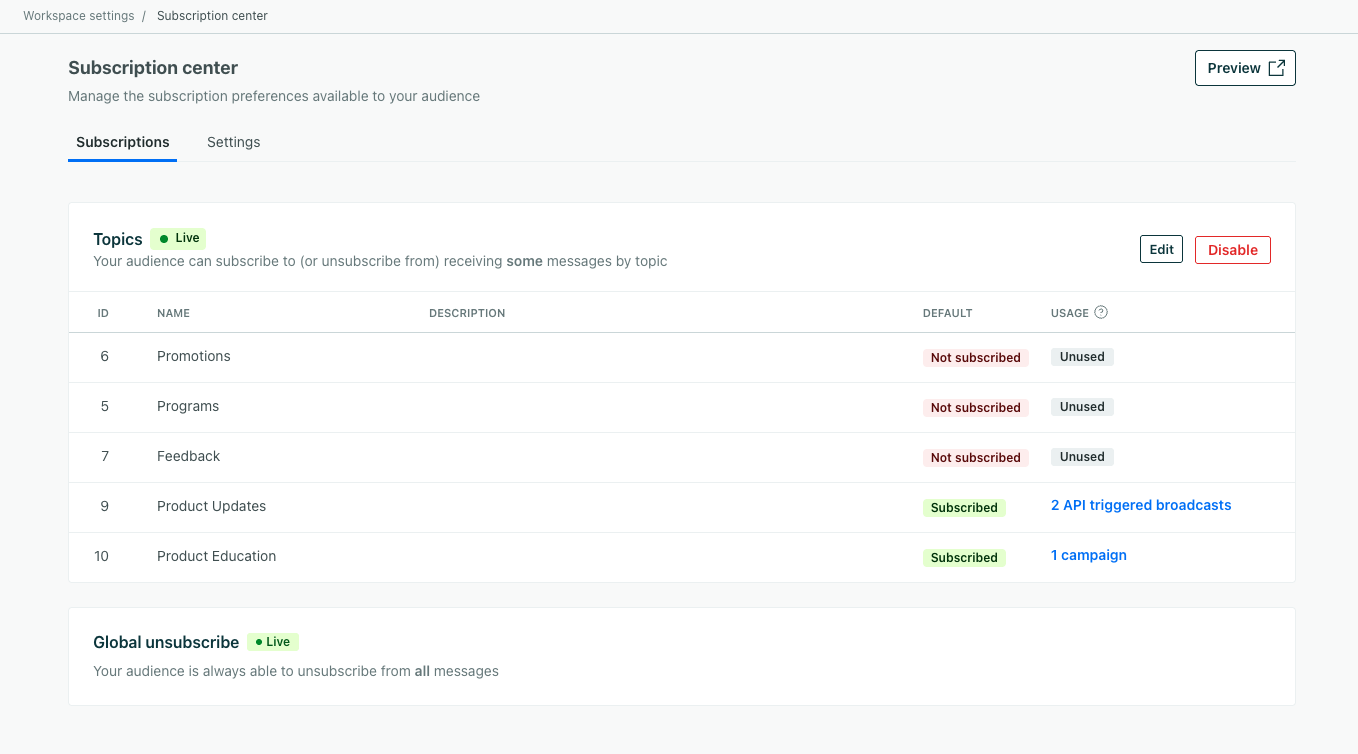
Topics are numbered based on the ID that you see in the UI—topic_1 corresponds to ID 1 in the left-column in your Subscription Center setup page. We set subscription preferences by topic ID rather than the topic Name, so that you can change the name of a topic without affecting your audience’s preferences.
Channels use the channel type name as the key (email, sms, push, in_app, whatsapp, slack, line, inbox). Channel preferences let people opt in or out of specific messaging channels, independent of their topic preferences.
When you send a message, a person must be subscribed to both the relevant topic and channel to receive the message.
{
   "cio_subscription_preferences": {
      "topics": {
         "topic_1": true,
         "topic_2": false
      },
      "channels": {
         "email": true,
         "sms": true,
         "push": false
      }
   }
}
App API: Fetch preferences
You can fetch subscription preferences from your workspace using our App API endpoint: /v1/customers/{customer_id}/subscription_preferences. The response includes both topic and channel preferences.
const axios = require('axios');

let config = {
  method: 'get',
  maxBodyLength: Infinity,
  url: 'api.customer.io/v1/customers/sdade8@example.com/subscription_preferences?id_type=email',
  headers: {
    'Accept': 'application/json',
    'Authorization': 'Bearer'
  }
};

axios.request(config)
.then((response) => {
  console.log(JSON.stringify(response.data));
})
.catch((error) => {
  console.log(error);
});
API: Set preferences
If you have your own backend integration, you can send subscription preferences—including both topic and channel preferences—to your workspace through our APIs or our libraries. We’ve provided some examples below.
Our Pipelines API preserves preferences by default. Our classic Track API does not. If you use our classic Track API, we’ve provided examples to help you preserve or overwrite existing preferences depending on your use case. Channel preferences work the same way as topic preferences in all APIs.
In the classic Track API, the “preserve” examples below use JSON dot notation (like cio_subscription_preferences.topics.topic_2) to update a single subscription preference without overwriting the others. When you send a flat, dot-notated key like "cio_subscription_preferences.topics.topic_2": false instead of the full nested cio_subscription_preferences object, Customer.io updates only that preference and leaves your other topic and channel preferences intact. This partial-update behavior is specific to cio_subscription_preferences—it does not apply to other nested attributes.
Topic and channel preferences only affect who receives your messages while your subscription center is enabled. If it’s off, Customer.io stores the preferences you send, but it only checks the unsubscribed attribute when it sends messages.
Every preference you change creates a consent record with the collection point api. Send only the preferences a person changed, so their consent history shows the choices they made and not values your integration resent or overwrote.
Pipelines (Recommended)
The Pipelines API automatically preserves any preferences you don’t set. Using our example below, if there was a topic_4 that was set to true, it would remain true after the update. You can reset all preferences by passing an empty topics object. The same behavior applies to channel preferences in the channels map.
This example uses our API directly, but we also have client-side JavaScript and server-side libraries that can make things easier.
const axios = require('axios');
let data = JSON.stringify({
  "userId": "customer@example.com",
  "traits": {
    "cio_subscription_preferences": {
      "topics": {
        "topic_1": true,
        "topic_2": true,
        "topic_3": false
      },
      "channels": {
        "email": true,
        "sms": true,
        "push": false
      }
    }
  }
});

let config = {
  method: 'post',
  maxBodyLength: Infinity,
  url: 'https://cdp.customer.io/v1/identify',
  headers: {
    'Content-Type': 'application/json',
    'Authorization': 'Basic <yourApiKey>:'
  },
  data : data
};

axios.request(config)
.then((response) => {
  console.log(JSON.stringify(response.data));
})
.catch((error) => {
  console.log(error);
});
Track v1 (Classic): Set & overwrite prefs
const axios = require('axios');
let data = JSON.stringify({
  "cio_subscription_preferences": {
    "topics": {
      "topic_1": true,
      "topic_2": true,
      "topic_3": false
    },
    "channels": {
      "email": true,
      "sms": true,
      "push": false
    }
  }
});

let config = {
  method: 'put',
  maxBodyLength: Infinity,
  url: 'https://track.customer.io/api/v1/customers/sdade8@example.com',
  headers: {
    'Content-Type': 'application/json',
    'Authorization': 'Basic'
  },
  data : data
};

axios.request(config)
.then((response) => {
  console.log(JSON.stringify(response.data));
})
.catch((error) => {
  console.log(error);
});
Track v1 (Classic): Set & preserve prefs
const axios = require('axios');
let data = JSON.stringify({
  "cio_subscription_preferences.topics.topic_2": false,
  "cio_subscription_preferences.channels.email": true
});

let config = {
  method: 'put',
  maxBodyLength: Infinity,
  url: 'https://track.customer.io/api/v1/customers/sdade8@example.com',
  headers: {
    'Content-Type': 'application/json',
    'Authorization': 'Basic'
  },
  data : data
};

axios.request(config)
.then((response) => {
  console.log(JSON.stringify(response.data));
})
.catch((error) => {
  console.log(error);
});
Track v2 (Classic): Set & overwrite prefs
const axios = require('axios');
let data = JSON.stringify({
  "type": "person",
  "identifiers": {
    "email": "sdade8@example.com"
  },
  "action": "identify",
  "attributes": {
    "cio_subscription_preferences": {
      "topics": {
        "topic_1": true,
        "topic_2": true,
        "topic_3": true
      },
      "channels": {
        "email": true,
        "sms": true,
        "push": false
      }
    }
  }
});

let config = {
  method: 'post',
  maxBodyLength: Infinity,
  url: 'https://track.customer.io/api/v2/entity',
  headers: {
    'Content-Type': 'application/json',
    'Accept': 'application/json',
    'Authorization': 'Basic'
  },
  data : data
};

axios.request(config)
.then((response) => {
  console.log(JSON.stringify(response.data));
})
.catch((error) => {
  console.log(error);
});
Track v2 (Classic): Set & preserve prefs
const axios = require('axios');
let data = JSON.stringify({
  "type": "person",
  "identifiers": {
    "email": "sdade8@example.com"
  },
  "action": "identify",
  "attributes": {
    "cio_subscription_preferences.topics.topic_1": false,
    "cio_subscription_preferences.channels.push": false
  }
});

let config = {
  method: 'post',
  maxBodyLength: Infinity,
  url: 'https://track.customer.io/api/v2/entity',
  headers: {
    'Content-Type': 'application/json',
    'Accept': 'application/json',
    'Authorization': 'Basic'
  },
  data : data
};

axios.request(config)
.then((response) => {
  console.log(JSON.stringify(response.data));
})
.catch((error) => {
  console.log(error);
});
Javascript/Web SDK: Set preferences
If you use our JavaScript source (which we recommend) or our classic JavaScript SDK, you can set preferences with the identify function. You can identify a person when they first sign up for your service and set their preferences or when they update their preferences in a settings page that you make available to them.
JavaScript client (Recommended)
With our JavaScript client, you can pass an empty topics or channels object to overwrite a person’s preferences. Otherwise, we’ll preserve the preferences that you don’t update.
_cio.identify({
  userId: '019mr8mf4r',
  cio_subscription_preferences: {
    topics: {
      topic_1: true,
      topic_2: true,
      topic_3: false
    },
    channels: {
      email: true,
      sms: true,
      push: false
    }
  }
});
Classic JS: Set and overwrite all preferences
_cio.identify({
    // request must contain an identifier like `id` or `email`, depending on the settings in your workspace
    email: 'cool.person@example.com',
    cio_subscription_preferences: JSON.stringify({ topics: { topic_1: true, topic_2: false, topic_3: false}, channels: { email: true, push: false } })
});Classic JS: Set preferences and preserve others
_cio.identify({
    // request must contain an identifier like `id` or `email`, depending on the settings in your workspace
    email: 'cool.person@example.com',
    // Set topic preferences using dot notation
    "cio_subscription_preferences.topics.topic_<topic ID>":<boolean>,
    // Set channel preferences using dot notation
    "cio_subscription_preferences.channels.email": true,
    "cio_subscription_preferences.channels.push": false
  });