# Subscription FAQs
This article contains a series of frequently asked questions that apply to our subscription center and global unsubscribe functionality.
### What messages will someone stop receiving after unsubscribing?[](#what-messages-will-someone-stop-receiving-after-unsubscribing)
By default, if a customer is globally unsubscribed, we will **not** send them **emails, push or SMS** for any campaign or broadcast. If a customer is unsubscribed from a topic in your subscription center, we also stop sending email, push and SMS, but only for that topic.
If you use [channel preferences](/journeys/subscriptions-overview/#channel-preferences), people can also opt out of specific messaging channels. For example, if someone unsubscribes from the `push` channel, they won’t receive push notifications for any topic—even if they’re still subscribed to those topics.
We continue to send slack messages and webhooks to unsubscribed, since these are often used for internal purposes. [In-app messages](/journeys/send-in-app-message/#in-app-messages-and-unsubscribes) also ignore users’ `unsubscribed` status, though channel preferences for `in_app` are respected if configured.
Keep in mind, [transactional messages](/journeys/transactional-api/) (password resets or invoices, for example) send to unsubscribed by default, but you can toggle that off in the message’s settings or override it through our [API](/integrations/api/app/#operation/sendEmail).
For other transactional use cases, you can override the default audience through your [campaign or broadcast settings](/journeys/unsubscribes/#default-behavior). You can also adjust this [setting on an individual message](/journeys/unsubscribes/#default-behavior) for emails, push, and SMS messages.
### How do I add an unsubscribe link to my emails?[](#how-do-i-add-an-unsubscribe-link-to-my-emails)
To add an unsubscribe link, go to our [subscription options overview](/journeys/subscriptions-overview/#unsubscrible-links).
### How do topics and channels work together?[](#how-do-topics-and-channels-work-together)
Topics and channels are independent dimensions of subscription control. Topics control *what kind* of content a person receives (for example, “Marketing Updates” or “Product News”). Channels control *how* they receive it (for example, email, SMS, or push).
Both the topic **and** the channel must be subscribed for a message to send. Here’s how the logic works:
Topic
Channel
Result
Subscribed
Subscribed
Message sends ✅
Subscribed
Unsubscribed
Message blocked ❌
Unsubscribed
Subscribed
Message blocked ❌
Unsubscribed
Unsubscribed
Message blocked ❌
There’s no per-topic-per-channel preference; channels and topics are independent layers. A person can be subscribed to all topics but opt out of push, or subscribed to push but opt out of a specific topic.
Webhooks bypass all subscription checks. See the [subscriptions overview](/journeys/subscriptions-overview/#unsubscribe-from-topics) for details on how each channel handles subscription preferences.
### Do I need to manually add channels to the subscription center?[](#do-i-need-to-manually-add-channels-to-the-subscription-center)
Yes. Enabling a messaging channel in your workspace (like email or SMS) does not automatically add it to the subscription center. You must go to *Workspace Settings > Subscription Center* and explicitly add each channel you want people to manage preferences for. For each channel, you can set whether it’s opt-in or opt-out, and provide a custom name and description.
### Can I set preferences for individual email addresses or phone numbers?[](#can-i-set-preferences-for-individual-email-addresses-or-phone-numbers)
No. Channel preferences apply to the channel type as a whole—for example, `email` or `sms`. Setting `email` to `false` stops all email for that person; you can’t opt out of messages from a specific email address or phone number while keeping others. If you need more granular control, consider using [topics](/journeys/subscription-center/#add-topics) to separate different types of content.
### Are unsubscribe links tracked?[](#are-unsubscribe-links-tracked)
By default, unsubscribe links are not tracked in Customer.io. That includes these liquid tags:
* `{% unsubscribe %}`
* `{% unsubscribe_url %}`
* `{% manage_subscription_preferences_url %}`
If you want to track unsubscribe links, use `{% unsubscribe_url %}` or `{% manage_subscription_preferences_url %}` and add `class='tracked'` to the `` tag in the HTML: `Unsubscribe`.
### What is the `List-Unsubscribe` header?[](#what-is-the-list-unsubscribe-header)
When you use an unsubscribe link in an email, we add the `List-Unsubscribe` header to your email automatically. **If a person, clicks this header, we always globally unsubscribe them** from messages, never from a single [subscription topic](/journeys/subscription-center/).
Test sends do not contain a `List-Unsubscribe` header
If you are sending ad hoc test emails from the template composer, they won’t include the `List-Unsubscribe` header. We generate the header from recipient information so we can properly attribute unsubscribes to the right message and person.
### How do I remove an unsubscribe link from my emails?[](#how-do-i-remove-an-unsubscribe-link-from-my-emails)
An unsubscribe link is added by default in the **Empty Layout** used in rich text and code-based emails. Edit this layout by going to the [*Content > Email Layouts*](/journeys/3-layouts-and-customerio) of the left hand nav of your workspace:
[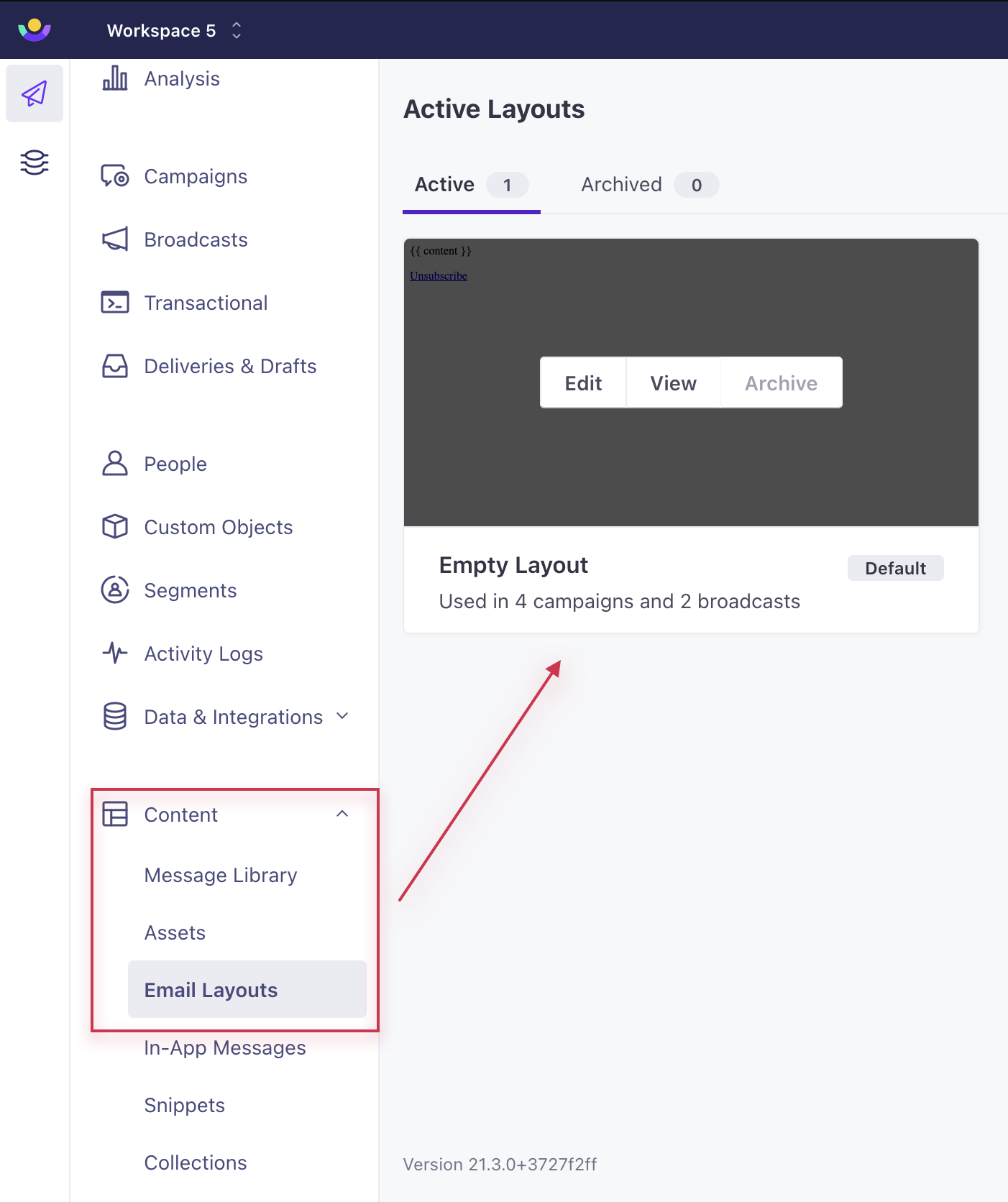](#85b3dc534da88afd2f571dbf31ef993d-lightbox)
You can also create a new layout without this link and add this through **Layout & Preview** while editing an email.
In the drag and drop editor, remove the unsubscribe link by editing or deleting the block.
[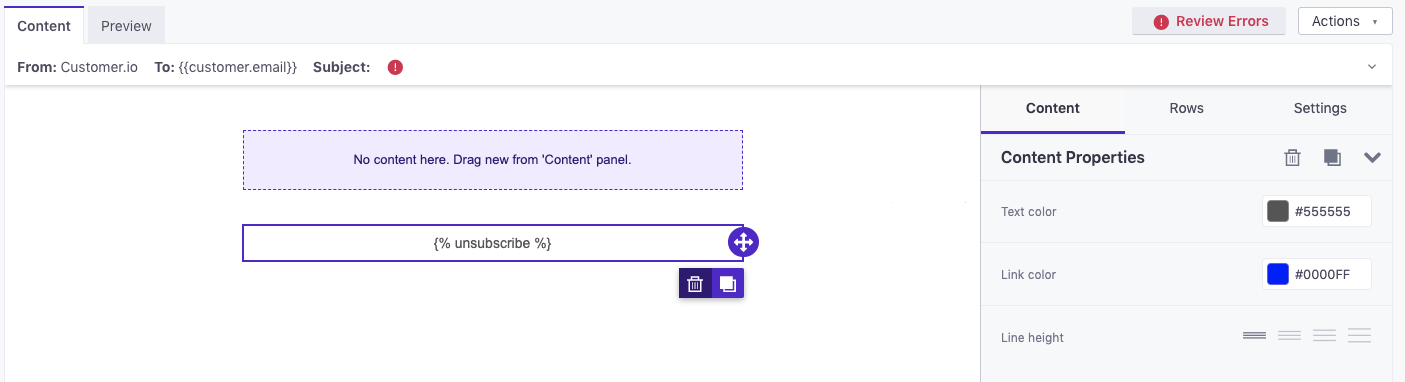](#59ce6d6f7f0d859bfa635454af2cdd00-lightbox)
### How do I handle more complex messaging preferences?[](#how-do-i-handle-more-complex-messaging-preferences)
Check out our [subscription center](/journeys/subscription-center/)!
### Does every email require an unsubscribe link?[](#does-every-email-require-an-unsubscribe-link)
We don’t programmatically enforce it, but we encourage it. If you are sending marketing emails, you should adhere to all local laws about customer communication.
### Do I have to use *your* unsubscribe link in emails?[](#do-i-have-to-use-your-unsubscribe-link-in-emails)
No. While we require you to include an *unsubscribe* whenever necessary and legal, we allow you to use your own unsubscribe functionality if you so choose. If you use your own, we won’t be able to track which email someone unsubscribed from or place an unsubscribe in your email header.
Custom unsubscribe links must adhere to new Google and Yahoo standards
If you use custom unsubscribe links, you’ll also need to do a bit of development work to support the new RFC 8058 before **June 1, 2024**. See [custom unsubscribe links (RFC 8058)](/journeys/custom-unsubscribe-links) for more information.
### How do I send my customers to an unsubscribe page in another language?[](#how-do-i-send-my-customers-to-an-unsubscribe-page-in-another-language)
The unsubscribe page will display in the language of your customer’s browser as long as this language is supported (see our list below).
If you’d like to manually set the unsubscribe page language, append the optional parameter `lang=` within the `{% unsubscribe_url %}` liquid. For example, to redirect users to a French translation of the unsubscribe landing page use `{% unsubscribe_url lang='fr' %}`. This parameter accepts valid [IETF Language Codes](https://en.wikipedia.org/wiki/IETF_language_tag) for any of the languages we currently have translations for.
Surround your language code in single quotes.
Note the use of single quotes around the language code (`'fr'`). This is important if the code is being placed in a link in the drag-and-drop editor. It’s also important for links enclosed in double quotes (`href="{% unsubscribe_url lang='fr' %}"`) that are placed in an `href` attribute in our rich-text or code editors. If you nest double quotes inside double quotes OR single quotes inside single quotes, your link will not work as expected.
#### Currently supported languages:[](#currently-supported-languages)
Language
Code
Brazilian Portuguese
`pt-br`
Bulgarian
`bg`
Chinese
`zh`
Czech
`cs`
Danish
`da`
Dutch
`nl`
English
`en`
Estonian
`et`
Finnish
`fi`
French
`fr`
German
`de`
Greek
`el`
Hebrew
`he`
Hungarian
`hu`
Italian
`it`
Japanese
`ja`
Latvian
`lv`
Norwegian
`no`
Polish
`pl`
Portuguese
`pt`
Romanian
`ro`
Russian
`ru`
Slovak
`sk`
Spanish
`es`
Swedish
`sv`
Thai
`th`
Turkish
`tr`
Ukrainian
`uk`
If you only use our global unsubscribe functionality and you provide an invalid or unsupported language code, we default back to the English unsubscribe page.
If you use our subscription center and you provide an invalid or unsupported language code, we fallback on your default language, the language you created your subscription center in (*Workspace Settings > Subscription Center > Settings > Localization*).
We are always willing to add additional languages, so [please let us know](mailto:product@customer.io) if you can provide a translation!