

Manage consent for open-tracking
Email open tracking helps you understand how people engage with your messages, but the rules and expectations around this kind of engagement tracking are shifting. Regulators are looking more closely at when senders can measure opens, clicks, and engagement, especially when that information is used for marketing performance, profiling, or campaign optimization.
Some regions now require recipient consent before you can track open activity on emails. France’s CNIL published recommendations for email tracking pixels with a July 14, 2026 transition date by which businesses must reach out to existing contacts. If you have recipients in France, see the section below for more information about how you can use Customer.io to support your compliance approach before that date.
Italy’s Garante adopted guidelines in April 2026 that generally require prior, informed consent for individual-level tracking used for marketing, profiling, or campaign performance unless a narrow exemption applies, with a six-month transition period for existing programs. More regulators are likely to look at this area over time, so it’s a good time to decide how you want to collect, store, and honor tracking choices across your audience.
This guide covers the Customer.io tools to help you manage your choices regarding open tracking. You can choose how strict you want your default tracking behavior to be, record each person’s preference, and give recipients a way to update that preference themselves. This guide is informational only and is not legal advice. You’re responsible for determining which laws apply to your audience, what consent or notice you need, and how to configure your workspace.
How it works
Email open tracking works by adding an invisible pixel to your emails. When someone opens the email, the pixel loads, effectively telling us that someone opened the email. However, some regions require recipient consent before you can track open activity on emails.
You control open tracking consent with a setting and an attribute A key-value pair that you associate with a person or an object—like a person's name, the date they were created in your workspace, or a company's billing date etc. Use attributes to target people and personalize messages.
- The setting: A workspace consent mode that determines the default consent behavior (off, opted in, or opted out).
- The attribute: A per-contact
cio_email_tracking_consentattribute that records each individual’s consent as a string (wheregrantedmeans consented,deniedmeans objected).
When Customer.io withholds open tracking for a send, the recipient still receives your email. You just won’t be able to determine whether they opened your message, protecting your audience’s right to privacy. By default, the consent mode only affects the open-tracking pixel, and recipients you don’t track for opens still receive tracked links. You can also withhold link tracking from the same recipients.
Consent-based tracking keeps metrics accurate
When Customer.io withholds open tracking for a send, we consider the email untracked and exclude it from your open-rate calculations. This keeps withheld sends from skewing your engagement rates, so you can continue to measure engagement for the people you’re allowed to measure.
- Open rate = opened / (delivered − untracked)
How many sends count as untracked depends on your mode. In Opt-out, only the contacts you’ve explicitly marked denied are untracked—usually a small group. In Opt-in, everyone whose consent is unset or denied is untracked.
Withhold link tracking from the same recipients
Your workspace can extend the consent gate to cover link tracking. When this option is on and your consent mode withholds open tracking for a recipient, Customer.io sends that person’s email with plain links instead of tracked links. This covers links in your message and links you write with the {% cio_link %} Liquid tag. The recipient still receives your email, and every link still works.
The option is off by default. To turn it on, go to Settings > Workspace Settings > General Workspace Settings. Under Do you need consent to track email opens?, select Opt-in or Opt-out, and then select Disable link tracking for people without tracking consent. The option is unavailable while your consent mode is Off.
Two things to weigh before you enable it:
- You give up the clicks, not just the tracking. Customer.io records no click activity for those recipients. Their clicks don’t reach profile activity, your link click metrics, or segments built on clicks.
- Your click rate reads lower. Unlike open rate, click rate divides by everything you delivered. Recipients whose link tracking you withheld stay in that denominator, so their unmeasured clicks pull the rate down.
When the option is on, the hosted consent page describes opens and clicks together, so recipients see everything their choice covers. Customer.io localizes that page in English, French, and Italian.
Disable open tracking for everyone
If you’re worried about accidentally sending emails to users in regions that require open-tracking consent, you can disable open tracking for emails all together.
However, this means you won’t be able to track email engagement, which can make it difficult to measure the effectiveness of your emails.
Disable open tracking at the message level
You can also disable open tracking for individual messages in an automation or API-triggered broadcast. This is useful if you want to track opens for some messages but not for others, which you might do if local regulations require consent for some messages but not for others.
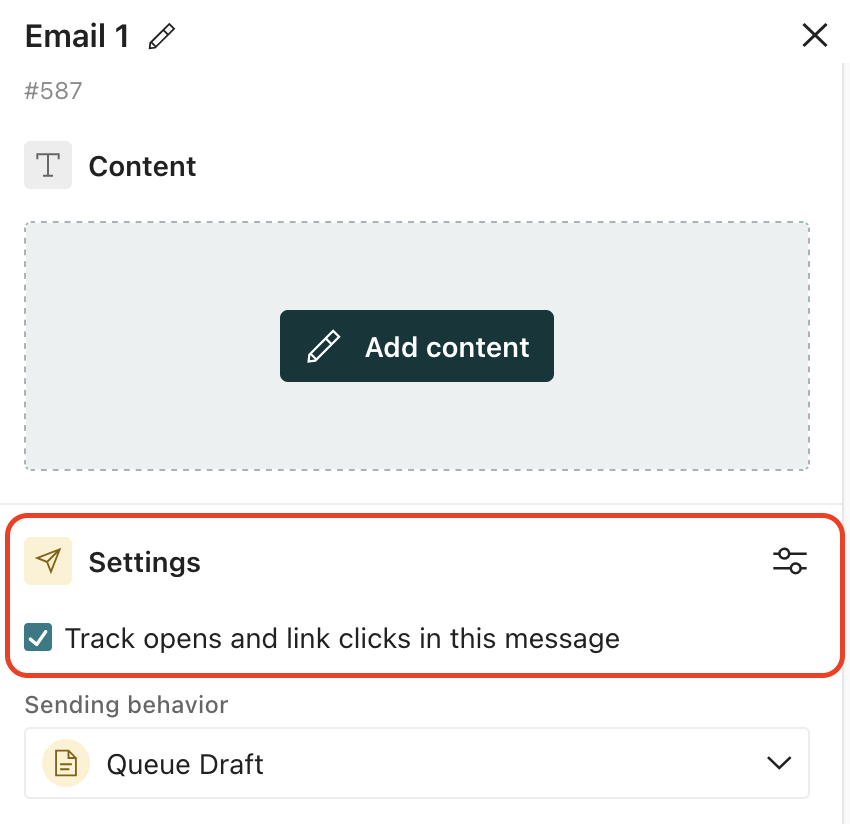
In any individual message’s Settings, you can uncheck the Track opens and link clicks in this message checkbox to disable open tracking for that message.
Set the email tracking consent mode
Go to Settings > Workspace Settings > General Workspace Settings. Under Do you need consent to track email opens?, choose a mode:
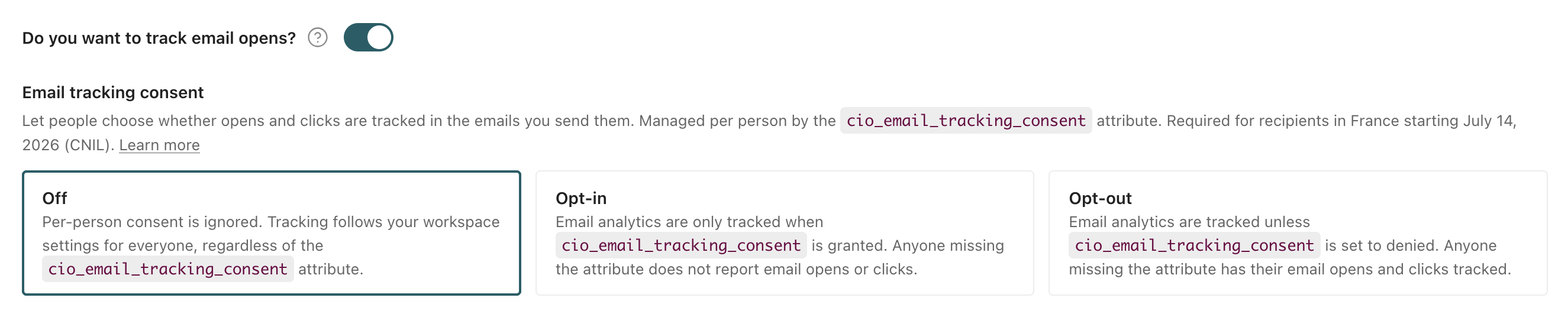
- Off enables open tracking for everyone. This setting is useful if you don’t send messages to users in regions that require open-tracking consent. (e.g. you’re a US-based company and your users are all in the US.)
- Opt-in limits open-tracking to people who have explicitly consented—their
cio_email_tracking_consentattribute isgranted. Anyone whose consent attribute is unset ordeniedis not tracked. Use this mode when you must have affirmative consent before tracking anyone. - Opt-out tracks everyone except people who have explicitly objected (
denied). Contacts who are unset orgrantedare tracked. Use this when you only need to honor the specific people who withdraw consent.
Set a person’s consent attribute
Customer.io records tracking consent in a reserved attribute called cio_email_tracking_consent. The attribute takes a string value:
grantedmeans the person has consented to open tracking, anddeniedmeans they’ve objected.- A contact with no value—or any other value—reverts to the consent mode’s default behavior.
We match granted and denied case-insensitively, but we recommend the lowercase form; it’s what Customer.io writes when someone sets consent through the People page or the hosted consent page.
You can set this attribute anywhere you set attributes A key-value pair that you associate with a person or an object—like a person's name, the date they were created in your workspace, or a company's billing date etc. Use attributes to target people and personalize messages.
We recommend that you capture consent when you identify someone—like when they sign up for your email list—and backfill your existing audience so you’re ready before you change modes. Here are some examples of identify calls that set the cio_email_tracking_consent attribute:
JavaScript client (signup / custom subscription management)
_cio.identify({
  userId: '019mr8mf4r',
  email: 'customer@example.com',
  cio_email_tracking_consent: 'granted'
});
Pipelines API (Node.js backfill / signup)
const axios = require('axios');
let data = JSON.stringify({
  "userId": "customer@example.com",
  "traits": {
    "email": "customer@example.com",
    "cio_email_tracking_consent": "granted"
  }
});

let config = {
  method: 'post',
  maxBodyLength: Infinity,
  url: 'https://cdp.customer.io/v1/identify',
  headers: {
    'Content-Type': 'application/json',
    'Authorization': 'Basic <yourApiKey>:'
  },
  data : data
};

axios.request(config)
.then((response) => {
  console.log(JSON.stringify(response.data));
})
.catch((error) => {
  console.log(error);
});
Pipelines API (Python backfill / signup)
import requests
import json

url = "https://cdp.customer.io/v1/identify"
headers = {
  'Content-Type': 'application/json',
  'Authorization': 'Basic <yourApiKey>:'
}

data = {
  "userId": "customer@example.com",
  "traits": {
    "email": "customer@example.com",
    "cio_email_tracking_consent": "granted"
  }
}

response = requests.request("POST", url, headers=headers, data=json.dumps(data))

print(response.text)
Let recipients manage their own consent
Add the {% tracking_consent_url %} Liquid tag to an email to give recipients a hosted, no-login page where they can grant or withdraw tracking consent—similar to an unsubscribe link. When a recipient updates their choice on that page, Customer.io sets their cio_email_tracking_consent attribute automatically (granted when they grant consent, denied when they withdraw it).
<a href="{% tracking_consent_url %}">Manage your tracking preferences</a>Choose an audience-wide compliance approach
An email address doesn’t tell you where a recipient lives, so applying consent rules only to the people you think are in a particular region is unreliable and hard to maintain. We recommend picking one approach and applying it to your whole audience. Your setup stays simple, and you avoid gaps when someone’s location isn’t what you assumed.
While we’ve offered some approaches below, it’s up to you to determine what you need to do to comply with regional regulations.
Require consent from everyone (Opt-in)
This is the strictest approach, and the one that satisfies regulations that require consent before tracking, such as France’s CNIL recommendations. Customer.io only engages open tracking for a person after they’ve affirmatively consented (their cio_email_tracking_consent is granted).
- Set up a flow to capture consent when you collect an email address—at signup, in a preference center, or through the hosted consent page.
- Backfill consent for the contacts you already have, so you don’t lose tracking for your existing audience. You can do this by notifying recipients and giving them a clear way to opt in or out.
- After enough time has passed that you’re confident you’ve backfilled consent for your existing audience, set the workspace mode to Opt-in.
Contacts you haven’t recorded consent for aren’t tracked, so backfill before you switch modes to avoid a sudden drop in your open metrics.
Track until someone objects (Opt-out)
This is a lighter-touch approach that keeps tracking everyone while honoring the people who explicitly withdraw consent. It suits regulations that let you track until a recipient objects, but it does not satisfy rules that require consent up front.
- Set the workspace mode to Opt-out.
- Give recipients a way to withdraw consent—typically the hosted consent page.
- Customer.io keeps tracking everyone whose consent is unset or
granted, and withholds tracking only for the people markeddenied.
France’s CNIL recommendations
France’s CNIL recommendations are the first major guidance of this kind, and they include a transitional window that changes how you handle existing contacts versus new ones. Other regions may adopt similar patterns as their own rules take effect.
If you have recipients in France, July 14, 2026 is the deadline to act for contacts you identified before April 14, 2026. Before July 14, consider sending those contacts clear information about your use of tracking pixels and give them an easy way to opt-out, like the hosted tracking preferences page. For contacts added on or after April 14, 2026, consider collecting tracking consent before using individual-level open tracking. If you have not completed those steps by July 14, consider using the opt-in tracking mode or disable open tracking—unless you have recorded consent or determined that an exemption applies.
- People identified before April 14, 2026: The CNIL recommendations allow a transitional approach for existing contacts if you provide clear and accessible information about tracking pixels and give them a way to object to tracking before July 14, 2026. For example, you may want to send them an email explaining the change and provide a prominent link to the hosted consent page.
- People identified on or after April 14, 2026: If your use case requires consent, you should capture consent for open tracking wherever you capture your audience’s email addresses—such as at signup, in a preference center, or through the hosted consent page—rather than assuming consent and offering opt-out preferences in a later welcome email.
- On July 14, 2026: Consider setting your email tracking consent mode to Opt-in if your compliance approach is to track only contacts who have affirmatively consented.
Italy’s Garante recommendation
Italy’s data protection authority, the Garante, adopted guidelines on tracking pixels in email communications in April 2026. The guidelines treat tracking pixels as access to a user’s terminal device and generally require prior, informed consent unless an exemption applies.
If you have recipients in Italy, consider reviewing whether your open tracking is individual-level tracking for marketing, profiling, or campaign performance purposes. If it is, you may want to use Opt-in or disable open tracking unless and until you have recorded consent. If your use case relies on aggregate, anonymized statistics, security or authentication, or legally required service communications, assess whether an exemption may apply before deciding which mode to use.
Italy’s guidelines give existing programs a transition period, but the substantive work is broader than timing. During that period, review whether you use individual-level open tracking, whether it supports marketing, profiling, or campaign performance, how recipients can withdraw tracking consent while still receiving emails, and whether your records show each recipient’s current choice.
This guide highlights a few examples of tracking-pixel requirements, but it does not cover every jurisdiction, state, or region that may regulate email tracking. Requirements can change, and they may apply differently depending on where your recipients are located and how you use tracking pixels. We recommend keeping track of the laws and guidance that apply to your audience and reviewing your Customer.io settings regularly so your tracking approach continues to match your compliance needs.
If you have any questions about configuring your pixel tracking, don’t hesitate to reach out to us.