

AI credits
AI credits are the currency for LLM actions in automations. Learn how credits work, about our pricing model, and how to manage your AI credit usage.
How it works
AI credits are the units that LLM actions consume when the action calls a Large Language Model (LLM). Each time a person uses an LLM action in your automation, the LLM runs and uses credits based on the model and complexity of the request.
Pricing
You can track your usage and purchase additional credits in your Account Settings:
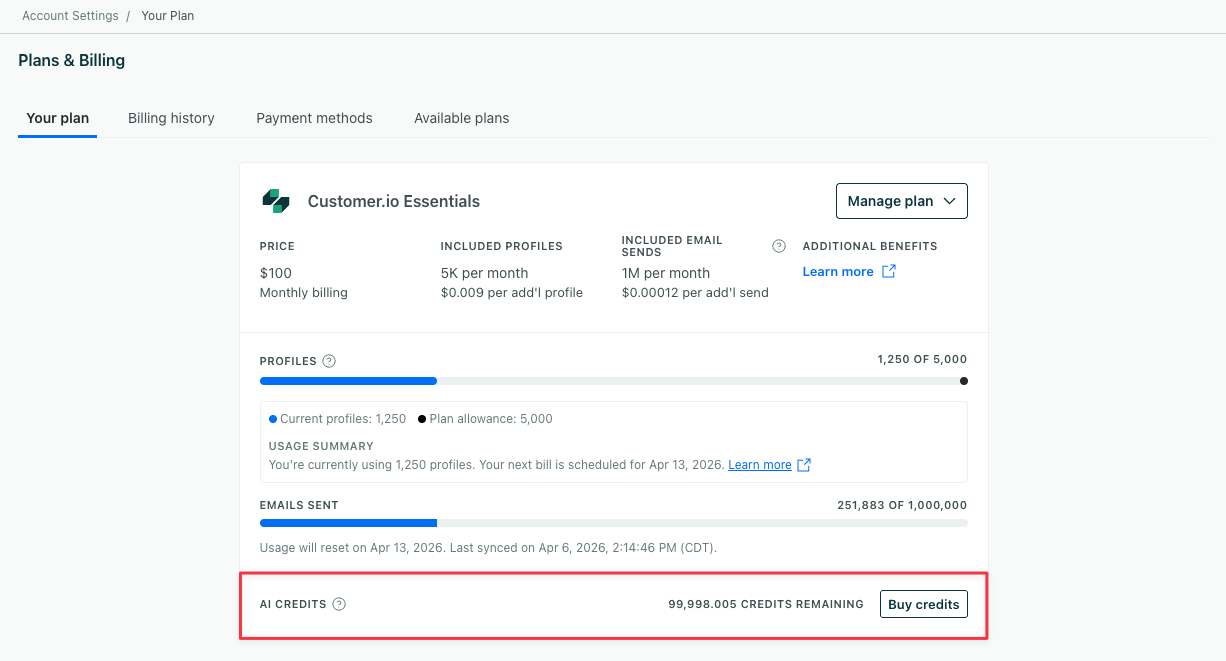
AI credits are applied at the account level and shared across all workspaces. So if you use 75,000 credits in one workspace and 25,000 in another, you’ll have spent all of your AI credits and need to purchase more.
AI credits are not available to customers on Trial plans.
* Use of AI features is subject to applicable Promotional Credit Terms and Feature Terms.
Purchase additional credits
You can purchase additional AI credits for $10 per 100,000 credits. You can only purchase additional credits in increments of 100,000.
If you purchase additional AI credits during the Q2 introductory period, your account will use the introductory AI credits before applying any purchased credits. While the introductory credits expire after 90 days, purchased credits do not expire.
To purchase additional credits, go to Account Settings > Plans & Billing.
- Click Buy Credits.
- Fill in your credit card info, billing address, and the number of credit packs you want to purchase. (1 pack = 100,000 credits).
- Confirm your purchase.
You must be an Account Admin or a Member with billing access to purchase additional credits. Learn more about roles and permissions in Team members.
Credit usage by model
Models consume credits at different rates. Reasoning models use more credits, while quick models use fewer.
- Reasoning models produce higher-quality results for complex tasks but use more credits per run.
- Quick models are faster and more cost-efficient, using fewer credits per run.
When you set up an LLM action, you choose which model to use. You’ll see which ones are considered most cost-efficient to help you make a decision. Learn more about choosing a model in LLM actions.
How LLMs consume AI credits
Credits provide a consistent way to track and manage cost across models, even though the underlying costs vary depending on the LLM in use. The number of credits consumed by an LLM action varies based on three factors:
- The model you choose
- The size of the input (your prompt)
- The output (the model’s response)
Each model has different pricing based on input and output tokens, where input tokens represent the information being processed and output tokens represent the information being generated, so a more uniform credit system makes it easier to communicate costs.
The credit burn rate below shows how credit consumption scales relative to the base rate of 1x. Because input and output tokens carry different weights, the actual burn rate will vary slightly from the approximations shown.
| Provider | Model | Credit burn rate |
|---|---|---|
| Gemini 3 Flash Lite | ~2.5x | |
| Gemini 3 Flash | ~5x | |
| Gemini 3 Pro | ~20x | |
| Anthropic | Claude Haiku 5.5 | 1x |
| Anthropic | Claude Sonnet 5.5 | ~20x |
| Anthropic | Claude Opus 5.5 | ~40x |
For example, Claude Sonnet 5.5 uses about 4x more credits than Gemini 3 Flash, though it could be slightly higher depending on the prompt and model’s response.
Note that credit consumption is based on varying factors, including model selection and usage patterns, and is subject to change at our discretion.
Only live automations use credits
Your account uses up credits when a person reaches an LLM action during their journey through an automation. The amount of credits used depends on the model you choose and the complexity of the request.
Your account does NOT use up credits when you click Test prompt to test the output of your LLM action.
Monitor credit usage
You can monitor AI credit usage in your account’s Plans & Billing page.
Customer.io will message you when your AI credit balance is running low, and then again when it’s exhausted. Use this period to purchase more credits and review how LLM actions are performing.
Fallback values kick in when credits run out
When your account runs out of AI credits, LLM actions use their configured fallback values instead of calling the model. Your automations continue to run, and any conditions or messages that rely on an LLM action won’t fail because they’ll use your fallback values.