

Azure blob storage
Send Customer.io data about messages, people, metrics, etc to Microsoft Azure Blob Storage. From here, you can ingest your data into the data warehouse of your choosing. This integration exports files up to every 15 minutes, helping you keep up to date on your audience's message activities.
How it works
This integration exports individual parquet files for Deliveries, Metrics, Subjects, Outputs, Content, People, and Attributes to your storage bucket. Each parquet file contains data that changed since the last export.
Once the parquet files are in your storage bucket, you can import them into data platforms like Fivetran or data warehouses like Redshift, BigQuery, and Snowflake.
Note that this integration only publishes parquet files to your storage bucket. You must set your data warehouse to ingest this data. There are many approaches to ingesting data, but it typically requires a COPY command to load the parquet files from your bucket. After you load parquet files, you should set them to expire to delete them automatically.
We attempt to export parquet files every 15 minutes, though actual sync intervals and processing times may vary. When syncing large data sets, or Customer.io experiences a high volume of concurrent sync operations, it can take up to several hours to process and export data. This feature is not intended to sync data in real time.
The initial export vs incremental exports
Your initial sync is a set of files containing historical data to represent your workspace’s current state. Subsequent sync files contain changesets.
- Metrics: The initial metrics sync is broken up into files with two sequence numbers, as follows.
<name>_v5_<workspace_id>_<sequence1>_<sequence2>. - Attributes: The initial Attributes sync includes a list of people and their current attributes. Subsequent files will only contain attribute changes, with one change per row.
- Events: The initial events sync includes up to 30 days of past events. Subsequent files contain events since the previous sync interval. We cannot export events older than 30 days.
For example, let’s say you’ve enabled the Attributes export. We will attempt to sync your data to your storage bucket every 15 minutes:
- 12:00pm We sync your Attributes Schema for the first time. This includes a list of people and their current attributes.
- 12:05pm User1’s email is updated to company-email@example.com.
- 12:10pm User1’s email is updated to personal-email@example.com.
- 12:15 We sync your data again. In this export, you would only see attribute changes, with one change per row. User1 would have one row dedicated to his email changing.
Requirements
If you use a firewall or an allowlist, you must allow the following IP addresses to support traffic from Customer.io. Make sure you use the correct IP addresses for your account region.
| US Region | EU Region |
|---|---|
| 34.71.192.245 | 34.118.255.179 |
| 35.188.196.183 | 34.76.143.229 |
| 104.198.177.219 | 34.78.91.47 |
| 35.184.88.76 | 35.187.55.80 |
| 34.72.101.57 | 104.199.99.65 |
| 34.123.199.33 | 34.76.81.2 |
| 35.222.137.61 | 34.77.146.181 |
| 34.68.113.63 | 34.140.234.108 |
| 35.240.84.170 | |
| 35.195.54.15 | |
| 34.38.105.52 | |
| 104.155.66.230 | |
| 34.76.119.61 | |
| 34.140.67.73 | |
| 34.78.74.81 |
Set up an Azure Blob Storage integration
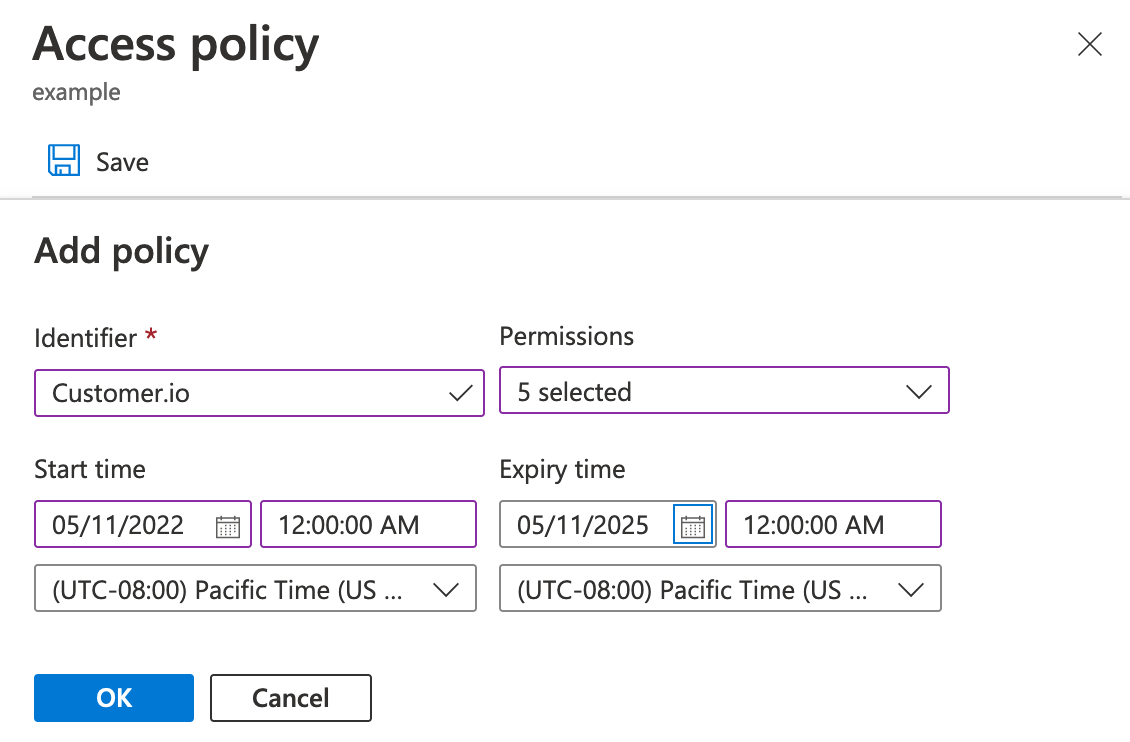
As a part of this process, you’ll create an Access policy and a Shared Access Signature (SAS) URL. The Shared Access Signature grants Customer.io access to your Azure blob container, but typically has a limited expiration date. Before you generate a SAS URL, you’ll create the Access policy (with read, write, add, create, and list permissions) that lets you set a longer expiration date for your SAS URL and provides a way to revoke the token later, if you decide to shut off this integration for any reason.
-
Login to your Azure account, go to Storage browser, and select Blob Containers.
-
Right click the container you want to export Customer.io data to, and select Access policy to create a policy allowing you to create a SAS URL with a long expiry date.
- Click Add policy and set an Identifier for the policy. This is just the name of the access policy that you’ll use in later steps.
- Click Permissions and select read, write, add, create, and list.
- Set the Start time to the current date.
- Set the Expiry time to a date well into the future.
- Click OK and then click Save.
-
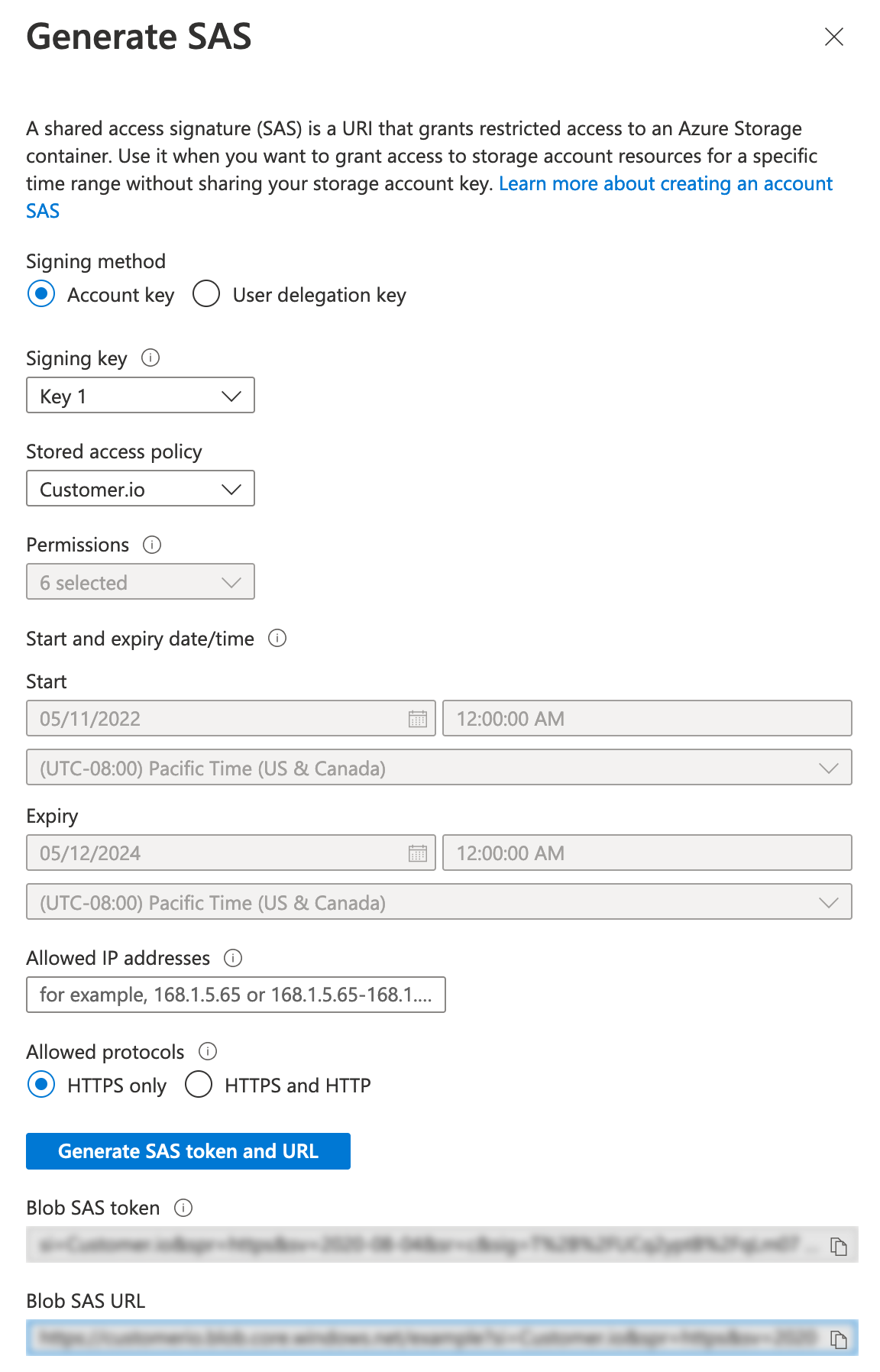
Right click the container again and select Generate SAS to generate the URL that Customer.io will use to access your Azure bucket.
- Select the Stored access policy you created in previous steps.
- (Optional) List Customer.io’s IP addresses under Allowed IP addresses to provide an extra layer of security for your SAS URL.
- Click Generate SAS token and URL and copy the URL. When you close the dialog, you won’t be able to access the token or URL again, so make sure that you copy the URL. You’ll need it in later steps.
-
Go to Customer.io and select Integrations > Azure Blob Storage.
-
Click Sync your Azure Blob Storage bucket.
-
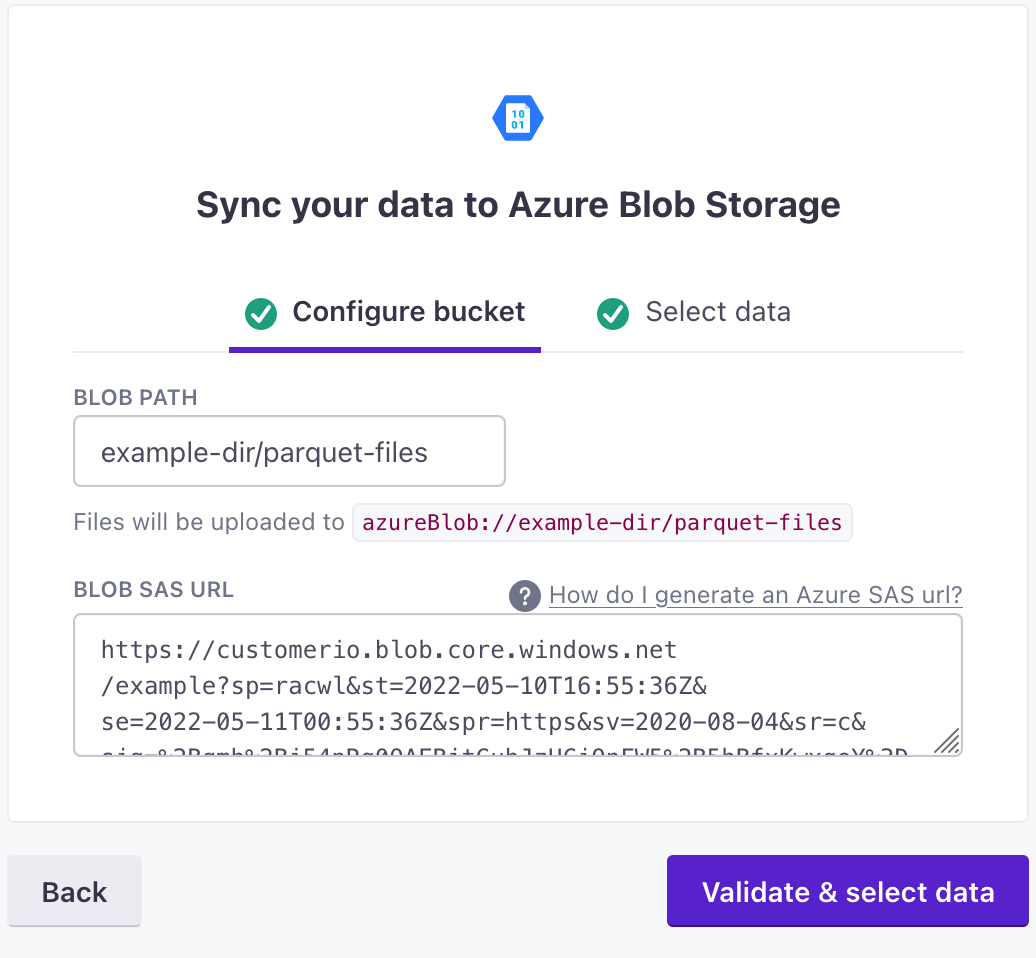
Enter the Blob Path: this is the directory in the blob where you want to deposit parquet files with each sync. If you don’t provide a path, we’ll deposit files in the root of the blob. If the path doesn’t already exist, clicking “Validate & Select Data” will create a new blob storage path.
-
Paste your Blob SAS URL in the appropriate box and click Validate & select data.
-
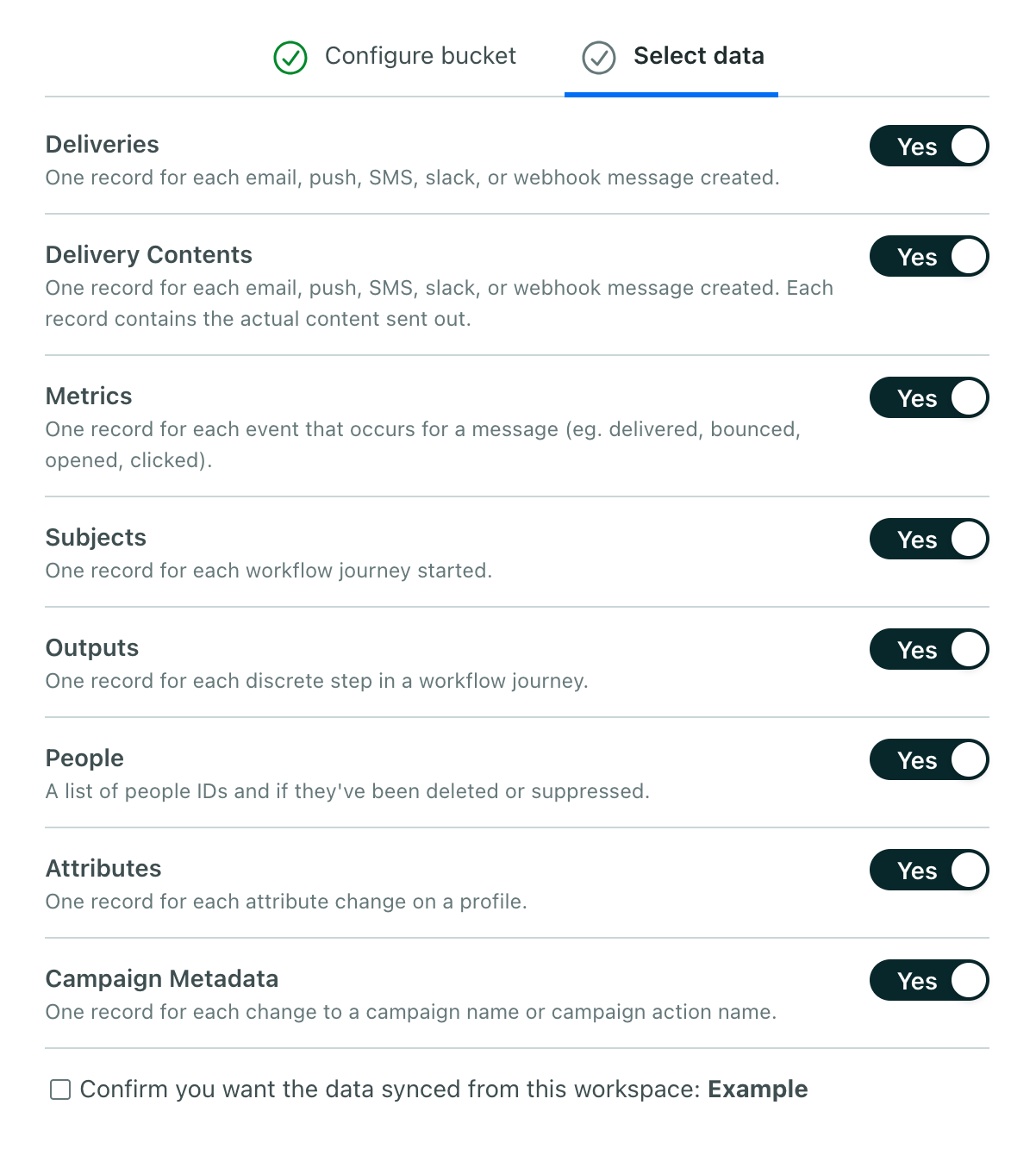
Select the data types that you want to export from Customer.io to your bucket. By default, we export all data types, but you can disable the types that you aren’t interested in.
-
Click Create and sync data.
Pausing and resuming your sync
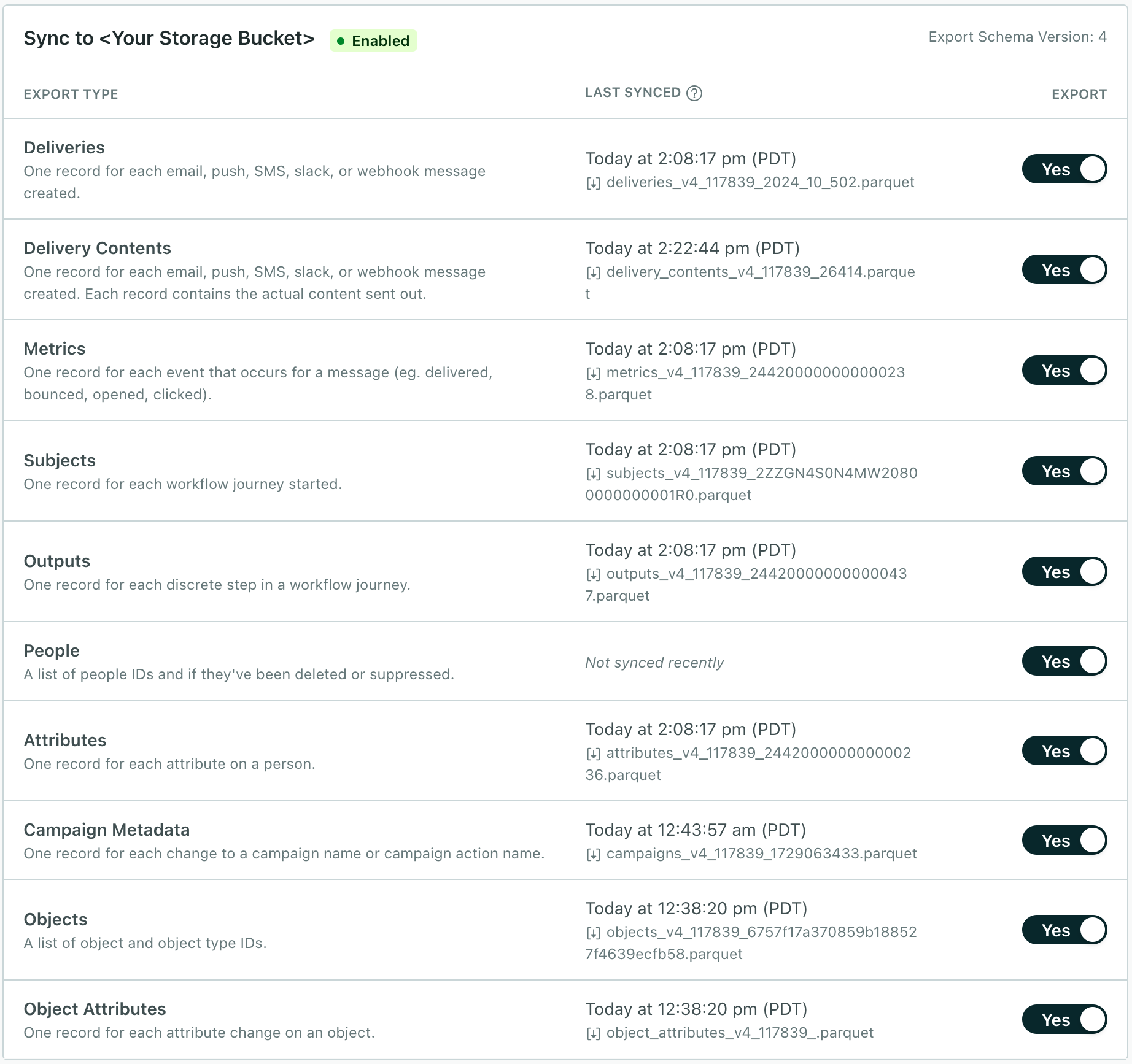
You can turn off files you no longer want to receive, or pause them momentarily as you update your integration, and turn them back on. When you turn a file schema on, we send files to catch you up from the last export.If you haven’t exported a particular file before—the file was never “on”—the initial sync contains your historical data.
You can also disable your entire sync, in which case we’ll quit sending files all together. When you enable your sync again, we send all of your historical data as if you’re starting a new integration. Before you disable a sync, consider if you simply want to disable individual files and resume them later.
Disabling and enabling individual export files
- Go to Data & Integrations > Integrations and select Azure Blob Storage.
- Select the files you want to turn on or off.
When you enable a file, the next sync will contain baseline historical data catching up from your previous sync or the complete history if you haven’t synced a file before; subsequent syncs will contain changesets.
Disabling your sync
If your sync is already disabled, you can enable it again with these instructions. But, before you re-enable your sync, you should clear the previous sync files from your data warehouse bucket first. See Pausing and resuming your sync for more information.
- Go to Data & Integrations > Integrations and select Azure Blob Storage.
- Click Disable Sync.
Manage your configuration
You can change settings for a bucket, if your path changes or you need to swap keys for security purposes.
- Go to Data & Integrations > Integrations and select Azure Blob Storage.
- Click Manage Configuration for your bucket.
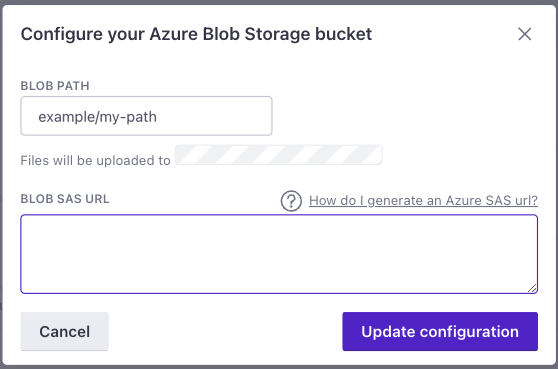
- Make your changes. No matter your changes, you must input your Blob SAS URL.
- Click Update Configuration. Subsequent syncs will use your new configuration.
Update sync schema version
Before you prepare to update your data warehouse sync version, see the changelog. You’ll need to update schemas to upgrade to the latest version (v9).
- Go to Data & Integrations > Integrations and select Azure Blob Storage.
- Click Upgrade Schema Version.
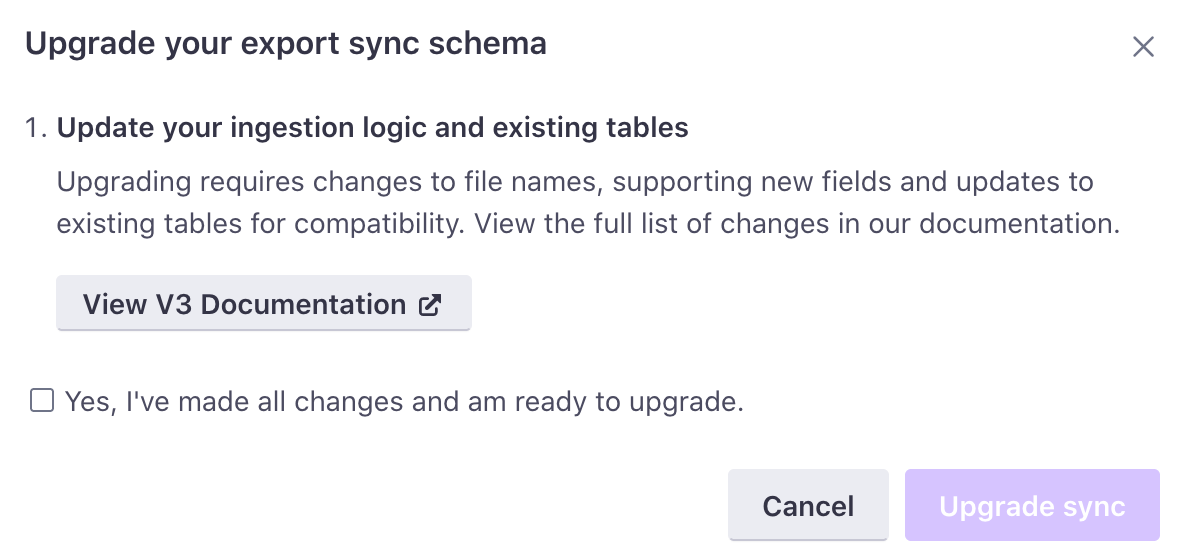
- Follow the instructions to make sure that your ingestion logic is updated accordingly.
- Confirm that you've made the appropriate pages and click Upgrade sync. The next sync uses the updated schema version.
Parquet file schemas
This section describes the different kinds of files you can export from our Database-out integrations. Many schemas include an internal_customer_id—this is the <Tooltip term="cio_id" />. You can use it to resolve a person associated with a subject, delivery, etc.
These schemas represent the latest versions available. Check out our changelog for information about earlier versions.
Deliveries
Deliveries are individual email, in-app, push, SMS, slack, and webhook records sent from your workspace. The first deliveries export file includes baseline historical data. Subsequent files contain rows for data that changed since the last export.
| Field name | Type | Required | Description |
|---|---|---|---|
workspace_id | integer (INT32) | ✅ | The ID of the Customer.io workspace associated with the delivery record. |
delivery_id primary key | string (UTF8) | ✅ | The ID of the delivery record. |
internal_customer_id foreign key: People | string (UTF8) | — | The cio_id of the person in question. Use the people parquet file to resolve this ID to an external customer_id or email address. |
subject_id foreign key: Subjects | string (UTF8) | — | If the delivery was created as part of a Campaign or API Triggered Broadcast workflow, this is the ID for the path the person went through in the workflow. Note: This value refers to, and is the same as, the subject_name in the subjects table. |
event_id foreign key: Subjects | string (UTF8) | — | If the delivery was created as part of an event-triggered Campaign, this is the ID for the unique event that triggered the workflow. Note that this is a foreign key for the subjects table, and not the metrics table. |
delivery_type | string (UTF8) | ✅ | The type of delivery. Accepted values: email · webhook · sms · slack · push · in_app · line · inbox · whatsapp · live_notification |
campaign_id | integer (INT32) | — | If the delivery was created as part of a Campaign or API Triggered Broadcast workflow, this is the ID for the Campaign or API Triggered Broadcast. |
action_id | integer (INT32) | — | If the delivery was created as part of a Campaign or API Triggered Broadcast workflow, this is the ID for the unique workflow item that caused the delivery to be created. |
newsletter_id | integer (INT32) | — | If the delivery was created as part of a Newsletter, this is the unique ID of that Newsletter. |
content_id | integer (INT32) | — | If the delivery was created as part of a Newsletter split test, this is the unique ID of the Newsletter variant. |
trigger_id | integer (INT32) | — | If the delivery was created as part of an API Triggered Broadcast, this is the unique trigger ID associated with the API call that triggered the broadcast. |
created_at | datetime (TIMESTAMP_MILLIS) | ✅ | The timestamp the delivery was created at. |
transactional_message_id added in v2 | integer (INT32) | — | If the delivery occurred as a part of a transactional message, this is the unique identifier for the API call that triggered the message. |
seq_num added in v3 | integer (INT64) | ✅ | A monotonically increasing number indicating relative recency for each record: the larger the number, the more recent the record. |
internal_object_id foreign key: Objects added in v6 | string (UTF8) | — | For object- or relationship-triggered campaigns, the internal ID of the object that triggered the delivery. Use the objects parquet file to resolve this ID to the external object_id (the ID you see in the Customer.io UI). Null for deliveries not triggered by an object. |
object_type_id foreign key: Object Types added in v6 | integer (INT32) | — | For object- or relationship-triggered campaigns, the ID of the object type that triggered the delivery. Use the object_types parquet file to resolve this ID to the object type name. Null for deliveries not triggered by an object. |
related_delivery_ids added in v8 | array (LIST) | ✅ | For push deliveries that match multiple devices for a profile, this is the list of the individual delivery IDs created for each device. Empty for deliveries that don't match multiple devices. |
app_id added in v8 | integer (INT32) | — | For push deliveries, the ID of the application that the push delivery was sent from. Null for non-push deliveries. |
conversation_operation added in v10 | string (UTF8) | — | For live notification deliveries, the operation this delivery performed on the conversation: start, update, or end. These are the same values your API and SDK payloads use. Deliveries on every other channel are null. |
holdout added in v11 | boolean | — | Whether Customer.io held the message back instead of sending it. A holdout still generates a record, which lets you compare a holdout test against the people who received the message. Customer.io sets a value on every delivery row. The column can be null, so create it as nullable in your database. |
Delivery Content
The delivery_content schema represents message contents; each row corresponds to an individual delivery. Use the delivery_id to find more information about the contents of a message, or the recipient to find information about the person who received the message.
If your delivery was produced from a campaign, it’ll include campaign and action IDs, and the newsletter and content IDs will be null. If your delivery came from a one-time send, the row will include newsletter and content IDs, and the campaign and action IDs will be null.
Delivery content might lag behind other tables by 15-30 minutes (or roughly 1 sync operation). We package delivery contents on a 15 minute interval, and can export to your data warehouse up to every 15 minutes. If these operations don’t line up, we might occasionally export delivery_content after other tables.
| Field name | Type | Required | Description |
|---|---|---|---|
workspace_id | integer (INT32) | ✅ | The ID of the Customer.io workspace associated with the output record. |
delivery_id primary key foreign key: Deliveries | string (UTF8) | ✅ | The ID of that delivery associated with the message content. |
campaign_id | integer (INT32) | — | The ID for the campaign that produced the content (if applicable). |
action_id | integer (INT32) | — | The ID for the campaign workflow item that produced the content. |
newsletter_id | integer (INT32) | — | If the content was created as part of a newsletter, the unique ID of that newsletter. |
content_id | integer (INT32) | — | If the content was created as part of a newsletter split test, the unique ID of the newsletter variant. |
from | string (UTF8) | — | The From address for an email, if the content is related to an email. |
reply_to | string (UTF8) | — | The Reply-To address for an email, if the content is related to an email. |
bcc | string (UTF8) | — | The Blind Carbon Copy (BCC) address for an email, if the content is related to an email. |
cc | string (UTF8) | — | The Carbon Copy (CC) address for an email, if the content is related to an email. |
recipient | string (UTF8) | — | The person who received the message, dependent on the type. For an email, this is an email address; for an SMS, it's a phone number; for a push notification, it's a device ID. |
subject | string (UTF8) | — | The subject line of the message, if applicable; required if the message is an email |
body | string (UTF8) | — | The rendered body of the message. For an email, this is the HTML body. |
body_amp | string (UTF8) | — | The HTML body of an email including any AMP-enabled JavaScript included in the message. |
body_plain | string (UTF8) | — | The plain text of an email message, without HTML tags or AMP content. This field is typically null unless you manually set or change the plain-text version of an email (the body_plain field when you use our APIs). |
preheader | string (UTF8) | — | "Also known as "preview text", this is the block block of text that users see next to, or underneath, the subject line in their inbox. |
url | string (UTF8) | — | If the delivery is an outgoing webhook, this is the URL of the webhook. Format: uri |
method | string (UTF8) | — | If the delivery is an outgoing webhook, this is the HTTP method used—POST, PUT, GET, etc. |
headers | string (UTF8) | — | If the delivery is an outgoing webhook, these are the headers included with the webhook. |
type | string (UTF8) | — | The delivery type. Accepted values: email · webhook · sms · slack · push · in_app · line · inbox · whatsapp · live_notification |
Metrics
Metrics exports detail events relating to deliveries (e.g. messages sent, opened, etc). Your initial metrics export contains baseline historical data, broken up into files with two sequence numbers, as follows:
<name>_v5_<workspace_id>_<sequence1>_sequence2>.
Subsequent files contain rows for data that changed since the last export.
The metric that the Customer.io UI calls suppressed appears in this export as dropped. Both names refer to the same thing: a message that wasn’t sent because the recipient was suppressed—for example, an email address on the suppression list after a prior hard bounce or spam complaint, or an SMS recipient who opted out of the sender. The specific cause may appear in the reason column. Messages blocked for other reasons—the person unsubscribed from email, hit a message limit, or was deleted—appear as undeliverable instead. A dropped metric does not indicate that a person is part of a holdout or control group. To identify branch or cohort membership, see Identify which branch or cohort a person followed.
| Field name | Type | Required | Description |
|---|---|---|---|
event_id primary key | string (UTF8) | ✅ | The unique ID of the metric event. This can be useful for deduplicating purposes. |
workspace_id | integer (INT32) | ✅ | The ID of the Customer.io workspace associated with the metric record. |
delivery_id foreign key: Deliveries | string (UTF8) | ✅ | The ID of the delivery record. |
metric | string (UTF8) | ✅ | The type of metric. The dropped value is what the Customer.io UI calls suppressed—a message that wasn't sent because the recipient was suppressed. It does not indicate holdout or control-group membership. Accepted values: failed · dropped · sent · spammed · bounced · delivered · triggered · opened · clicked · converted · unsubscribed · attempted · undeliverable · deferred · device_change · drafted |
created_at | datetime (TIMESTAMP_MILLIS) | ✅ | The timestamp the metric was created at. |
reason | string (UTF8) | — | For certain metrics (e.g. attempted), the reason behind the action. |
link_id | integer (INT32) | — | For "clicked" metrics, the unique ID of the link being clicked. |
link_url | string (UTF8) | — | For "clicked" metrics, the URL of the clicked link. Max length: 1000 bytes
Format: uri |
seq_num added in v3 | integer (INT64) | ✅ | A monotonically increasing number indicating relative recency for each record: the larger the number, the more recent the record. |
domain added in v5 | string (UTF8) | — | For email metrics, the sender's domain (the part after @ in the from address). If the from address isn't available or can't be parsed, this value is null. |
proxied added in v5 | boolean | ✅ | For email opened metrics, this indicates that the open event originated from a proxy server. For example, a proxy server may record an open independently of a message reaching the user's inbox. For other metrics, this is false. |
prefetched added in v5 | boolean | ✅ | For email opened metrics, this indicates that the metric was the result of prefetching and not necessarily a user action. For example, Gmail prefetches images to speed up rendering in the inbox, which may result in an opened metric—but the user didn't actually open the email. For other metrics, this this value is false. |
machine added in v5 | boolean | ✅ | For email clicked metrics, it means that the click event originated a non-human, e.g. a security service or email-protection application clicked a link. For other metrics, this is false. |
email_client added in v5 | string (UTF8) | — | For email metrics, the email client the recipient used, detected from the event's User-Agent—in practice we capture it on opened events. For non-email channels, and when we can't detect a client, this value is null. Values are uppercase, underscore-separated names: GMAIL, YAHOO, APPLE_MAIL, APPLE_MAIL_PROTECTED (an open through Apple Mail Privacy Protection's proxy), SUPERHUMAN, THUNDERBIRD, LOTUS_NOTES, AOL_DESKTOP, OUTLOOK_2016, OUTLOOK_2013, OUTLOOK_2010, OUTLOOK_2007, OUTLOOK_2003, OUTLOOK_IOS, SAMSUNG_MAIL, POSTBOX, IPHONE, IPAD, ANDROID, BLACKBERRY, WINDOWS_PHONE, and BOT (a known security scanner, not a person). Opens from a web browser are recorded as WINDOWS_<browser> or MAC_<browser>—for example, WINDOWS_CHROME or MAC_SAFARI. The set can grow as we recognize new clients. The Customer.io UI displays the same values under friendlier names—for example, APPLE_MAIL_PROTECTED appears as Apple Mail Protected. |
user_agent added in v5 | string (UTF8) | — | The user agent string of the person (or machine) who performed the action, where available. If we don't have a user agent string, this value is null. |
inbox_domain added in v5 | string (UTF8) | — | For email metrics, the inbox domain of the person who performed the action. If this value isn't discernable, or the metric is not email related, this value is null. |
inbox_provider added in v5 | string (UTF8) | — | For email metrics, the inbox provider of the person who performed the action. If this value isn't discernable, or the metric is not email related, this value is null. |
mx_host added in v5 | string (UTF8) | — | For email metrics, this is the MX host of the inbox (e.g. mailhost1.example.com). If this value isn't discernable, or the metric is not email related, this value is null. |
channel_provider added in v10 | string (UTF8) | — | The provider that sent the message, like your email or SMS vendor. Customer.io resolves the provider when it sends the message and attaches it to the sent metric alone. Later metrics for the same delivery—delivered, bounced, clicked, and so on—arrive from the provider's webhooks without it. To attribute those rows to a provider, join them back to the delivery's sent row on delivery_id. |
Outputs
Outputs are the unique steps within each workflow journey. The first outputs file includes historical data. Subsequent files contain rows for data that changed since the last export.
| Field name | Type | Required | Description |
|---|---|---|---|
workspace_id | integer (INT32) | ✅ | The ID of the Customer.io workspace associated with the output record. |
output_id primary key | string (UTF8) | ✅ | The ID for the step of the unique path a person went through in a Campaign or API Triggered Broadcast workflow. |
subject_name foreign key: Subjects | string (UTF8) | ✅ | A secondary unique ID for the path a person took through a campaign or broadcast workflow. |
output_type | string (UTF8) | ✅ | The type of step a person went through in a Campaign or API Triggered Broadcast workflow. Note that the "delay" output_type covers many use cases: a Time Delay or Time Window workflow item, a "grace period", or a date-based campaign trigger. |
action_id | integer (INT32) | ✅ | The ID for the unique workflow item associated with the output. |
explanation | string (UTF8) | ✅ | The explanation for the output. |
delivery_id foreign key: Deliveries | string (UTF8) | — | If a delivery resulted from this step of the workflow, this is the ID of that delivery. |
draft | boolean | — | If a delivery resulted from this step of the workflow, this indicates whether the delivery was created as a draft. |
link_tracked | boolean | — | If a delivery resulted from this step of the workflow, this indicates whether links within the delivery are configured for tracking. |
split_test_index | integer (INT32) | — | If the step of the workflow was a Split Test, this indicates the variant of the Split Test. |
delay_ends_at | datetime (TIMESTAMP_MILLIS) | — | If the step of the workflow involves a delay, this is the timestamp for when the delay will end. |
branch_index | integer (INT32) | — | If the step of the workflow was a T/F Branch, a Multi-Split Branch, or a Random Cohort Branch, this indicates the branch or cohort that was followed, as an integer index corresponding to its position in the automation's workflow. There's no fixed convention for which index is a holdout or control group, and branch rows never include a delivery_id. For a Random Cohort Branch, branch_label gives you the cohort's name; other branch types export the index alone. |
manual_segment_id | integer (INT32) | — | If the step of the workflow was a Manual Segment Update, this is the ID of the Manual Segment involved. |
add_to_manual_segment | boolean | — | If the step of the workflow was a Manual Segment Update, this indicates whether a person was added or removed from the Manual Segment involved. |
created_at | datetime (TIMESTAMP_MILLIS) | ✅ | The timestamp the output was created at. |
seq_num | integer (INT64) | ✅ | A monotonically increasing number indicating relative recency for each record: the larger the number, the more recent the record. |
holdout added in v11 | boolean | — | Whether Customer.io held the message back instead of sending it. Only delivery outputs carry a value. Every other output type is null rather than false, so a row for a holdout test/message doesn't read the same as a message that was sent. |
branch_label added in v11 | string (UTF8) | — | For a Random Cohort Branch, the name of the cohort the person went down. Customer.io resolves the name when it exports the row, so a cohort you rename shows its new name on rows exported after the change while earlier rows keep the old one. It's null for other branch types and for cohorts you haven't named. |
People
The first People export file includes a list of current people at the time of your first sync (deleted or suppressed people are not included in the first file). Subsequent exports include people who were created, deleted, or suppressed since the last export.
When you select the data you want to sync, this export appears as People in Customer.io. The exported files and tables keep the people naming.
People exports come in two different files (v<x> is your configured schema version—for example, v9):
people_v<x>_<env>_<seq>.parquet: Contains new people.people_v<x>_chgs_<env>_<seq>.parquet: Contains changes to people since the previous sync.
These files have an identical structure and a part of the same data set. You should import them to the same table.
| Field name | Type | Required | Description |
|---|---|---|---|
workspace_id | integer (INT32) | ✅ | The ID of the Customer.io workspace associated with the person. |
customer_id | string (UTF8) | ✅ | The ID of the person in question. This will match the ID you see in the Customer.io UI. |
internal_customer_id primary key | string (UTF8) | ✅ | The cio_id of the person in question. Use the people parquet file to resolve this ID to an external customer_id or email address. |
deleted | boolean | ✅ | This indicates whether the person has been deleted. |
suppressed | boolean | ✅ | This indicates whether the person has been suppressed. |
created_at | datetime (TIMESTAMP_MILLIS) | ✅ | The date/time when the person was added to Customer.io (using the _created_in_customerio_at attribute). Note that this is not necessarily the same as a person's created_at value! If you import people from an external system, a CSV, or backdate the created_at value, this value is likely to be different from a person's created_at attribute.Note that this value is 0 for deleted or suppressed people |
updated_at added in v3 | datetime (TIMESTAMP_MILLIS) | ✅ | The date-time when a person was updated. Use the most recent updated_at value for a customer_id to disambiguate between multiple records. |
email_addr added in v3 | string (UTF8) | ✅ | The email address of the person. For workspaces using email as a unique identifier, this value may be the same as the customer_id. Format: email |
phone added in v9 | string (UTF8) | ✅ | The phone number of the person, taken from the person's phone attribute. For workspaces using phone number as a unique identifier, this value may be the same as the customer_id. It's empty when your workspace doesn't have phone enabled as an identifier, or when the person has no phone number. |
Subjects
Subjects are the unique workflow journeys that people take through Campaigns and API-triggered broadcasts. The first subjects export file includes baseline historical data. Subsequent files contain rows for data that changed since the last export.
| Field name | Type | Required | Description |
|---|---|---|---|
workspace_id | integer (INT32) | ✅ | The ID of the Customer.io workspace associated with the subject record. |
subject_name primary key | string (UTF8) | ✅ | A unique ID for the path a person took through a campaign or broadcast workflow. |
internal_customer_id foreign key: People | string (UTF8) | — | The cio_id of the person in question. Use the people parquet file to resolve this ID to an external customer_id or email address. |
campaign_type | string (UTF8) | ✅ | The type of Campaign (segment, event, or triggered_broadcast) |
campaign_id | integer (INT32) | ✅ | The ID of the Campaign or API Triggered Broadcast. |
event_id foreign key: Metrics | string (UTF8) | — | The ID for the unique event that triggered the workflow. |
trigger_id | integer (INT32) | — | If the delivery was created as part of an API Triggered Broadcast, this is the unique trigger ID associated with the API call that triggered the broadcast. |
started_campaign_at | datetime (TIMESTAMP_MILLIS) | ✅ | The timestamp when the person first matched the campaign trigger. For event-triggered campaigns, this is the timestamp of the trigger event. For segment-triggered campaigns, this is the time the user entered the segment. |
created_at | datetime (TIMESTAMP_MILLIS) | ✅ | The timestamp the subject was created at. |
seq_num | integer (INT64) | ✅ | A monotonically increasing number indicating relative recency for each record: the larger the number, the more recent the record. |
Attributes
Attribute exports represent changes to people (by way of their attribute values) over time. The initial Attributes export includes a list of people and their current attributes. Subsequent files contain attribute changes, with one change per row.
For changes to nested attributes, like the subscription preferences attribute, the attribute_name will be the top-level attribute and the attribute_value returns the stringified JSON representing the nested changes. Using our subscription preferences example, the attribute_name would be cio_subscription_preferences and the attribute_value would be something like "{\"topics\":{\"topic_7\":false,\"topic_8\":false}}".
| Field name | Type | Required | Description |
|---|---|---|---|
workspace_id | integer (INT32) | ✅ | The ID of the Customer.io workspace associated with the person. |
internal_customer_id primary key | string (UTF8) | ✅ | The cio_id of the person in question. Use the people parquet file to resolve this ID to an external customer_id or email address. |
attribute_name | string (UTF8) | ✅ | The attribute that was updated. |
attribute_value | string (UTF8) | ✅ | The new value of the attribute. |
timestamp | datetime (TIMESTAMP_MILLIS) | ✅ | The timestamp of the attribute update. |
Campaigns
When you enable the Campaign Metadata schema, we actually return two different tables: Campaigns and Actions. The Campaigns table returns the names and versions of your campaigns and API-triggered broadcasts. Some other tables—like Deliveries and Subjects—return campaign ID values. You can use this table to get campaign names based on those IDs so you can better understand exports related to campaigns.
Note that this table includes both Campaigns and API-triggered broadcasts; both have campaign_id values. One-time sends appear in the Broadcasts table with a broadcast_id.
With each sync, we’ll return the rows where the version changed. The version is a number that increments each time a campaign or API-triggered broadcast is updated. This way, you can keep your campaign names and versions up-to-date.
| Field name | Type | Required | Description |
|---|---|---|---|
workspace_id | integer (INT32) | ✅ | The ID of the Customer.io workspace containing the campaign. |
campaign_id primary key | integer (INT32) | ✅ | The ID of the campaign or API-triggered broadcast. Note that newsletters appear in the Broadcasts schema with a broadcast_id, not here. |
name | string (UTF8) | ✅ | The name of a campaign. You set this in Customer.io when you create your campaign. |
topic_names added in v5 | array (LIST) | ✅ | LIST (Nullable). If you use our subscription center feature, this value is a comma-separated list of subscription topics that users must be subscribed to in order to receive the campaign. If the campaign is not associated with any topics, this value is null. |
tag_names added in v7 | array (LIST) | ✅ | The tags applied to the campaign, resolved to their names. Empty when the campaign has no tags. |
status added in v7 | string (UTF8) | ✅ | The campaign's current state: draft, running, paused, stopped, or archived. You might also catch a transitional state while a change is in progress—evaluating, stopping, sunsetting, archiving, or deleting. A campaign whose state isn't set yet reports unknown. |
type added in v7 | string (UTF8) | ✅ | The campaign type, which reflects how the campaign is triggered—for example, segment, event, or date. These use the same labels as the journeys export, so you can join the two tables on type. Accepted values: segment · seg_attr · rel_seg_attr · event · form · triggered_broadcast · none · date · webhook · relationship · object |
description added in v8 | string (UTF8) | ✅ | The description text provided for the campaign. Empty when the campaign has no description. |
created_at | datetime (TIMESTAMP_MILLIS) | ✅ | The date-time (in milliseconds) when you created the campaign. You can create campaigns without activating them! |
updated_at | datetime (TIMESTAMP_MILLIS) | ✅ | The date-time (in milliseconds) when a campaign was last updated. |
version | integer (INT64) | ✅ | An incrementing number starting at 1 representing the "version" of the campaign. The largest version number represents the latest version of the campaign. Versions increment when you change the name, trigger, or goal of a campaign. See the Actions table for changes to messages and other items in your campaign workflow. |
Broadcasts
The Broadcasts schema returns information about your one-time sends. Note that API-triggered broadcasts appear in the Campaigns schema, not the Broadcasts schema. The initial sync returns all your one-time sends. Subsequent syncs return only the one-time sends that have changed since the last sync.
| Field name | Type | Required | Description |
|---|---|---|---|
workspace_id | integer (INT32) | ✅ | The ID of the Customer.io workspace containing the broadcast. |
broadcast_id primary key | integer (INT32) | ✅ | The ID of the newsletter. Note that API-triggered broadcasts appear in the Campaigns schema with a campaign_id, not here. |
name | string (UTF8) | ✅ | The name of a broadcast. You set this in Customer.io when you create your broadcast. |
topic_names added in v5 | array (LIST) | ✅ | LIST (Nullable). If you use our subscription center feature, this value is a comma-separated list of subscription topics that users must be subscribed to in order to receive the campaign. If the campaign is not associated with any topics, this value is null. |
tag_names added in v8 | array (LIST) | ✅ | The tags applied to the broadcast, resolved to their names. Empty when the broadcast has no tags. |
created_at | datetime (TIMESTAMP_MILLIS) | ✅ | The date-time (in milliseconds) when you created the broadcast. You can create broadcasts without activating them! |
updated_at | datetime (TIMESTAMP_MILLIS) | ✅ | The date-time (in milliseconds) when a broadcast was last updated. |
Actions
When you enable the Campaign Metadata schema, we actually return two different tables: Campaigns and Actions. The Actions table returns the names and versions of workflow steps in your campaigns, which we call actions A block in an automation workflow—like a message, delay, or attribute change.
With each sync, we’ll return the rows where the version changed. The version is a number that increments each time a campaign is updated. This way, you can keep your understanding of campaign actions up-to-date.
| Field name | Type | Required | Description |
|---|---|---|---|
workspace_id | integer (INT32) | ✅ | The ID of the Customer.io workspace containing the workflow action. |
campaign_id foreign key: Campaigns | integer (INT32) | ✅ | The ID of the campaign containing the action. |
action_id | integer (INT32) | ✅ | The ID of the action. |
name | string (UTF8) | ✅ | The name of a workflow action. You set this in Customer.io when you create or edit your action. If you didn't set a name for the action, this field is empty. |
topic_names added in v5 | array (LIST) | ✅ | LIST (Nullable). If you use our subscription center feature, this value is a comma-separated list of subscription topics that users must be subscribed to in order to receive the campaign. If the campaign is not associated with any topics, this value is null. |
created_at | datetime (TIMESTAMP_MILLIS) | ✅ | The date-time (in milliseconds) when you created the workflow action. |
updated_at | datetime (TIMESTAMP_MILLIS) | ✅ | The date-time (in milliseconds) when a workflow action was last updated. |
version | integer (INT64) | ✅ | An incrementing number starting at 1 representing the "version" of the workflow action. The largest number for any action represents the latest version. The version changes whenever you update the name, content, or settings of your workflow action. |
Objects
The first Object export file includes a list of current objects at the time of your first sync (deleted objects are not included in the first file). Subsequent exports include objects who were created, deleted, or suppressed since the last export.
When you enable the Objects export, we also export Object Types.
Object exports come in two different files (v<x> is your configured schema version—for example, v9):
objects_v<x>_<env>_<seq>.parquet: Contains new objects.objects_chgs_v<x>_<env>_<seq>.parquet: Contains changes to objects since the previous sync.
These files have an identical structure and a part of the same data set. You should import them to the same table.
| Field name | Type | Required | Description |
|---|---|---|---|
workspace_id | integer (INT32) | ✅ | The ID of the Customer.io workspace associated with the object. |
object_type_id foreign key: Object Types | integer (INT32) | ✅ | Object type IDs begin at 1 and increase sequentially. For example, if you created objects call Accounts and Companies, in that order, they'd have object types 1 and 2 respectively. |
object_id | string (UTF8) | ✅ | The ID of the object in question. This will match the ID you see in the Customer.io UI. |
internal_object_id primary key | string (UTF8) | ✅ | A unique, immutable ID that Customer.io assigns to the object. Other exports use this value in to reference your object; you can use this export to resolve internal IDs to your object IDs. |
deleted | boolean | ✅ | This indicates whether the object has been deleted. |
created_at | datetime (TIMESTAMP_MILLIS) | ✅ | The date/time when the object was added to your workspace. |
updated_at | datetime (TIMESTAMP_MILLIS) | ✅ | The date-time when a object was updated. Use the most recent updated_at value for an object_id to disambiguate between multiple records. |
Object Types
We export object types when you enable the Objects export. All objects have a type indicating what kind of entity they are—like an account or company. The object_type value is an integer starting at 1. For example, if you create two types of objects in your system, accounts and companies, in that order, accounts have an object_type of 1 and companies have an object_type of 2.
The first export includes a list of object types at the time of your first sync (we don’t include deleted types in the first file). Subsequent exports include types you created, updated, or deleted since the last sync.
Object type exports come in two different files (v<x> is your configured schema version—for example, v9):
object_types_v<x>_<env>_<seq>.parquet: Contains new object types.object_types_chgs_v<x>_<env>_<seq>.parquet: Contains changes to object types since the previous sync.
These files have an identical structure and a part of the same data set. You should import them to the same table.
| Field name | Type | Required | Description |
|---|---|---|---|
workspace_id | integer (INT32) | ✅ | The ID of the Customer.io workspace associated with the object. |
object_type_id primary key | integer (INT32) | ✅ | Object type IDs begin at 1 and increase sequentially. For example, if you created objects call Accounts and Companies, in that order, they'd have object types 1 and 2 respectively. |
name | string (UTF8) | ✅ | The name of the object type, like "Accounts" or "Companies." |
slug | string (UTF8) | ✅ | The value you use to reference objects of this type with Liquid. For example, if your object type is Accounts, you'll typically reference objects using {{objects.accounts}}. |
deleted | boolean | ✅ | If true, the object type has been deleted. |
enabled | boolean | ✅ | If true, the object type is enabled. You can't use disabled object types in segments, messages, and so on. Learn more |
Object Attributes
Object attribute exports contain changes to object attribute A key-value pair that you associate with a person or an object—like a person's name, the date they were created in your workspace, or a company's billing date etc. Use attributes to target people and personalize messages.
If your object attributes contain nested JSON, the attribute_name is the top-level attribute and the attribute_value returns the stringified JSON for that attribute.
| Field name | Type | Required | Description |
|---|---|---|---|
workspace_id | integer (INT32) | ✅ | The ID of the Customer.io workspace associated with the person. |
object_type_id foreign key: Object Types | integer (INT32) | ✅ | The type of the object represented by the internal_object_id. Object type IDs begin at 1 and increase sequentially. For example, if you created objects call Accounts and Companies, in that order, they'd have object types 1 and 2 respectively. |
internal_object_id primary key foreign key: Objects | string (UTF8) | ✅ | A unique, immutable ID that Customer.io assigns to the object. You can resolve this value to the object name or ID you're familiar with from the associated Objects export. |
attribute_name | string (UTF8) | ✅ | The attribute that changed. |
attribute_value | string (UTF8) | ✅ | The new value of the attribute. |
timestamp | datetime (TIMESTAMP_MILLIS) | ✅ | The timestamp of the attribute update. |
Events
Events are the things people do in your app, on your website, etc. The Events export includes a list of events, with one event per row. Each event includes an internal_customer_id that you can use in conjunction with the People table to resolve a person’s customer_id or email address.
The initial sync includes up to 30-days of past events. Subsequent files contain events since the previous sync interval. We cannot backfill events older than 30 days.
| Field name | Type | Required | Description |
|---|---|---|---|
workspace_id | integer (INT32) | ✅ | The ID of the Customer.io workspace associated with the person. |
event_id primary key | string (UTF8) | ✅ | The ID of the event, which may be useful if you need to dedupe events. |
internal_customer_id foreign key: People | string (UTF8) | ✅ | The cio_id of the person who performed the event. Use the people parquet file to resolve this ID to an external customer_id or email address. |
name | string (UTF8) | ✅ | The event name. |
type | string (UTF8) | ✅ | One of event, page, or screen; page and screen represent page and screenviews respectively. The event value represents any other kind of event. |
data | string (UTF8) | ✅ | A stringified object containing the event properties—the event payload aside from the name, timestamps, and ID. |
timestamp | datetime (TIMESTAMP_MILLIS) | ✅ | The Unix timestamp associated with the event. If you don't set this value yourself, this is the date-time when Customer.io received the event. |
processed_at | datetime (TIMESTAMP_MILLIS) | ✅ | The Unix time when Customer.io processed the event. |
sources | array (LIST) | ✅ | The source(s) of the event, e.g. Customer.io Data Pipelines via JavaScript. |
source_uas | array (LIST) | ✅ | The user agent source(s) of the event, e.g. Mozilla/5.0 (Macintosh; Intel Mac OS X 10.15; rv:132.0) Gecko/20100101 Firefox/132.0. |
Inbound
You’ll only see the option to enable this schema if you send SMS through Customer.io.
When someone replies to an SMS message you sent, we record an inbound event. The “inbound” export contains one row for each inbound SMS message you receive between syncs. Each event includes an internal_customer_id that you can use in conjunction with the People table to resolve a person’s customer_id or email address.
The initial sync includes up to 30-days of past inbound events. Subsequent files contain events since the previous sync interval. We cannot backfill events older than 30 days.
| Field name | Type | Required | Description |
|---|---|---|---|
workspace_id | integer (INT32) | ✅ | The ID of the Customer.io workspace associated with the inbound message. |
event_id primary key | string (UTF8) | ✅ | The unique event identifier, which may be useful if you need to dedupe events. |
internal_customer_id foreign key: People | string (UTF8) | ✅ | The cio_id of the person who sent the message. Use the people parquet file to resolve this ID to an external customer_id or email address. |
timestamp | datetime (TIMESTAMP_MILLIS) | ✅ | The Unix timestamp when the person sent the inbound message. |
processed_at | datetime (TIMESTAMP_MILLIS) | ✅ | The Unix timestamp when Customer.io processed the event. |
channel | string (UTF8) | ✅ | The messaging channel (e.g., "sms"). |
from | string (UTF8) | ✅ | The phone number the person sent the inbound message from. |
to | string (UTF8) | ✅ | The phone number the person replied to. |
body | string (UTF8) | ✅ | The content of the inbound message. |
keyword | string (UTF8) | ✅ | The keyword detected in the message, if any. |
optout | boolean | ✅ | If true, the message was an opt-out request; if false, it was not. |
messaging_service_sid | string (UTF8) | ✅ | The messaging service identifier from the SMS provider. |
message_sid | string (UTF8) | ✅ | The unique message identifier from the SMS provider. |
in_reply_to_delivery_id foreign key: Deliveries | string (UTF8) | ✅ | The delivery ID of the message this inbound message is replying to, if available. We match inbound messages to deliveries within 72 hours of the original delivery. If the inbound message occurs outside the 72 hour window, or we can't attribute the inbound message to a delivery, this field is null. |
message_type | string (UTF8) | ✅ | The type of the inbound message. |
has_media | boolean | ✅ | Whether the inbound message includes media, such as an MMS attachment. |
Troubleshooting
I get a 403 error in Customer.io
This means that your Shared Access Signature URL doesn’t grant Customer.io permission to access your Azure blob store. Make sure that your Access policy or Shared access signature grant read, add, create, write, and list permissions. If not, you may need to edit your Access policy or generate a new SAS URL and paste it into Customer.io to fix the issue.
I can’t extend my SAS URL’s expiry date
By default, you Microsoft Azure doesn’t allow a Shared Access Signature (SAS) more than 1 week or 365 days in the future, depending on the signing method you use. You must create an Access policy that allows you to create tokens with a longer expiration period.
In general, we suggest that you create an Access policy as a way to both extend the life of your SAS token and as a method for revoking your SAS token later if you decide to turn off this integration.
To create an Access policy, right click your blob container in Microsoft Azure and go to Access policy. Add a policy with the same permissions as your SAS token (read, add, create, write, and list permissions), and set an expiry date in the future.