

Segment (message metrics)
Set up Customer.io as a Segment Source to pipe data out of Customer.io and into any one of Segment’s hundreds of Destination integrations. This integration sends data to Segment in track() calls. You can send any event supported by our reporting webhooks to Segment.
Enable Customer.io as a Segment source
To enable Customer.io as a Segment source, you need both a Customer.io and a Segment.com account. If you are creating a new Segment account, enter “Customer.io” in the How Did You Hear About Us? field.
-
In the Segment interface, Go to Connections, click Add Source, and select Customer.io.
-
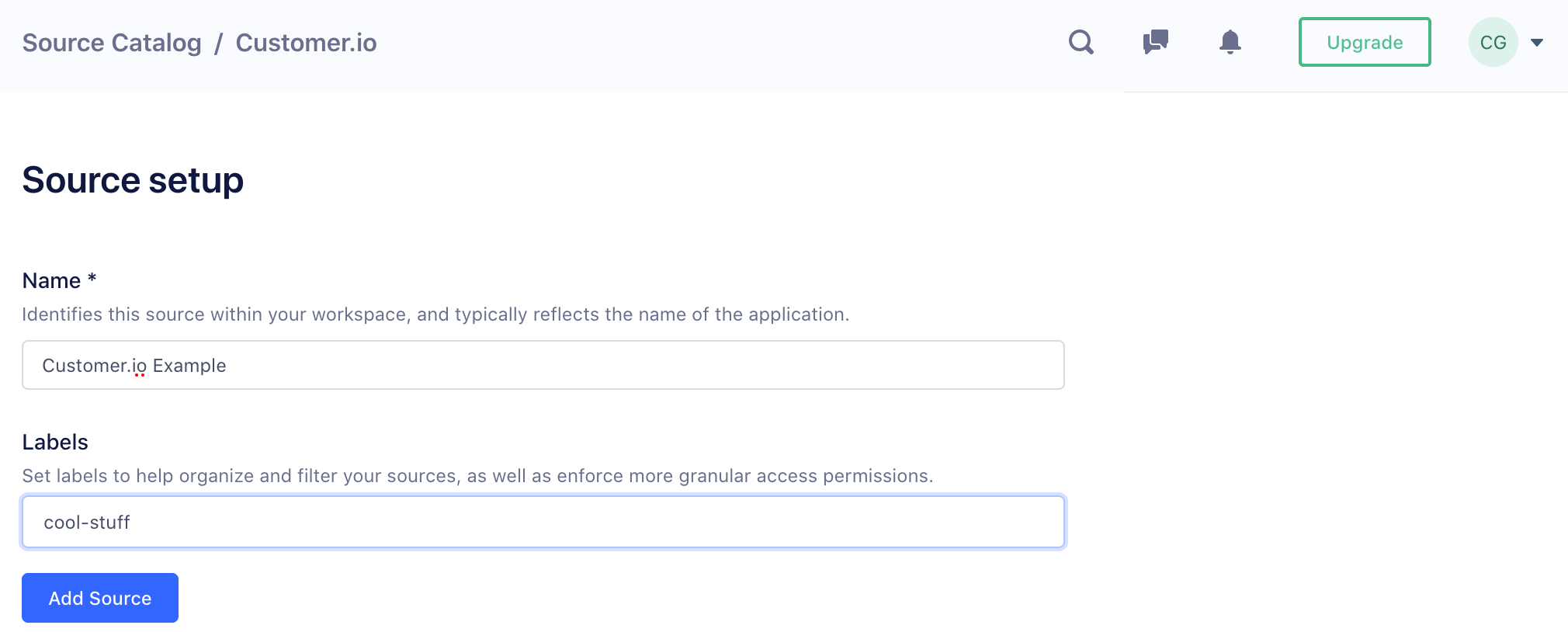
Give your source a Name and a Label, and click Add Source. The Name helps you identify your source in Segment, and the label helps you organize sources in your Segment workspace.
-
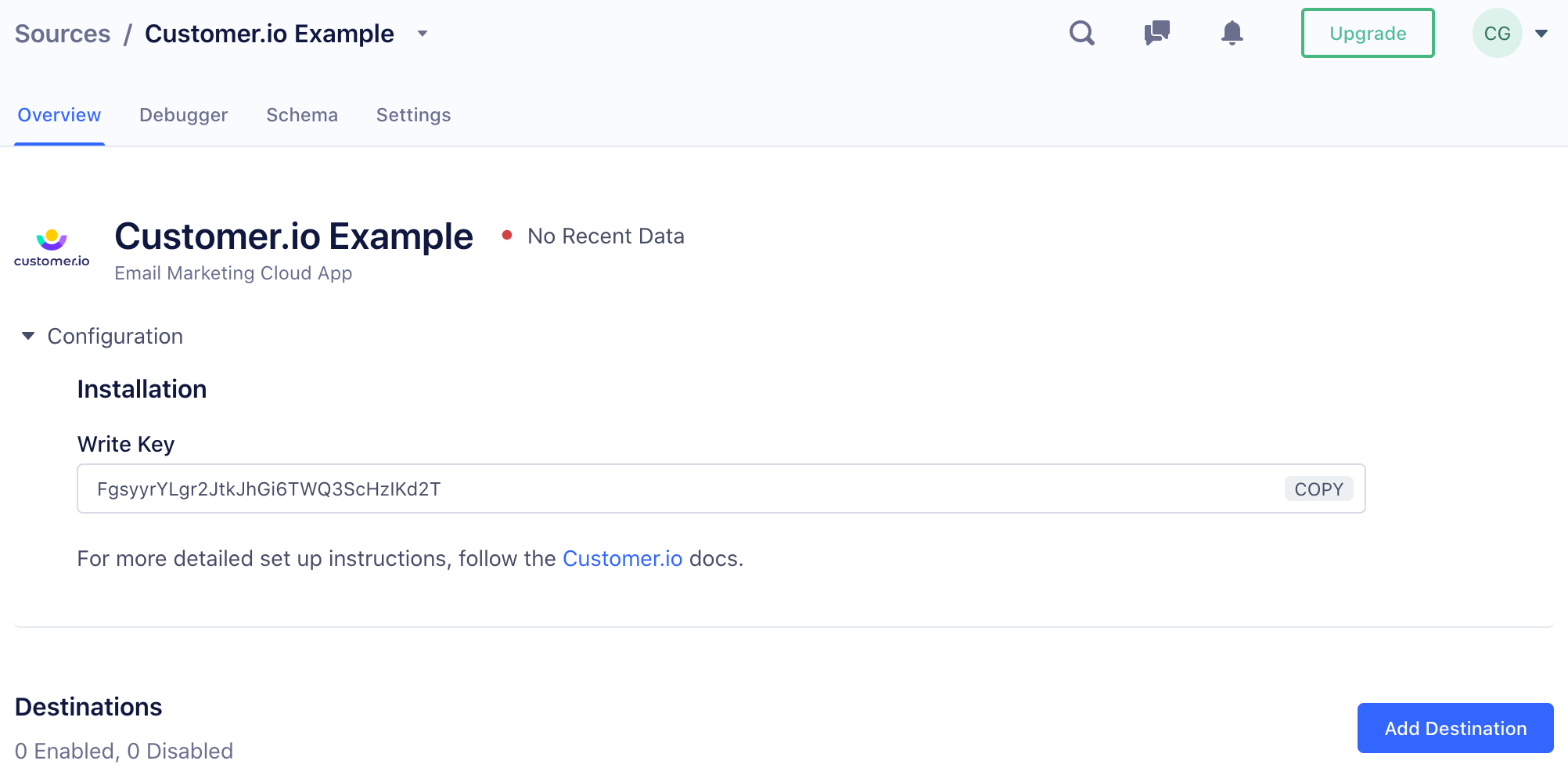
On the Overview page, copy your Write Key.
-
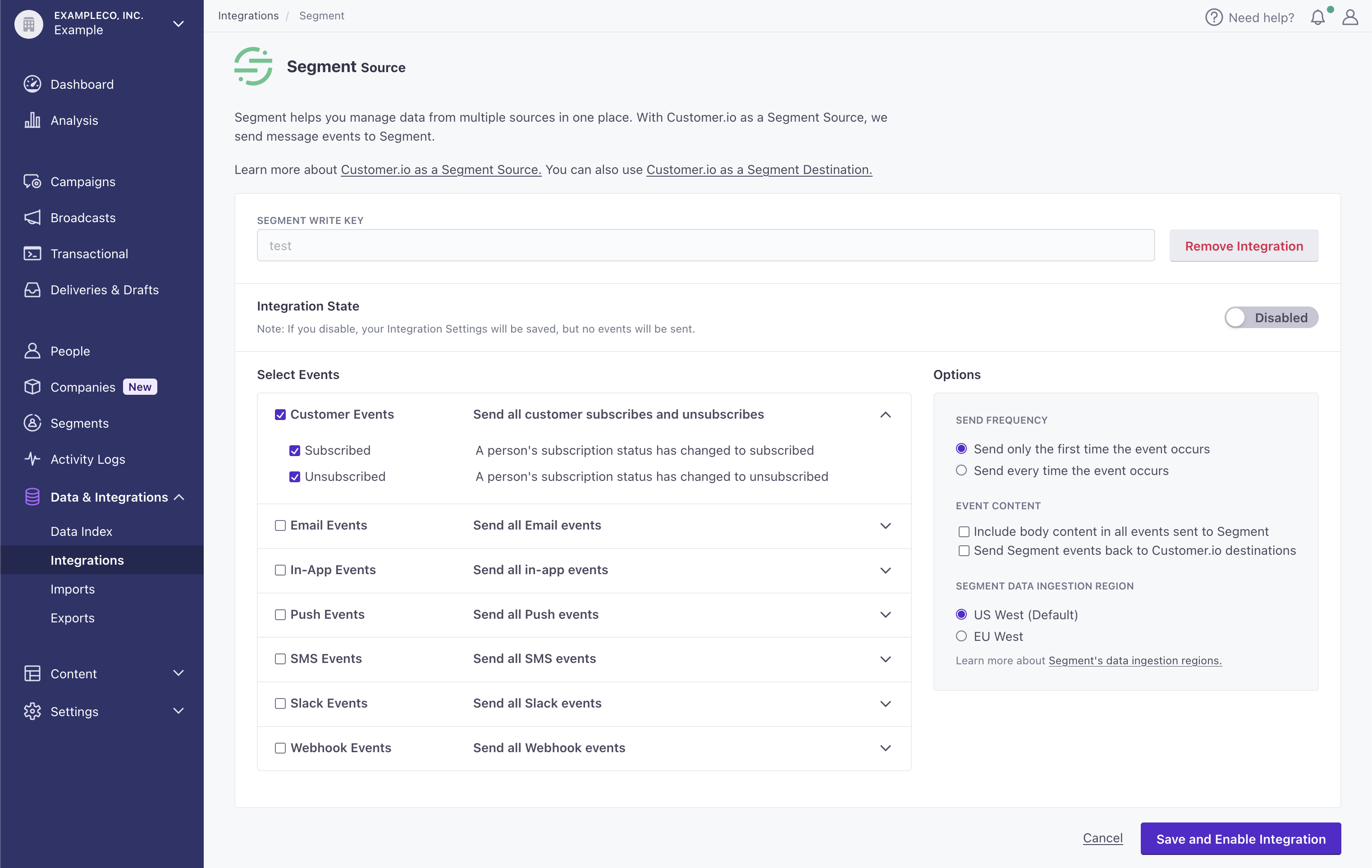
In your Customer.io workspace, go to Integrations and select the Segment Source integration. You can find it in the Data Management category.
-
Paste your Write Key in the field and click Connect Segment.
-
Enable the events you want to send from Customer.io to Segment.
-
Set your integration options:
- Send Frequency: Determine whether to send every instance of every event or only the first time an event occurs.
- Body Content: Enable this to include your message’s body content in all of the “Sent” events we send to you.
- Send segment events back to Customer.io destinations: This setting lets you send events from Customer.io, as a Segment source, back to Customer.io as a Segment destination. In general, we suggest that you leave this feature disabled. The data you send to Segment is already available in Customer.io. Learn more.
- Segment Data Ingestion Region: Set the region you want to ingest data into.
-
In Segment, turn on the destinations you want to send your Customer.io data to.
How we map profiles to Segment
Our Segment Source integration maps a profile’s id in Customer.io to userId in Segment.
If your Customer.io workspace supports both The attributes you use to add, modify, and target people. Each unique identifier value represents an individual person in your workspace.email and id as identifiersemail but not an id. In this case, we use a profile’s email as their anonymousId in Segment.
For more information about identifying profiles, see Segment’s Identify API.
Person without ID
cioanalytics.track("New Lead", {
  anonymousId: "peter@example.com"
  name: "Peter Gibbons",
  email: "peter@example.com"
});
Person with ID
cioanalytics.track("New Customer", {
  userId: "97980cfea0067",
  name: "Peter Gibbons",
  email: "peter@example.com",
  plan: "premium"
});
Send segment events back to Customer.io destinations
We give you the option to feed events from your source back to Customer.io destinations. In general, you should not enable this option. The data that you send to Segment is already available in your workspace. Sending it back to your workspace simply makes this data available as events.
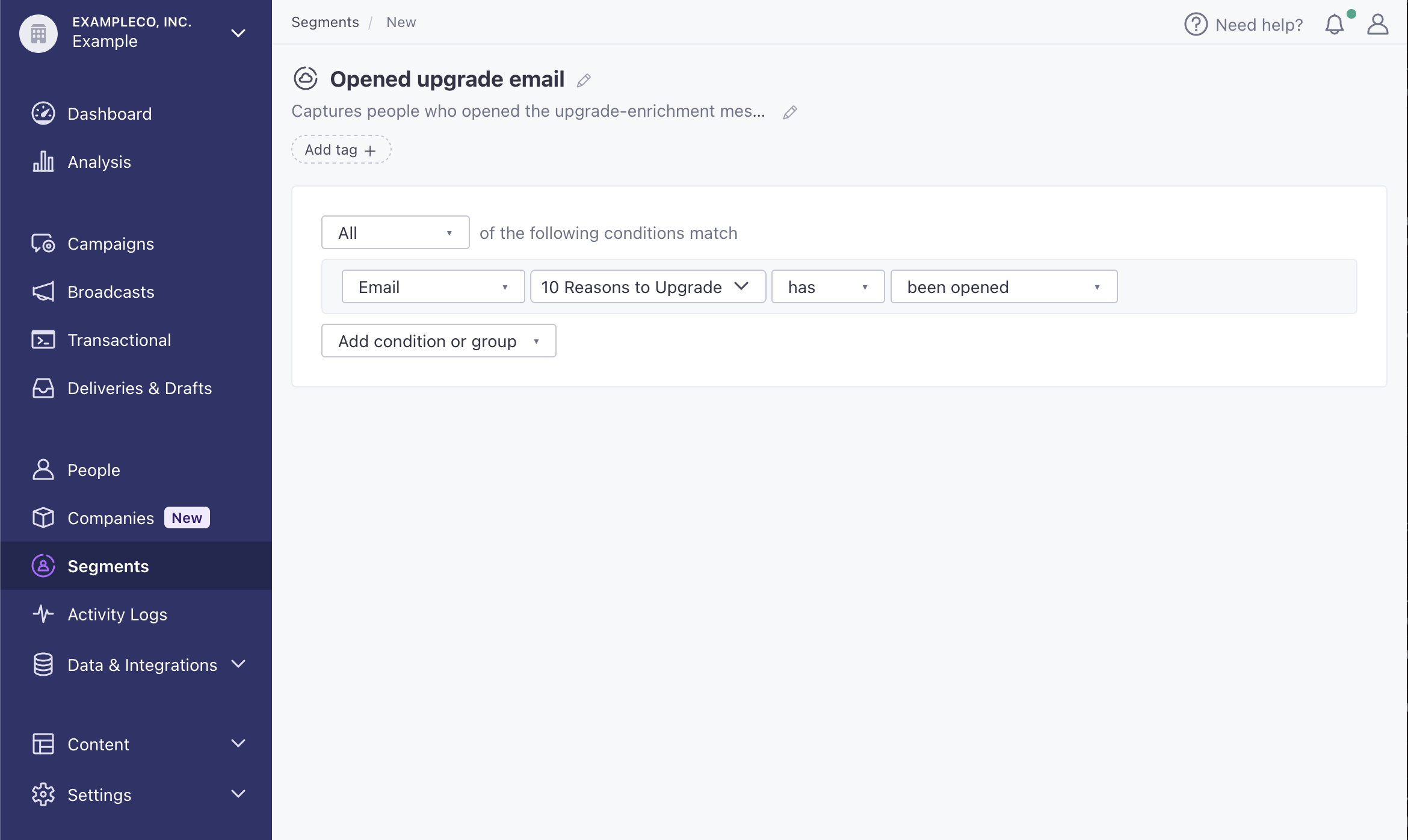
Rather than looping events back into your workspace, you can use our data-driven segment builder A group of people who match a series of conditions. People enter and exit the segment automatically when they match or stop matching conditions.
Track Payloads: confirm that your Segment Source works
You can confirm that your Customer.io Source is working by sending yourself a test automation and checking the debugger. Customer.io can send any of our reporting webhook events to Segment, reshaped specifically for Segment’s track calls. We’ve provided some examples below to help you understand the information that you’ll see in Segment.
If you enable the Body Content setting, the events below will also include a data.content key representing the body of your message.
Email Opened
{
  "context": {
    "integration": {
      "name": "customer.io",
      "version": "2.0.0"
    },
    "library": {
      "name": "unknown",
      "version": "unknown"
    },
    "traits": {
      "email": "cool.person@example.com"
    }
  },
  "event": "Email Opened",
  "integrations": {
    "Customer.io": false
  },
  "messageId": "api-1u21CJeZPJX3TdLhPNrzstyAYZa",
  "originalTimestamp": "2021-06-16T13:04:06Z",
  "properties": {
    "action_id": 16,
    "campaign_id": 1,
    "delivery_id": "dgP6xQb6xQYDAAF6FOl-vmR0E7zoPqTRiAo=",
    "journey_id": "01G2NBFT8N2MYDTT3MHWK7Z6C6",
    "subject": "Test Subject",
    "content": null, //null unless Body Content is enabled and event is Email Sent
    "recipient": "cool.person@customer.io",
    "userId": "cool-person"
  },
  "receivedAt": "2021-06-16T13:05:39.605Z",
  "sentAt": "2021-06-16T13:05:39.000Z",
  "timestamp": "2021-06-16T13:04:06.605Z",
  "type": "track",
  "userId": "cool-person",
  "writeKey": "aSOzeRCalHEDr3H5BslyxT4G35vDJBna"
}
SMS Sent
{
  "context": {
    "integration": {
      "name": "customer.io",
      "version": "2.0.0"
    },
    "library": {
      "name": "unknown",
      "version": "unknown"
    },
    "traits": {
      "email": "cool.person@example.com"
    }
  },
  "event": "SMS Sent",
  "integrations": {
    "Customer.io": false
  },
  "messageId": "api-28wdXq0yQP8jesjRYdLmj2dxiaM",
  "originalTimestamp": "2022-05-09T21:27:02.000Z",
  "properties": {
    "action_id": 41,
    "anonymousId": "cool.person@example.com",
    "campaign_id": 7,
    "content": "Hey, just testing sms segment stuff.",
    "delivery_id": "RKGZAQACAYCqt-kVejTLzrd-t9D_sQ==",
    "journey_id": "01G2NBFT8N2MYDTT3MHWK7Z6C6",
    "recipient": "15555555555",
    "userId": "cool.person@example.com"
  },
  "receivedAt": "2022-05-09T21:27:03.384Z",
  "sentAt": "2022-05-09T21:27:03.151Z",
  "timestamp": "2022-05-09T21:27:02.233Z",
  "type": "track",
  "userId": "karn@customer.io",
  "writeKey": "aSOzeRCalHEDr3H5BslyxT4G35vDJBna"
}
SMS Link Clicked
{
  "context": {
    "integration": {
      "name": "customer.io",
      "version": "2.0.0"
    },
    "library": {
      "name": "unknown",
      "version": "unknown"
    },
    "traits": {
      "email": "cool.person@example.com"
    }
  },
  "event": "SMS Link Clicked",
  "integrations": {
    "Customer.io": false
  },
  "messageId": "api-1u242Y8g1XCtEl9rEp7NwBx3K9o",
  "originalTimestamp": "2021-06-16T13:29:01Z",
  "properties": {
    "action_id": "n18",
    "campaign_id": 3,
    "delivery_id": "dgP6xQb6xQYDAAF6FQJvh4yaVoIOMGeCVp4=",
    "content": null, //null if Body Content is disabled
    "journey_id": "01G2NBFT8N2MYDTT3MHWK7Z6C6",
    "recipient": "15555555555",
    "userId": "cool.person@example.com",
    "link": {
      "id": 1,
      "url": "https://customer.io/features"
    }
  },
  "receivedAt": "2021-06-16T13:29:03.021Z",
  "sentAt": "2021-06-16T13:29:02.000Z",
  "timestamp": "2021-06-16T13:29:02.021Z",
  "type": "track",
  "userId": "cool-person",
  "writeKey": "aSOzeRCalHEDr3H5BslyxT4G35vDJBna"
}
Push Sent
{
  "context": {
    "integration": {
      "name": "customer.io",
      "version": "2.0.0"
    },
    "library": {
      "name": "unknown",
      "version": "unknown"
    },
    "traits": {
      "email": "cool.person@example.com"
    }
  },
  "event": "Push Sent",
  "integrations": {
    "Customer.io": false
  },
  "messageId": "api-1u21CJeZPJX3TdLhPNrzstyAYZa",
  "originalTimestamp": "2021-06-16T13:04:06Z",
  "properties": {
    "action_id": "n16",
    "campaign_id": 1,
    "delivery_id": "dgP6xQb6xQYDAAF6FOl-vmR0E7zoPqTRiAo=",
    "journey_id": "01G2NBFT8N2MYDTT3MHWK7Z6C6",
    "recipients": [
      {
        "device_id": "15ad6c7ddc29f1d6a28580b040ddddfb831fd009bafac1dff718be7ed4233c15",
        "device_platform": "ios"

      }
    ],
    "userId": "cool.person@example.com"
  },
  "receivedAt": "2021-06-16T13:05:39.605Z",
  "sentAt": "2021-06-16T13:05:39.000Z",
  "timestamp": "2021-06-16T13:04:06.605Z",
  "type": "track",
  "userId": "cool-person",
  "writeKey": "aSOzeRCalHEDr3H5BslyxT4G35vDJBna"
}
Slack Sent
{
  "context": {
    "integration": {
      "name": "customer.io",
      "version": "2.0.0"
    },
    "library": {
      "name": "unknown",
      "version": "unknown"
    },
    "traits": {
      "email": "sales@example.com"
    }
  },
  "event": "Slack Sent",
  "integrations": {
    "Customer.io": false
  },
  "messageId": "api-1u21CJeZPJX3TdLhPNrzstyAYZa",
  "originalTimestamp": "2021-06-16T13:04:06Z",
  "properties": {
    "action_id": "n16",
    "campaign_id": 1,
    "delivery_id": "dgP6xQb6xQYDAAF6FOl-vmR0E7zoPqTRiAo=",
    "journey_id": "01G2NBFT8N2MYDTT3MHWK7Z6C6",
    "recipient": "#cool-channel",
    "userId": "cool.person@example.com"
  },
  "receivedAt": "2021-06-16T13:05:39.605Z",
  "sentAt": "2021-06-16T13:05:39.000Z",
  "timestamp": "2021-06-16T13:04:06.605Z",
  "type": "track",
  "userId": "sales-team",
  "writeKey": "aSOzeRCalHEDr3H5BslyxT4G35vDJBna"
}
Webhook Sent
{
  "context": {
    "integration": {
      "name": "customer.io",
      "version": "2.0.0"
    },
    "library": {
      "name": "unknown",
      "version": "unknown"
    },
    "traits": {
      "email": "cool.person@example.com"
    }
  },
  "event": "Webhook Sent",
  "integrations": {
    "Customer.io": false
  },
  "messageId": "api-1u21MrfL8kIJwhuNanhhBbuc9gq",
  "originalTimestamp": "2021-06-16T13:05:55Z",
  "properties": {
    "action_id": "n17",
    "campaign_id": 2,
    "delivery_id": "dgP6xQb6xQYDAAF6FOsF0yqZiIo1NgezYcI=",
    "journey_id": "01G2NBFT8N2MYDTT3MHWK7Z6C6",
    "recipient": "https://example.com/webhook-url",
    "userId": "cool.person@example.com"
  },
  "receivedAt": "2021-06-16T13:07:04.404Z",
  "sentAt": "2021-06-16T13:07:04.000Z",
  "timestamp": "2021-06-16T13:05:55.404Z",
  "type": "track",
  "userId": "cool-person",
  "writeKey": "aSOzeRCalHEDr3H5BslyxT4G35vDJBna"
}
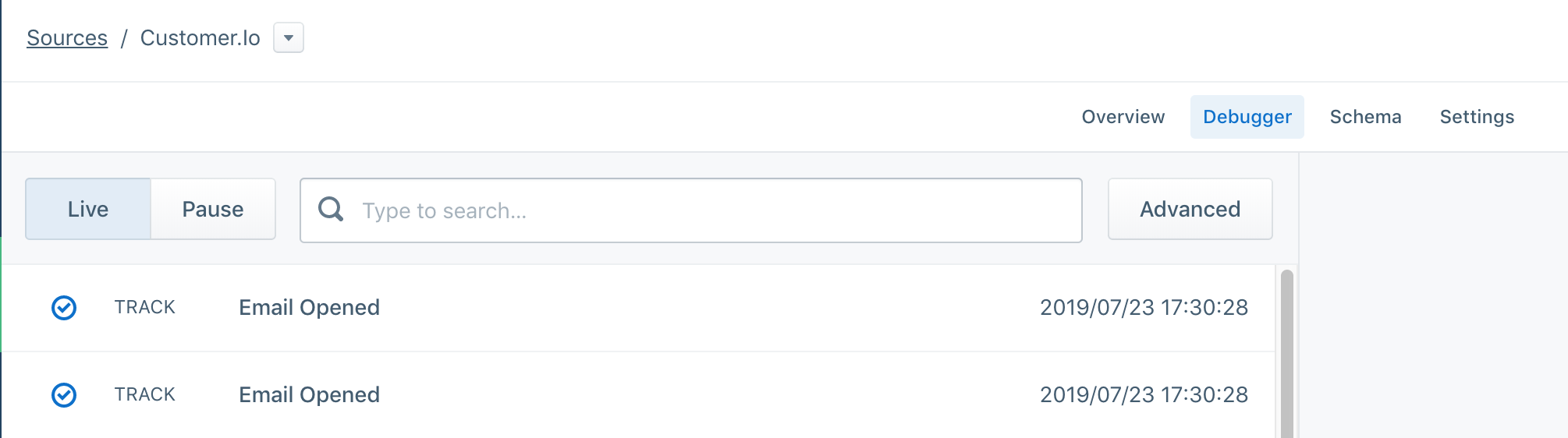
If events flow into your Segment debugger, you’ll know that the Source is properly enabled.
Upgrade your integration
If you had the previous iteration of this integration enabled, you were only able to send email events to Segment. To update your integration to version 2.0, disable the integration and then re-enable it. When you re-enable the integration, you’ll have access to the new event types and other settings made available in May of 2022.
Differences between versions 1.0 and 2.0
When updating from version 1.0 to 2.0, you’ll notice the following changes:
versionis incremented from1.0.0to2.0.0.email_idis no longer included in Email events. This field duplicated thedelivery_id.- When you enable Body Content for email events,
email_subjecthas changed to simplysubject. - Events no longer include
action_name,campaign_name,newsletter_name, ortransactional_message_name. We’ve removed these items to improve performance. Instead, you can retrieve these values using the corresponding object id (iecampaign_id) and our App API.
Need help?
- If you run into issues enabling the Customer.io Source, finding your Write Key, setting up a Segment workspace, or find that your data isn’t syncing, contact Segment’s support team.
- Not seeing Customer.io events in the Segment debugger? Get in touch with support!