

Introduction to broadcasts
We offer two types of broadcasts: One-time send and Messages triggered via API.
If you’re new to Customer.io, checkout Automations, broadcasts, and transactional messages to make sure you’re creating the right kind of automation.
How it works
A broadcast is a message or workflow that you trigger (or schedule) for a group of people. It’s not “active” like an automation: you’ll send, schedule, or trigger your broadcast for a group of people. Anybody outside that group won’t get the broadcast unless you send it again.
When you create a new broadcast, you choose a Broadcast Type: One-time send or API-triggered broadcast. These two things are fundamentally different, but we can help you choose the right one.
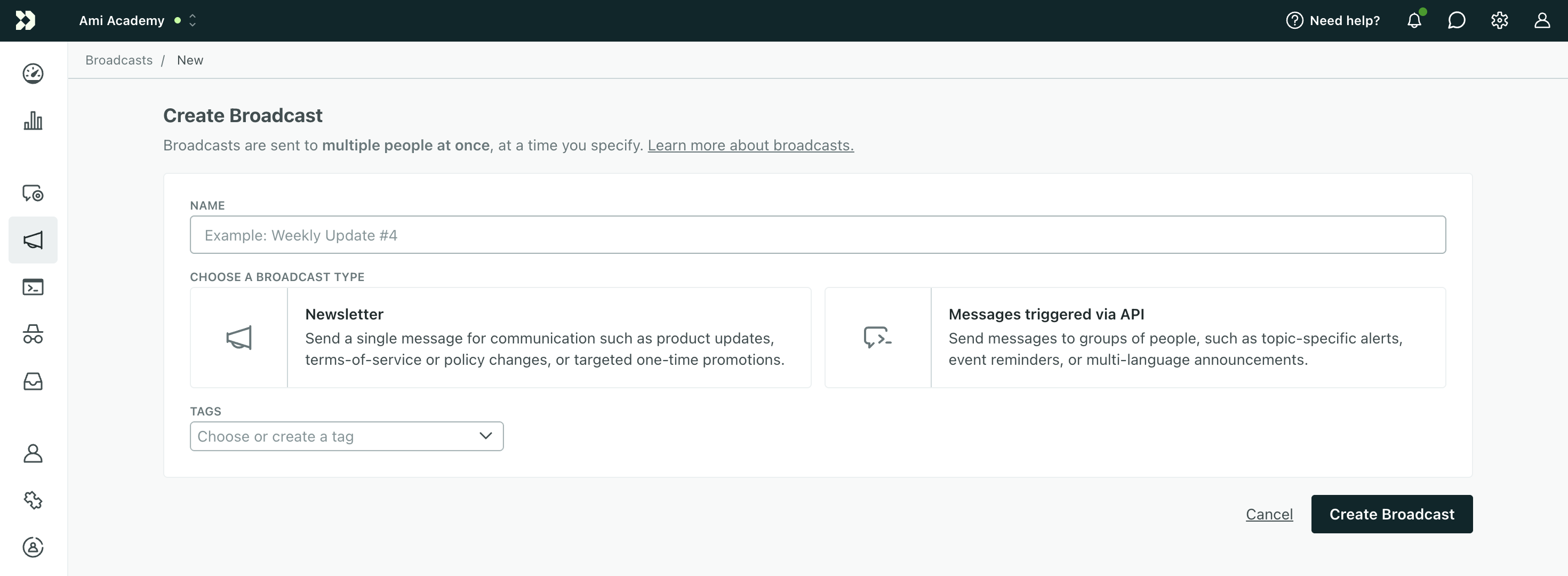
A One-time send is a single message you want to send to a group of people. You can schedule your message or send it immediately. One-time sends provide a simple way to broadcast a message to your audience without setting up a complex automation.
An API-triggered broadcast is a complete workflow A series of actions (messages, attribute updates, etc) that people progress through as a part of an automation or broadcast.recipients. API-triggered broadcasts are highly customizable, and give you precise control over workflows from your backend integration, but are certainly more technical than one-time sends or automations.
What type of broadcast should I choose?
You should use a one-time send if:
- You need to send or schedule one message to a group of people.
- The data to personalize your message already exists in Customer.io.
- You don’t have development resources.
A one-time send is the easiest way to accomplish a simple broadcast. You might send a broadcast to alert your audience to changes in your terms of service, or to a group of people when you onboard people belonging to an account.
You should set up an API-triggered broadcast if:
- You want to send more than one message.
- You want to send custom data with your message(s).
- You want to trigger a workflow for a group of people from your backend.
API-triggered broadcasts provide a way for you to trigger workflows directly from an outside service and pass custom data to the workflow. It’s like an event-triggered automation but the event can represent a group of people. For example, you might trigger a broadcast for people who are interested in an event when tickets go on sale for the event, or students who are interested in a particular online course when registration opens.
One-time sends
One-time sends provide a simple way to send a single message to a group of people.
When you set up a one-time send you’ll:
- Determine your audience.
- Set up your message.
- Schedule or send it.
One-time sends do offer a few powerful options that aren’t available for other automations or broadcasts:
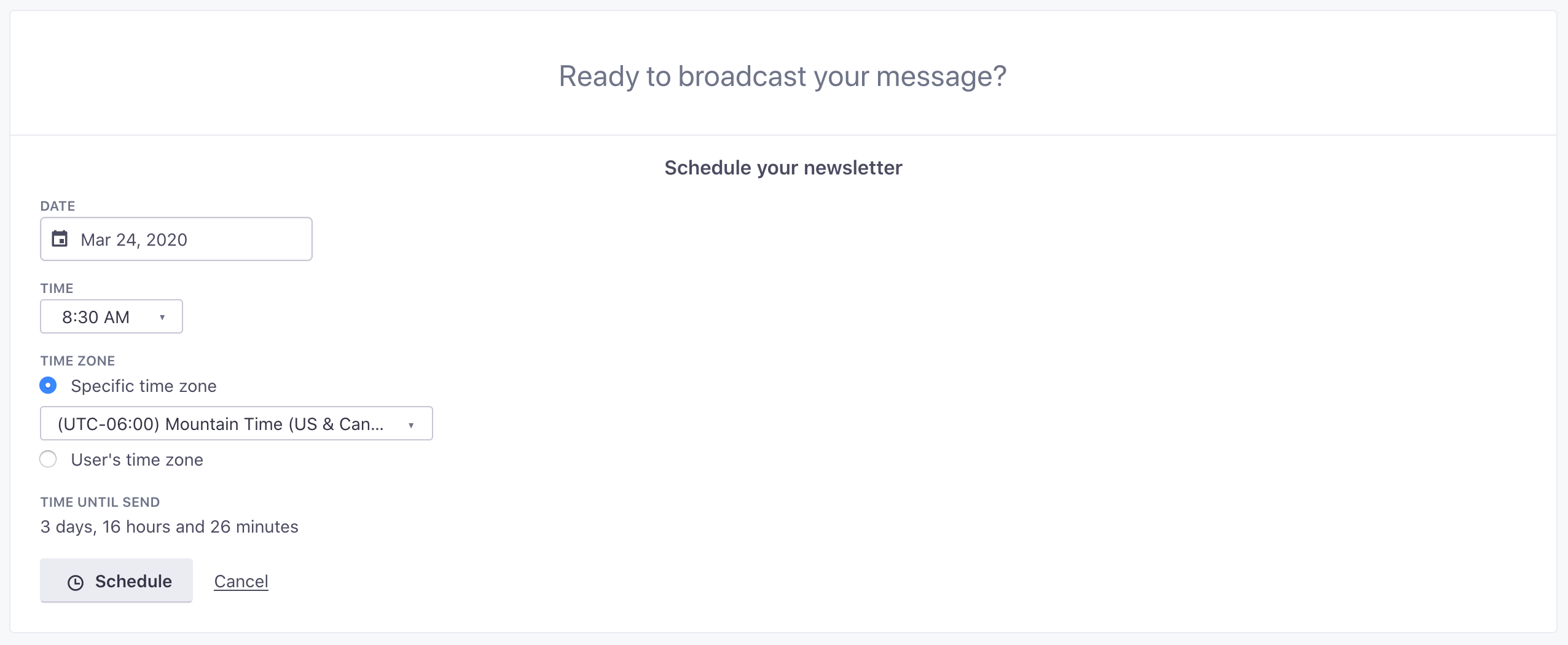
- Send to Everyone: You can send a message to everyone in your workspace without setting up a segment or assigning attributes. This helps you send important messages, like changes to your Terms Of Service or company-wide alerts.
- Send rate: You can limit the send rate to deliver your message in batches.
- Scheduling: You can schedule your message for a specific time!
API-triggered broadcasts
API-triggered broadcasts provide a way to send a one-to-many automation on demand. It may help to think of API-triggered broadcasts like event-triggered automations, except the event comes from your backend integration and represents a group of people. For example, you might use an API-triggered broadcast to:
- Send news alerts to a group of people interested in a specific topic.
- Alert users interested in an event when tickets go on sale.
- Alert students when registration opens for a new online class.
Unlike a one-time send, you can reference trigger data in your API-triggered broadcasts with liquid A syntax that supports variables, letting you personalize messages for your audience. For example, if you want to reference a person's first name, you might use the variable {{customer.first_name}}.
Learn more about API-triggered broadcasts.
.png)
Organize your broadcasts
You can organize your broadcasts by assigning tags, a way of grouping related automations together. You can use tags to group not just broadcasts, but automations, transactional messages, and segments too. Create, assign, edit, and delete as many tags as you need in your workspace.