

Create segments based on mobile devices
To group people by mobile device information, you can create segments based on predefined device attributes like platform, last used, and last status, and custom attributes.
How it works
When you integrate with our mobile SDKs, we automatically collect some device data like platform, last used, and last status. You can also pass custom attributes to your workspace.
You can use these attributes in segment conditions to group people with shared mobile device data together.
Device conditions are evaluated per person, not per device
Segment conditions match people, but people can have more than one device. Framed another way, segments evaluate conditions across devices, not per device, which means it’s possible a person meets your conditions when a single one of their devices does not.
So if one of a person’s two devices matches your segment criteria, that person—and both of their devices—enter your segment.
For example, if your segment conditions include Device platform = iOS AND app_version = 3.16, and a person has two devices, they could match this criteria if one of the devices uses iOS 3.15 while the other devices uses Android 3.16.
If you want to send messages in an automation only to iOS devices with a specific app version, you could try one of these workarounds:
- Set a custom attribute on a person that tracks platform + app version like
"device_1": "ios_316". Then trigger an automation based on that attribute or add it as a condition to a message action. - Send a custom event when a device with both conditions is identified. Then trigger an automation based on that event.
Add conditions for different apps
If your workspace has more than one mobile app, you can group people into segments based on the app on people’s devices. You might do this to track the quantity of people who use any one of your apps.
This condition groups people—it’s separate from a message’s own app targeting. In-app messages pick their app in the message’s settings, so you don’t need this condition to keep an in-app message out of your other apps.
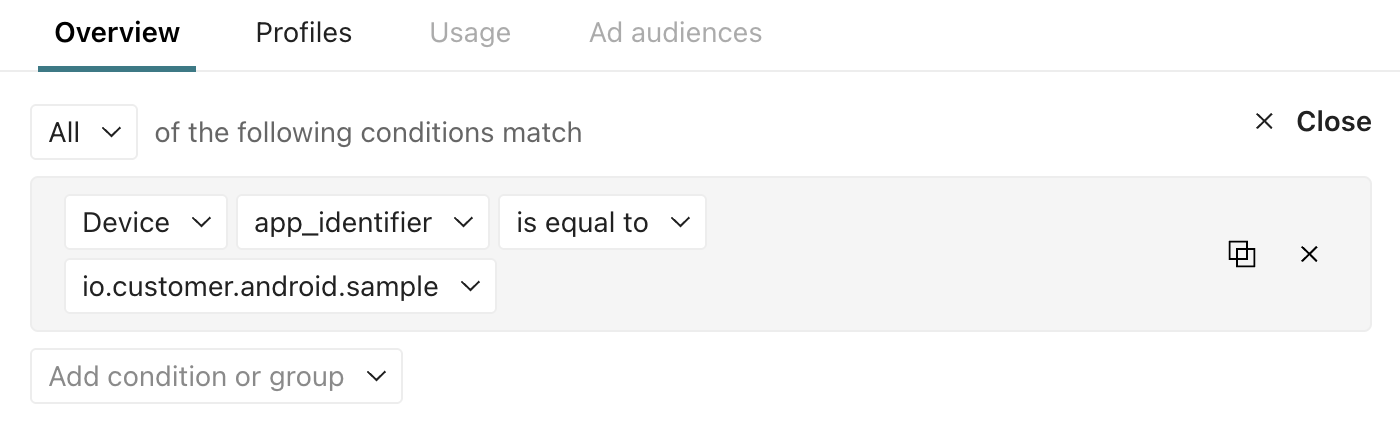
Note, devices that don’t report an app identifier, like devices registered by older SDK versions, are routed through your workspace’s default app. So if you group people by the app_identifier of your default app, it could contain more people than you expect because it includes people whose devices aren’t reporting an app_identifier back.
Add a condition for a device’s platform
You can segment people based on their device platform—iOS or Android. You might do this if you want to notify people about an update to your app on a specific operating system.

Add a condition for last status
The last status attribute shows the delivery outcome of the last push notification. This doesn’t track any other mobile message channel, like in-app messages or SMS.
Statuses include sent, bounced, suppressed, or unused. Unused means that the last status isn’t one of the previous three, but it’s commonly seen when a device is new and hasn’t yet been sent a push notification.
You can use this attribute to group people who have been receptive to previous messages or who haven’t received a push notification from you before.

Add a condition for last used
The last used attribute contains the timestamp when the device was last identified. You can use it to find devices within a recent timeframe or between two dates.
