

Geofence events
See geofence enter, dwell, and exit events in your activity logs, and export them through data warehouse syncs.
Track geofence events
When people move in or out of your geofences, Customer.io logs Geofence Enter and Geofence Exit in your activity logs. If a geofence has a dwell time, Customer.io also logs Geofence Dwell when a person stays inside for that long. Filter for the behavioral event type Geofence to see all geofence transitions in your workspace.
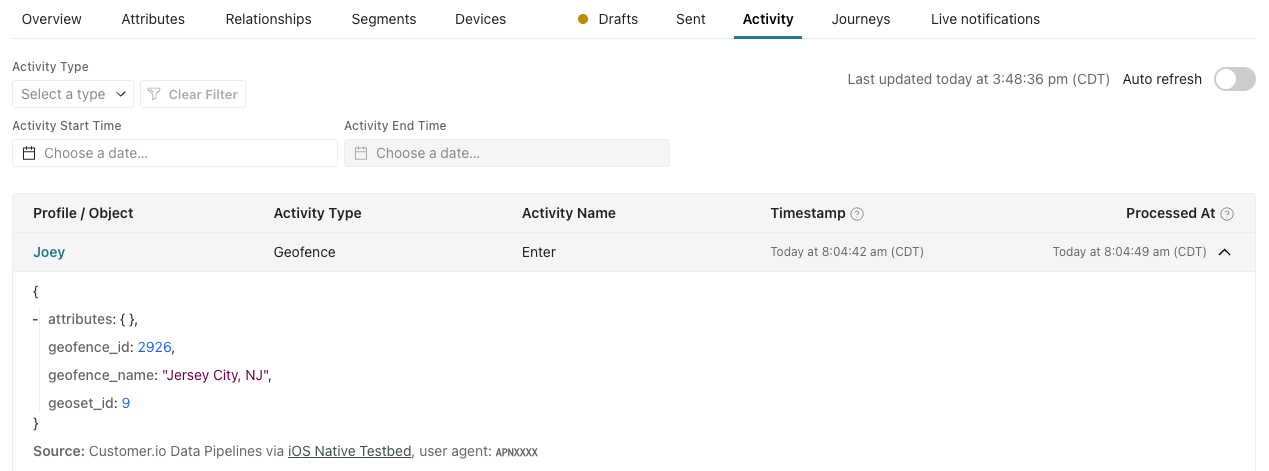
Each event carries the geofence_id of the geofence and the geoset_id that the geofence belongs to. The activities do not send back exact coordinates of your customers, only data for the geofence they crossed.
- Exit events include
visit_duration_secondswhen the SDK can time the visit reliably. - Dwell events include the geofence’s
dwell_threshold_secondsand, when the SDK can time the visit reliably,dwell_duration_seconds.
A missing duration means the SDK couldn’t measure it, not that the visit lasted zero seconds.
A geofence enter or exit event fires when a person enters or exits a geofence. However, keep the following in mind:
- Geofence transitions are not instantaneous. Detection and delivery time varies with the operating system, device movement, location accuracy, background restrictions, and network availability. Many events arrive within tens of seconds, but delivery can take several minutes.
- Enter and exit events have a 1-hour cooldown. The SDK tracks it separately for each person, geofence, and transition type. If a person enters, exits, then re-enters within an hour, the SDK sends the first enter and the exit, and drops the second enter. Dwell events have no cooldown, so the SDK can still send a dwell event for that second visit. If the person leaves again within an hour of the first exit, the SDK drops that exit too, so the dwell event arrives without a matching enter or exit.
- Dwell events happen at most once per visit. A person who stays inside a geofence for hours still produces one dwell event. Editing the geofence or an interruption in monitoring, like a device restart, resets the visit. The SDK may then send no dwell event for the rest of that stay, or send a new one after the person stays for the dwell time again.
Report on geofence events
You can export geofence events through data warehouse syncs. They come with the Events schema in your export files with type = geofence.
Geofence events don’t currently come with destination actions in other data out integrations.