

Introduction to messaging
Welcome to Customer.io! This page and section are designed to help you get acquainted to our platform. This page introduces the core concepts in Customer.io, and the following pages dive deeper into each concept.
Customer.io incorporates data from your customer touchpoints, helping you customize automations and send sophisticated, personalized messages that support and engage your audience.
How it all works
The image below illustrates what a well-rounded integration with Customer.io looks like.
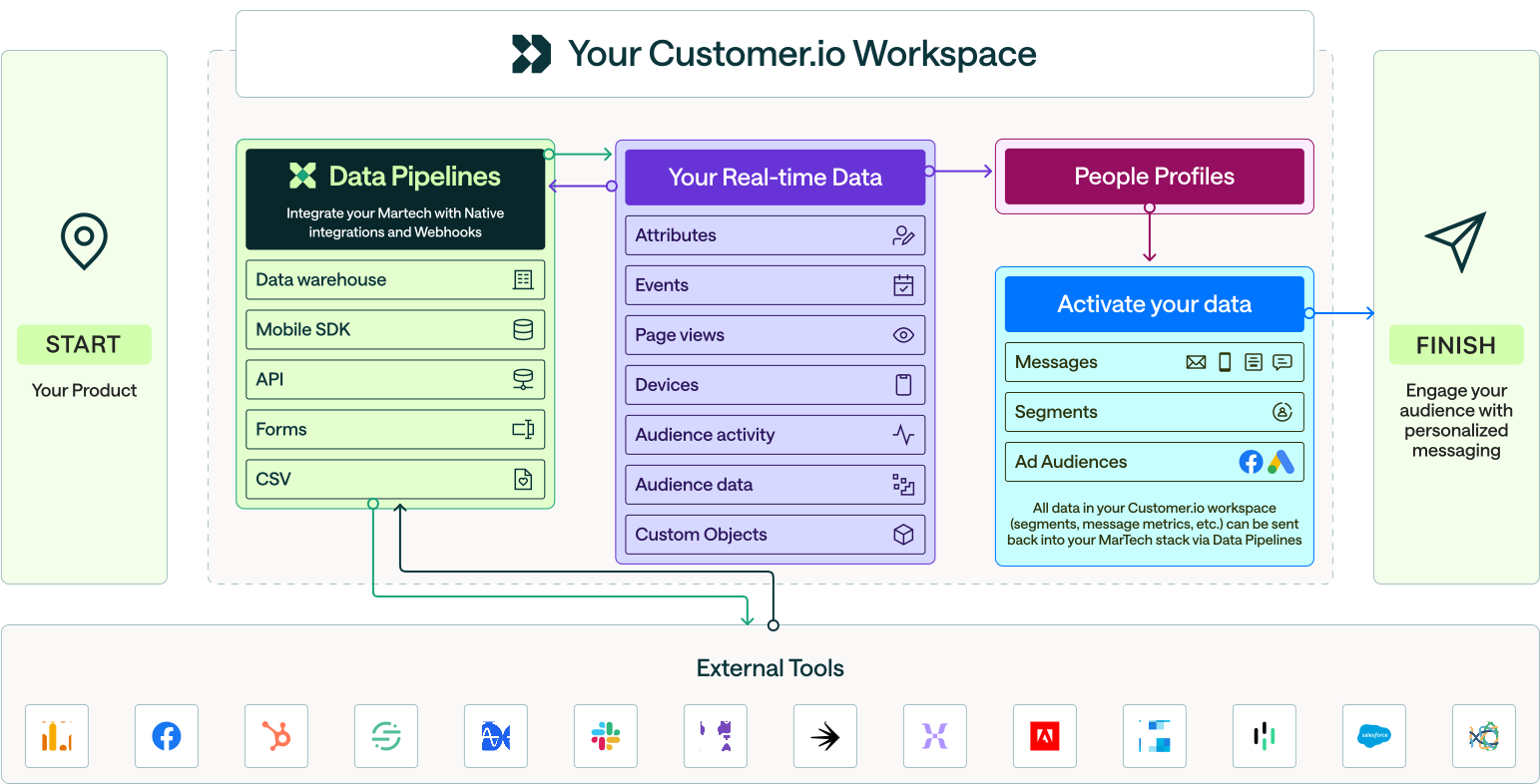
- Your Product sends Real-time Data to Customer.io.
- We’ll associate your real-time data with People and Objects. People are your leads, users, customers, etc that you want to send messages to. Objects are things that are important to your users, like an account they belong to.
- Next, you Activate your data: populate Segments and build powerful automations that send personalized Messages to your audience.
When you’re fully set up, data will flow into Customer.io, triggering automations and messages, helping you automate customer communications!
People
In Customer.io, everything revolves around people. You represent a person with data:
- the things you know about them (attributes
A key-value pair that you associate with a person or an object—like a person's name, the date they were created in your workspace, or a company's billing date etc. Use attributes to target people and personalize messages.
) - the things they do (events
Something that a person in your workspace did. Events can trigger automations, add people to segments, etc, and you can use properties from events to personalize messages.
) - the things they’re related to (object
An object is a non-person entity that you can associate with one or more people—like a company, account, or online course.
relationships) - the automations they’re in and the messages they’ve received
You’ll find people and their associated data on the People page.
Objects
Objects are the things that are important to your people, like an account they belong to, online courses they enroll in, or homes they’re interested in purchasing. A change to object and people’s relationships can trigger automations. You’ll find objects under Manage audience in the left-hand menu.
Learn more about setting up objects here: Objects: how they work.
Segments
Segments are groups of people who match the same criteria. A segment can trigger automations, define recipient lists, represent conversion criteria, and more. To help you get started, we’ve pre-configured a few segments for you. If you go to the Segments page, you’ll see segments like “Paying Customers”, “Have not logged in recently” and “Unsubscribed”. Be sure to check those out!
Learn more about segmenting your users here: Getting Started: Segments
Automations, Broadcasts, and Transactional Messages
Automations and Broadcasts send email, SMS, push, and in-app messages to your people. But, beyond that, your automation and broadcast workflows can send Slack messages, webhooks, update attributes A key-value pair that you associate with a person or an object—like a person's name, the date they were created in your workspace, or a company's billing date etc. Use attributes to target people and personalize messages.
Transactional messages are emails that you send in response to your audience’s actions in your app.
Automations are the quintessential messaging automation workflow. They help you send one or more messages in a workflow sequence to people when they meet your trigger condition(s). You can trigger automations when people perform events, when they join Segments (e.g. they meet attribute conditions), and so on.
Automations are ideal for dripping content to people as they become eligible to receive it.
- Welcome and onboarding series
- Re-engagement series
- Behavioral messages (respond to actions people take in your app or on your website)
Broadcasts send a message to a list of recipients. Broadcast messages are queued to send to all the defined recipients at a time you specify.
Broadcasts are ideal for manually sending messages or programmatically triggering announcements in bulk, like:
- One-time send messages
- Pre-scheduled announcements
- Promotions
- Periodic release notes
- Community alerts
- Event change notifications
- Product launches
Transactional messages help you respond directly to your audience’s actions in your app. Unlike broadcasts and automations, transactional messages are one-to-one interactions. Transactional messages are ideal for:
- Purchase receipts
- Registration confirmations
- Password resets
- Event reminders
- Shipping updates
Learn more about Automations and Broadcasts or Transactional Messages.
Integrations
Once you grasp the basics of Customer.io, you’ll want to plan your integration.
And don’t worry - you can also use your preferred tools and sources to transit data through Customer.io. It’s up to you!