

Delete or suppress people
Learn how to delete or suppress people for GDPR compliance from your People page or a person's profile, and how deleting, GDPR suppression, and email suppression differ.
How it works
Deletion and GDPR suppression are two ways of removing people from your workspace. You cannot restore these people’s profiles at a later time.
You might delete people to remove unengaged users and reduce your billable profile count. If these people re-engage, you can re-add them to your workspace at a later time.
You should suppress people, instead of only deleting them, when you need to honor a request to be forgotten, in compliance with GDPR. Suppressing prevents their identifiers from being added to your workspace in the future.
Email suppression is another type of suppression and significantly different from GDPR suppression. Email suppression only prevents you from sending emails to a suppressed email address, which helps protect your sender reputation after a hard bounce or a spam complaint. The person stays in your workspace, can continue to enter automations, receive messages on other channels, and counts toward your billable profiles. To view or manage your email suppression list, go to Email deliverability: Email suppression lists.
Delete vs suppress
After you delete people, with or without GDPR suppression, they leave any automations they’re in, leave segments, and stop receiving messages.
When your email service provider suppresses an email address, or you manually suppress one via API, the person remains in your workspace, can trigger automations, and can receive other messages, just not email.
| Delete only | GDPR suppression | Email suppression | |
|---|---|---|---|
| Typical reason | Unengaged people, billing. | Deletion requests, right to be forgotten. | Deliverability. |
| The person’s profile | Deleted. You can’t restore it. | Deleted. You can’t restore it. | Unchanged. The profile stays in your workspace. |
| Attributes, devices, and segment memberships | Deleted. | Deleted. | Unchanged. |
| Automations in progress | Ended. The person leaves every automation they’re in. | Ended. The person leaves every automation they’re in. | Unchanged. The person keeps entering and moving through automations. |
| Past activity and delivery history | Retained, but attributed to the deleted person’s cio_id An identifier for a person that is automatically generated by Customer.io and cannot be changed. This identifier provides a complete, unbroken record of a person across changes to their other identifiers (id, email, phone, etc). , not to an identifier you can reuse. A new person with the same identifier does not regain it. | Retained, but the activity log no longer shows the person’s entries, and their deliveries show forgotten (anonymous) in place of the recipient, subject, and content. | Unchanged. Customer.io records new emails to the address as not sent, with the reason that the recipient is on a suppression list. |
| Consent records | Retained. Consent records remain and still appear in consent exports. | Retained. Consent records remain and still appear in consent exports, so you can show the person’s opt-in history. | Unchanged. |
| Reusing the person’s identifiers | You can reuse the deleted person’s identifiers to create a new person. | You can’t reuse the person’s identifiers The attributes you use to add, modify, and target people. Each unique identifier value represents an individual person in your workspace. unless you unsuppress them. A request that sends a blocked identifier alongside other identifiers blocks those too. | N/A The address stays on the profile. |
| A person you add later with the same identifier | Starts as a new person with no prior data, including no consent state. The new person can trigger automations that the deleted person received before. | Can’t be added. Customer.io ignores or returns an error for any attempt to re-add a person with a suppressed id, email, or phone, whether from a CSV import, the API, or a connected source. | Updates existing profile. |
| New messages | None. The person no longer exists to receive them. | None. The person no longer exists to receive them. | Customer.io doesn’t send email to the address. Push, SMS, in-app, and other channels still send. |
| Where you manage it | The People page or API. | The People page or API. You can review and remove ids from the GDPR suppression list at Workspace settings > Workspace suppressions. | If Customer.io is your ESP: Workspace settings > Email > Suppression list or the API. If you use a Custom SMTP: your email provider’s tools only. |
| How you undo it | You can’t. Re-adding the identifier creates a new person with no history. | Unsuppress the identifiers. Re-adding them creates a new person with no history. | Unsuppress the address in Customer.io, or in your provider’s tools if you use custom SMTP. The person’s data is unchanged. |
Suppressing a person blocks every identifier your workspace uses, according to your workspace’s settings:
- Their
idis always blocked. - Their
emailis blocked only ifemailis an identifier in your workspace. - Their
phoneis blocked only ifphoneis an identifier in your workspace.
If phone or email are not identifiers, you can reuse the number or email address of a suppressed person on other profiles.
However, if you suppressed people and later change what counts as an identifier in your workspace, learn more about how Customer.io handles your workspace ID migration.
Customer.io keeps consent records for people you delete and suppress. They don’t appear in the activity log or API, but they still appear in consent exports.
Understand billing
Go to How we bill to learn more about how Customer.io counts deleted people towards your billable profiles.
Delete people
Before you delete people, know that deleting a person is permanent. Customer.io removes their attributes, devices, segment memberships, and subscription preferences, and ends any journeys they’re in. You can’t undo this.
Deleted people’s past activity, message deliveries, and consent records stay in your workspace, attributed to the deleted person’s cio_id, but you can’t reattach them to a person’s profile. If you identify a person later on using one of the ids of the deleted person, you create a new person with no history, no segment memberships, and your default subscription preferences. Consider exporting a person’s profile before you delete them if you might need a full copy of their data in the future.
You can delete people in bulk or individually in your workspace through the People page.
Delete people in bulk
You can filter for, select, and delete individuals from the People page. When you select people from the list, the checkbox at the top of the list selects only the people on the current page (up to 50).
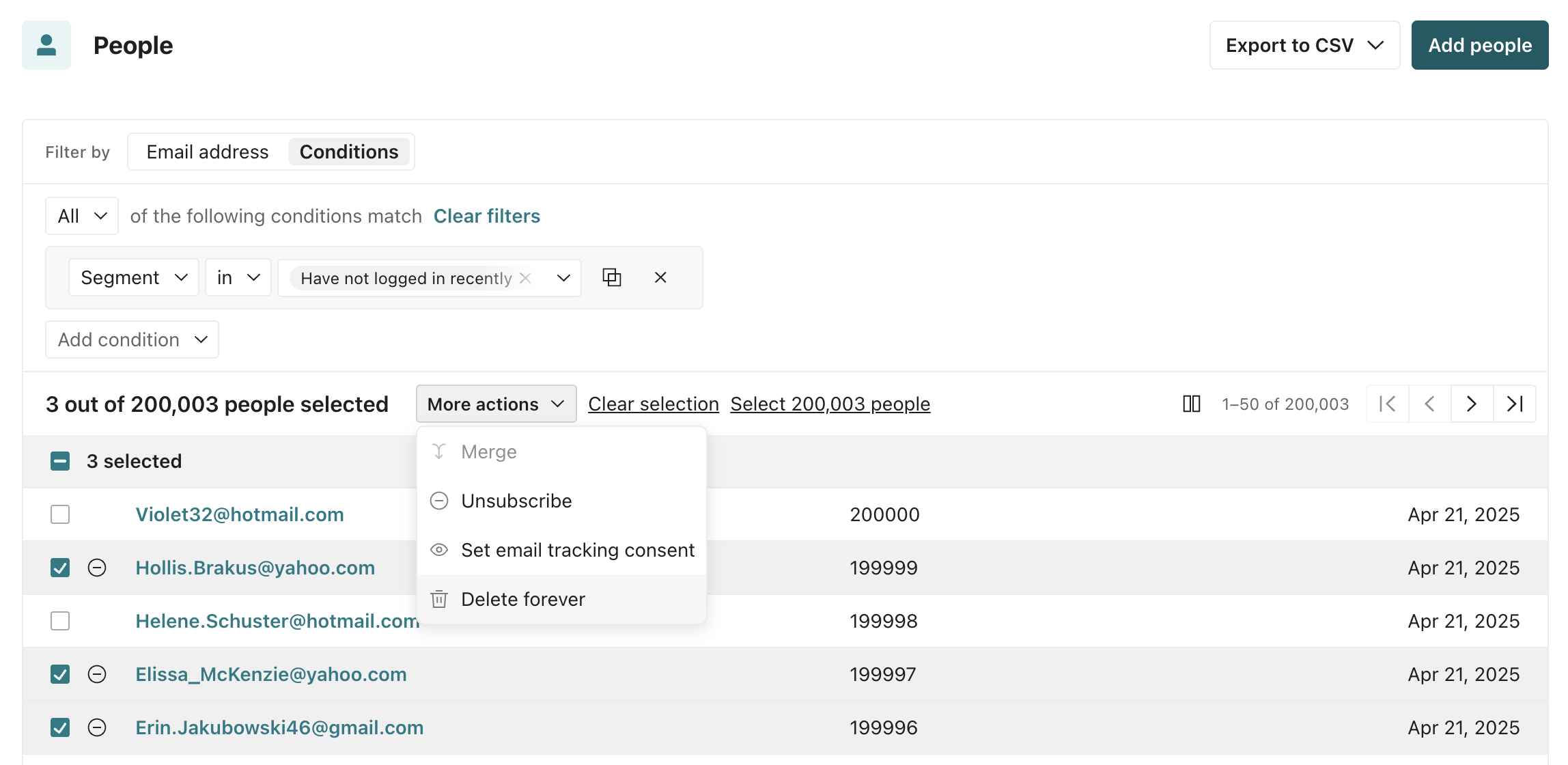
Alternatively, if you need to delete all of the people included in your search results (such as those matching a specific segment), click Select ### people.
When you’re ready, click More actions > Delete forever.
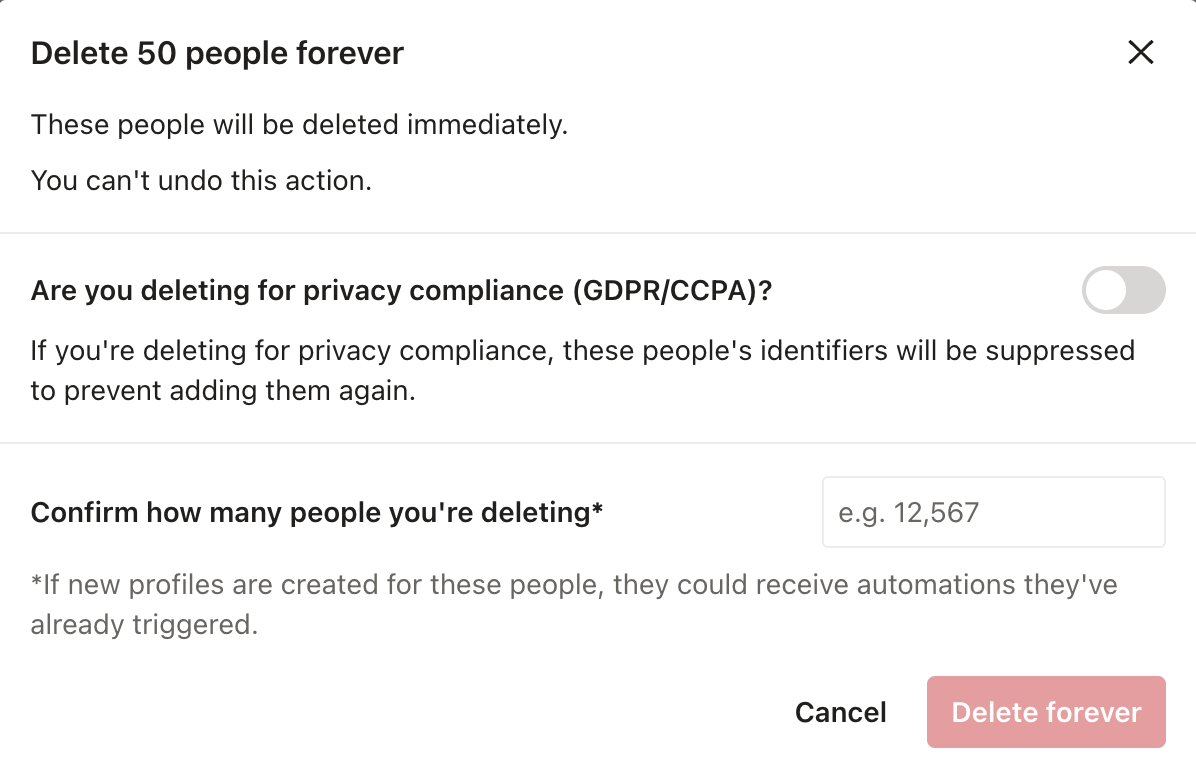
Input the number of people you’re deleting to continue.
If you’re deleting people for compliance, learn more about “Are you deleting for privacy compliance (GDPR/CCPA)?” under GDPR suppressions.
Delete everyone in your workspace
- On the People page, click Conditions > Attribute and specify “
cio_idexists”. Customer.io generates acio_idfor every person, so this matches everyone.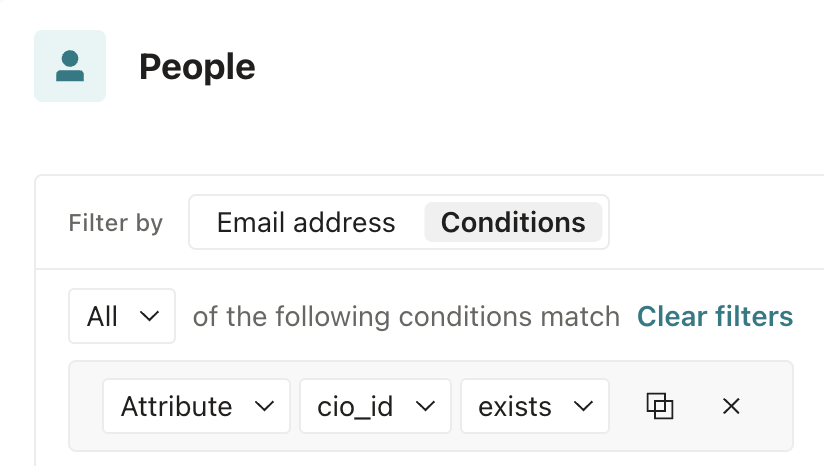
- Click Select ### people.
- Click More actions > Delete forever, and input the number of people you’re removing.
If you’re deleting people for compliance, learn more about “Are you deleting for privacy compliance (GDPR/CCPA)?” under GDPR suppressions.
Delete a single person
You can delete a single person from the People dashboard or through their profile page:
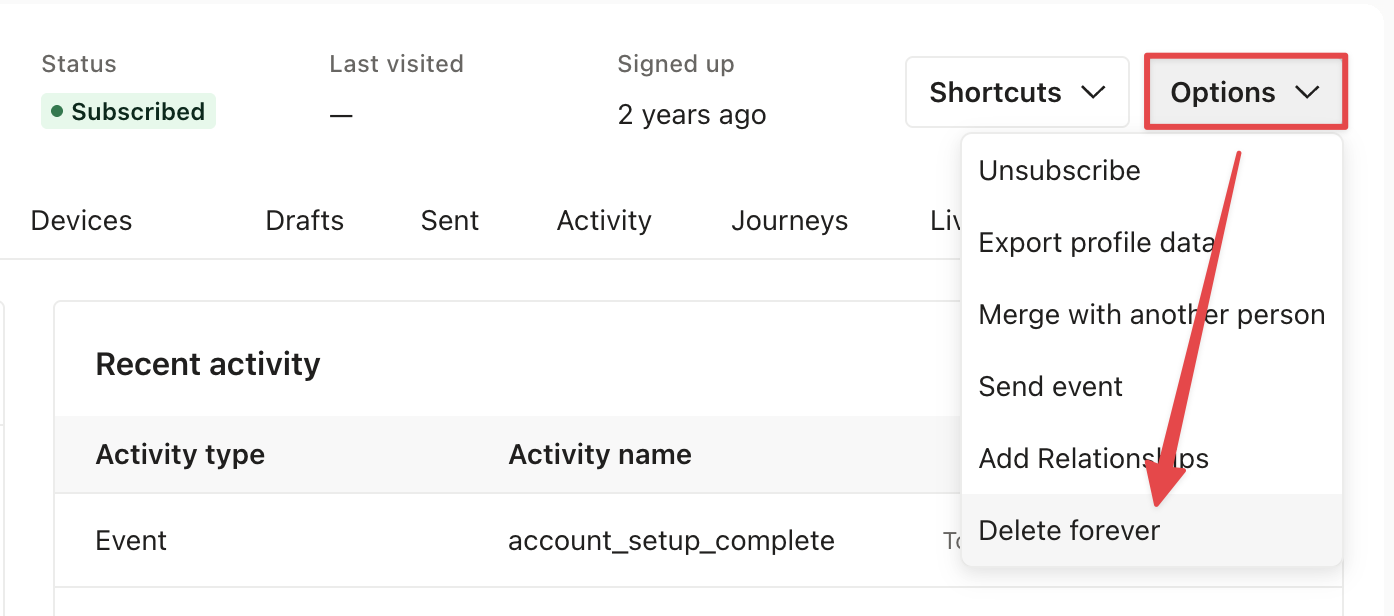
Click Options > Delete forever and input the number of people you’re deleting (1).
If you’re deleting people for compliance, learn more about “Are you deleting for privacy compliance (GDPR/CCPA)?” under GDPR suppressions.
Prevent re-adding deleted people
If you delete a person without suppressing them, anything that still sends data about that person can re-create them. The usual sources are:
- The JavaScript snippet or a mobile SDK on a device the person still uses.
- A reverse ETL sync, a CDP source, or a CRM integration that still holds the person’s identifiers.
- A CSV import that includes the person.
To keep a deleted person from coming back, review your integrations and remove them from the sources.
GDPR suppression
When you delete a person, you can also suppress them. Suppressing a person hides activity attributed to the person and prevents anyone from adding a person with the same identifiers The attributes you use to add, modify, and target people. Each unique identifier value represents an individual person in your workspace.
If people have not requested removal from your products, it’s best practice to delete only, not suppress. This way you can remove them while they’re inactive and re-add them in the future if they re-engage and want to receive messages again.
If you attempt to add or update a person with a suppressed identifier, the request fails. CSV imports report an error for each row that includes a suppressed identifier. And your Profile activity logs record a Failed Attribute Change entry with the reason GDPR suppression. Customer.io hashes the identifiers in the entry, so you can’t read the suppressed values, but the entry helps you confirm that suppression is the cause.
Suppress people for GDPR compliance
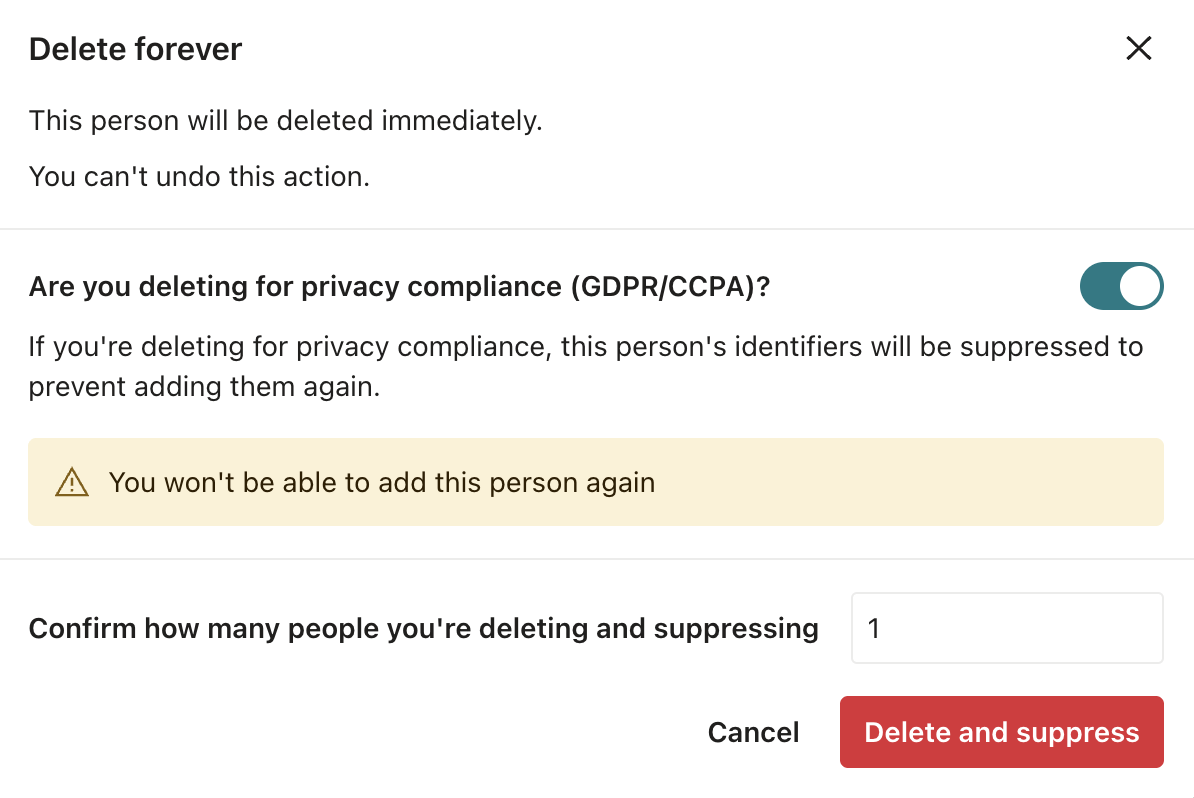
To suppress people for GDPR compliance, you follow the same steps as deleting from the People page. Then turn on the toggle for “Are you deleting for privacy compliance (GDPR/CCPA)?”:
Export people suppressed for GDPR
You can export a list of the people you’ve suppressed for GDPR compliance. You might do this to verify that someone is on the list or to confirm a “right to be forgotten” request was honored.
- Go to > Workspace settings > Workspace suppressions.
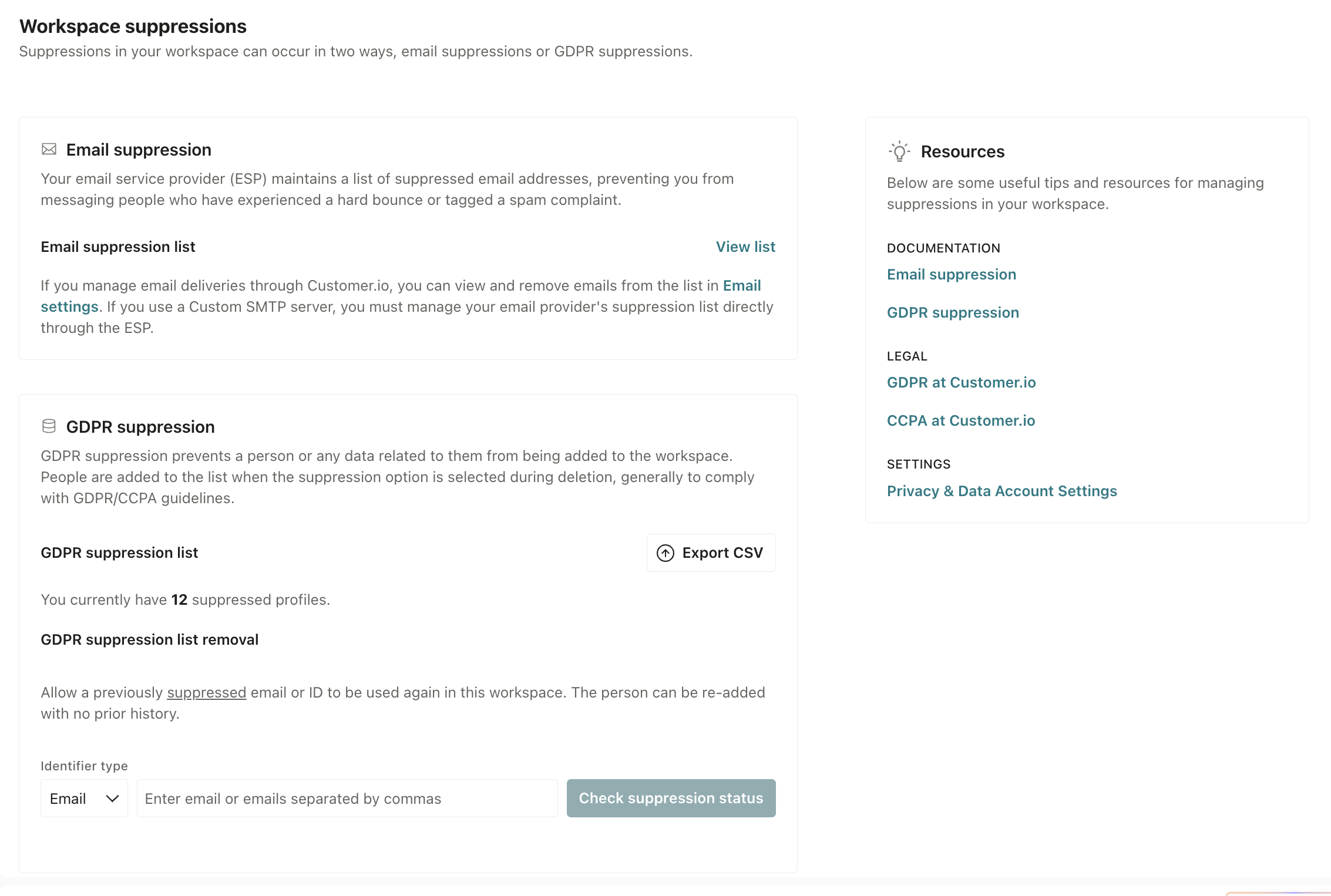
- Export the list of suppressed people under GDPR suppression.
The export is a CSV file. To protect the privacy of the people on the list, we hash suppressed ids and email addresses in the CSV using SHA-256.
To verify the hashed values against the original identifiers, you need to hash the original id or email to compare them. Alternatively, if you stored Customer.io’s unique identifier cio_id elsewhere, you can directly compare this id against the one in the CSV; it’s not hashed.
Unsuppress people
When you unsuppress a person, their identifiers become available to use in your workspace again. If you add a person with a recently unsuppressed identifier, Customer.io creates a new person without any of the history (messages, journeys, and so on) previously associated with that id.
Unsuppressing a person lifts every identifier that belonged to that person’s profile. But an identifier that Customer.io suppressed on its own stays blocked until you unsuppress it by itself. This happens when a request spread the suppression to other identifiers, or when you suppressed a value through the API that no profile held at the time. If you unsuppress an id and still can’t use the id to add a person, their email or phone is probably still on the list.
- Go to > Workspace settings > Workspace suppressions.
- Under GDPR suppression list removal, search by email or id.
- Select the person you want to remove.
- Click Unsuppress.
- Search again for each of the person’s other identifiers, and unsuppress any that still appear.
Unsuppressing a person is different from removing an email address from your email suppression list. When you unsuppress a person, you free up their identifiers so you can use them to create new people in your workspace. When you unsuppress an email address, the only change is that the address can receive email again.
Delete, suppress, or unsuppress via API
You can delete, suppress, and unsuppress people through our APIs, or through a webhook action in an automation.
- Delete a person with the delete endpoint. The person’s identifiers stay available, so an integration can use them to create a new person.
- Delete and suppress a person with the suppress endpoint. You don’t need to call delete first. Customer.io ignores later API calls that reference the suppressed identifiers, and returns an error if you try to re-add a person with one of them. The
identifierin the path is any of your workspace’s unique identifiers. - Unsuppress a person with the unsuppress endpoint. If you then add a person with the unsuppressed identifiers, Customer.io creates a new person with none of the history formerly associated with them.
You can also manage deletions and suppressions through our Pipelines API using semantic events—you’ll use POST calls, not DELETE operations.
Remember, these are different from email suppressions—learn more about programmatically managing email suppressions in the App API.
If you attempt to add or update a person with a suppressed identifier, the response shows the request was successful but, after your workspace processes the call, your activity logs accurately reflect that the request failed due to GDPR suppression.
Suppress people by phone
You can only suppress people by phone through the Track v2 API.
The v1 suppress and unsuppress endpoints resolve the path identifier as an id or email only. A phone number in the path is treated as an id. To suppress or unsuppress a person by their phone number, use the Track v2 API. Whichever identifier you reference, suppressing a person suppresses all of the identifiers your workspace uses, including phone if you’ve enabled it as an identifier. Suppressing a phone number that doesn’t belong to anyone in your workspace has no effect, unlike an unknown id or email, which Customer.io blocks ahead of time.
Are identifiers you never suppressed getting rejected?
When a request sends a suppressed identifier alongside other identifiers, Customer.io rejects the request and suppresses the other identifiers too.
Say you suppress the id 4592 to honor a deletion request. Later, you identify a person with the id 4592 and the email person@customer.io. Customer.io rejects the request, and suppresses person@customer.io as well. From then on, you can’t add or update anyone with that address or id until you unsuppress it.
This applies to any request that identifies a person, including CSV imports and syncs from a connected source. It doesn’t apply to events Something that a person in your workspace did. Events can trigger automations, add people to segments, etc, and you can use properties from events to personalize messages.
If identifiers you never suppressed start getting rejected, this is the usual cause. To trace it, look for requests that send a suppressed id, email, or phone alongside other identifiers. A reverse ETL sync, a CDP, or a CRM integration that still holds the suppressed value is often the source. The Failed Attribute Change entries in your activity log show you when each rejection happened.